How to Turn an OpenAPI Spec into an MCP Server (Open Source or Hosted)

By
Tom Dallimore
Published
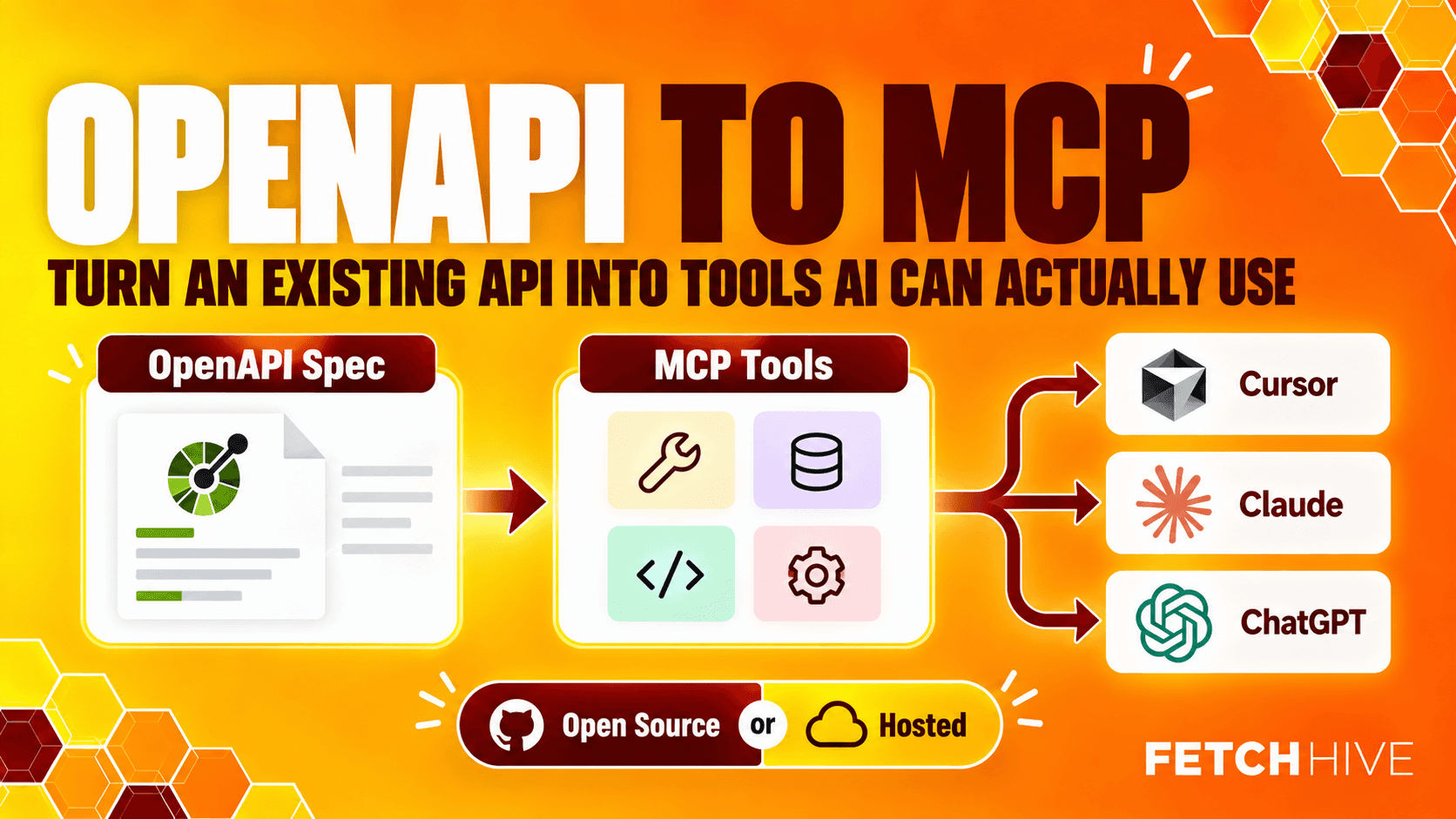
If you already have a decent OpenAPI spec, OpenAPI to MCP is much less complicated than it sounds. You are already much closer to a working MCP server than you might think. You do not need to hand-write forty tool definitions, duplicate every API endpoint, and then spend a weekend keeping the two versions in sync. Please do not do that to yourself.
OpenAPI already describes most of the things an MCP client needs to know: what API operations exist, which parameters they accept, what the request body looks like, how authentication works, and what data gets returned. The job of an OpenAPI MCP generator is to translate that existing contract into MCP tools that AI assistants and AI agents can actually call.
For the practical examples, I am using Fetch Hive's open-source mcp-gateway CLI because it gives us a real implementation to poke at, not a diagram with twelve arrows and no code. Later, I will show the hosted route too, for the point where you want a persistent MCP endpoint without operating the gateway yourself.
Bottom line: OpenAPI to MCP is mostly a translation problem. Your OpenAPI specification remains the API contract; the MCP layer turns useful API operations into tool definitions an AI model can discover and invoke.
What does OpenAPI to MCP actually mean?
The Model Context Protocol (MCP) gives large language models a standard way to discover and call external tools. Your REST API already has endpoints. MCP gives an AI model a structured description of those endpoints so it can decide when to call them and how to fill in the parameters.
The mapping is fairly mechanical. An OpenAPI spec describes a path, method, operation, parameters, request body, response formats, and documentation. An MCP server exposes a set of tool names, descriptions, and JSON input schemas. A generator sits in the middle and converts one into the other.
OpenAPI | MCP |
operationId | Tool name / unique identifier |
summary + operation description | Tool description |
path + query parameters | Tool input parameters |
request body schema | Tool input schema |
response schemas | Expected data returned |
server / base URL | Upstream API server |
API key, bearer token, basic auth | Credentials injected when the API call is made |
That is why OpenAPI is such a useful starting point. Existing APIs do not need to be redesigned just because an AI client is now on the other side. Your normal HTTP client traffic can keep working exactly as before while the MCP protocol provides a second, agent-friendly interface.
It is also worth separating an MCP gateway from a normal API gateway. Your existing API gateway may still handle routing, auth, throttling, observability, and policy for regular API requests. The MCP layer is concerned with presenting selected API capabilities as tools and safely forwarding the resulting API call upstream. They can sit next to each other without drama.

Before you generate anything, check the OpenAPI spec
Automatic generation is useful, but it is not magic. A bad OpenAPI specification produces bad MCP tools with impressive efficiency.
Before turning a spec into an OpenAPI MCP server, I would check a few boring things first. Boring is good here. Boring means you do not discover at 2am that five different operations are all called getData.
Give every important operation an action oriented operationId such as listInvoices, createCustomer, or searchOrders.
Write an operation description that explains what the API call actually does and when it should be used.
Add useful parameter descriptions, especially for IDs, enums, filters, dates, and query parameters.
Document the request body accurately, including required fields and array items.
Describe response formats and common error responses instead of returning 'object' and hoping for the best.
Make the base URL and OpenAPI servers explicit for each environment.
Keep secrets out of the spec. An API key belongs in environment variables or a secret manager, not committed documentation.
The model only sees the tool definitions you give it. If the documentation says 'Get data' and the parameter is called value, no amount of AI sparkle is going to create a better understanding of what the tool is supposed to do.
The open-source route: generate an MCP server from OpenAPI
There are plenty of ways to build servers from OpenAPI. The implementation I am using below is Fetch Hive's Apache-2.0 open-source mcp-gateway project. It supports OpenAPI 3.0 and 3.1, can load a local spec or URL, and serves the generated MCP tools over stdio or Streamable HTTP.
Open-source project: github.com/Fetch-Hive/openapi-mcp
1. Install the MCP generator
On macOS with Homebrew:
The project also provides npm, Docker, release installer, and Cargo routes. Use whichever one makes your current directory least angry.
2. Initialize the project
For a public HTTPS API, initialize normally:
For local development against localhost or a private network, opt in explicitly:
Initialization creates the MCP configuration and generates the gateway access token. The important bit is the separation between configuration and credentials. Settings can live in config; secrets should not.
3. Add your OpenAPI spec
For a public specification URL, the flow is simple:
If you are developing an API locally, point the generator at the local file and override the upstream base URL:
This is the actual OpenAPI to MCP conversion step. The generator reads the spec, turns API operations into MCP tools, builds the input schemas from parameters and the request body, and records the resulting tool definitions.
If you have several existing REST APIs, you can expose more than one spec through the same server. That can be useful, but do not automatically expose every endpoint just because you can. The maximum number of tools you can expose is not a target. A smaller, clearer tool surface is normally easier for AI models to use reliably.
4. Test a generated tool before involving an AI model
This is one of those steps people skip because connecting Claude Desktop or Cursor feels more exciting. Test the tool directly first. It removes a whole layer of guesswork.
The arguments are passed as a JSON string, which lets you simulate the same structured input an MCP client would send. If the test fails here, you have an API, auth, configuration, or schema problem. You do not have an 'AI is being weird' problem yet. Enjoy the simpler debugging surface while it lasts.
5. Serve the MCP tools
At this point you have a working MCP server backed by your existing API. The server can receive a tool call from the client, validate the parameters, make the upstream API request, and return the data.
The gateway binds conservatively by default rather than throwing your local API onto the public internet. That matters once the tools can create, update, or delete real data.
6. Inspect what the MCP client will actually see
Inspection is where you catch the less obvious problems. You might have a valid server and still have terrible tool names, vague descriptions, awkward schemas, or ten near-identical search operations that make the model flip a coin.
Use inspect for the client you actually care about, then look at the generated tool definitions. If they are confusing to you, they are not going to become clearer just because an AI model reads them faster.

Local development is where this gets genuinely useful
The bit I like most about this workflow is not 'convert a production API to MCP'. It is being able to work against the API running on your laptop while you are still building it.
Imagine you have an API server on localhost:3000 and a draft OpenAPI spec in the repo. You can compile the spec into MCP tools, set the base URL to the local server, then let Cursor, Claude Desktop, Claude Code, Codex, VS Code, or another MCP client call the same API you are actively editing.
That gives you a very tight local development loop:
Run the API locally.
Generate or update the OpenAPI spec.
Re-run add-spec so the MCP tools match the latest contract.
Test the tool directly.
Serve the MCP server.
Ask the AI assistant to use the tool and watch the real API requests hit your local logs.
No fake staging service. No hand-maintained duplicate tool schema. Your OpenAPI spec stays the source of truth and the MCP layer follows it.

Need a remote client? Tunnel the local MCP server
Sometimes the MCP client is not running on the same machine. Maybe you want ChatGPT, a cloud agent, or a teammate to reach a server sitting on your laptop. Opening random inbound ports is not exactly my favourite development ritual.
The CLI can create an outbound tunnel and give you a temporary HTTPS MCP URL. Anonymous temporary URLs do not require an account. If you need a stable name, the account-backed flow can keep a persistent hostname.
This is optional. If your client and API are both local, keep them local. The tunnel exists for the cases where something outside your machine genuinely needs to reach the MCP server.
The hosted route: same OpenAPI, less infrastructure
Self-hosting is great when you want control, you are working locally, or you already have somewhere sensible to run the gateway. If that is all you need, the open-source route is enough. It becomes less exciting when the next requirement list says persistent URL, team access, tokens, quotas, logs, safe tool policies, and 'can somebody please keep this online'.
That is the point where a hosted MCP gateway starts to make sense. The concept is still the same: provide an OpenAPI spec, generate the tools, configure auth, and publish an MCP endpoint. The difference is mostly operational. Somebody else keeps the thing online.
For a concrete example, Fetch Hive's hosted MCP Gateway lets you analyze an OpenAPI specification, review the generated tools, catch schema issues, configure upstream auth, choose which tools to expose, and publish a managed MCP endpoint. It also adds the operational layer around the server: access tokens, rate limits and quotas, tool policy, redacted request logs, and a playground for testing. If you would rather keep everything self-hosted, none of that is required for the rest of this guide.
Hosted gateway: fetchhive.com/mcp
Open source or hosted?
Question | Open source / self-hosted | Hosted gateway |
Working against localhost? | Excellent fit | Usually unnecessary |
Want full control of deployment? | Yes | Managed for you |
Need a persistent public MCP URL? | You operate it | Built for this |
Need tokens, quotas, logs, team controls? | You assemble the stack | Included in the management layer |
Want to run it in CI/CD or your own infra? | Excellent fit | Possible, but not the main reason to choose hosted |
There is no law saying you must pick one forever. A sensible pattern is open source for local development and branch testing, then hosted only when a production endpoint actually needs the extra operational layer. The OpenAPI spec does not care either way.

Tool quality matters more than the generator
An MCP generator can automatically generate valid tools. That does not mean those tools are good.
This is the same mistake people make with API documentation: 'the schema validates' slowly turns into 'therefore humans will understand it'. AI assistants have the same problem. They need enough context to select the right tool and fill it correctly.

I would focus on four things:
Use action oriented tool names
Good tool names describe the action: createInvoice, listUsers, searchTickets. Bad names like execute, data, or getThing force the model to infer too much. In most OpenAPI MCP generators, the operationId becomes the tool name, so fix it at the source.
If your API cannot change its operation IDs, use an override tool names feature at the gateway layer where available. Just keep the names stable once clients start depending on them.
Write descriptions for the model, not the API author
A query description or parameter description should explain when the parameter matters, not simply repeat the field name. 'Status filter' is technically documentation. 'Filter orders by fulfilment status: pending, shipped, cancelled' is useful documentation.
The same applies to the operation description. Tell the model what the operation does, what it does not do, and when another API call is more appropriate.
Keep parameters precise
Types, enums, required fields, defaults, and examples all reduce ambiguity. If the API expects a path ID, say what the ID represents. If a query supports a default page size, document it. If there is a maximum number of array items, include that rather than waiting for the upstream server to complain.
A clean schema reduces the chance that the model invents parameters or sends something that technically looks like JSON but has no relationship with what the API expects.
Return useful response schemas
The response matters too. The model needs to understand whether the data returned is an object, an array, a paginated envelope, or a giant nested blob containing three useful fields and the entire history of mankind.
Realistic examples can help. So can simplifying needlessly complex response formats before they become part of the tool surface.
MCP configuration and authentication: keep the two trust boundaries separate

Authentication gets confusing when people talk about 'the MCP token' and 'the API key' as if they are the same credential. They are not.
There are usually two boundaries:
MCP client -> MCP server: the credential that allows a client to call your MCP endpoint.
MCP server -> upstream API: the API key, bearer token, basic auth, or other credential used when the gateway makes the real API request.
Keep upstream secrets out of the OpenAPI spec and out of committed configuration. Environment variables are the simplest local option; production deployments should normally use whatever secret manager your infrastructure already trusts.
This also makes it easier to use different auth per environment. The same tool definitions can point at a local API with one credential and a production API server with another without rewriting the spec.
Security: an MCP server is another way into your API
This is the part where the fun demo becomes infrastructure.
Once an AI assistant can call your API endpoints, you need the same boring security discipline you would apply to any other client, plus a few AI-specific problems. Do not expose an internal API to the internet and assume the word 'MCP' acts as a firewall.
Bind locally by default during development.
Require explicit opt-in before the HTTP client can reach localhost or private-network addresses.
Prefer HTTPS for remote upstreams; make insecure HTTP an explicit development choice.
Use SSRF protections when the server can fetch user-supplied URLs or OpenAPI servers.
Do not expose every operation. Limit the tool surface to what the AI agents genuinely need.
Treat write and destructive operations differently from read-only tools, with stronger policy or confirmation where appropriate.
Keep gateway credentials and upstream credentials separate and rotate both like normal secrets.
The safest MCP configuration is still one that exposes less. If your assistant only needs to read invoices, there is no prize for also giving it deleteCustomer because the endpoint happened to exist in the spec.
Test with real AI assistants, not just schema validators
A tool can validate perfectly and still be horrible for an AI model to use. The final test is whether the client chooses the correct tool, fills the correct parameters, and behaves sensibly when the API returns something unexpected.
I would test with the actual clients your users care about. That might be Cursor for developers, Claude Desktop or Claude Code for internal workflows, ChatGPT for remote use, or another MCP client entirely.
Give them natural requests, not requests written to match your operation names:
"Show me the open invoices for customer 1842."
"Create a support ticket for this account and mark it high priority."
"Find orders that failed to ship last week."
"Do not change anything. Just tell me which subscriptions are overdue."
Then watch what happens. Did the client choose the right tool? Did it use the correct query parameters? Did it make one API call or five? Did it understand the response? Did it try a write operation when a read tool would have been enough?
This feedback loop is where the documentation gets better. Update the OpenAPI spec, regenerate, inspect, test again. The nice part about generation is that fixing the source improves every client at once.
Common OpenAPI to MCP mistakes
Most failures are less exotic than people expect.
Exposing everything. Your API might have 150 endpoints. Your AI assistant probably does not need 150 tools.
Using vague operation IDs. If three tools are called getData, getData2, and process, the model is going to have a wonderful time.
Treating descriptions as optional. Tool selection depends heavily on names and descriptions. Give the model enough context.
Hard-coding credentials. An API key does not belong in the OpenAPI document just because it is convenient.
Skipping direct tool tests. Prove the API call works before adding an AI client to the debugging stack.
Ignoring local development. The fastest workflow is often to use the MCP server against the branch API on your own machine.
Confusing MCP with the API itself. MCP is another interface to existing APIs. Your REST API and normal clients do not disappear.

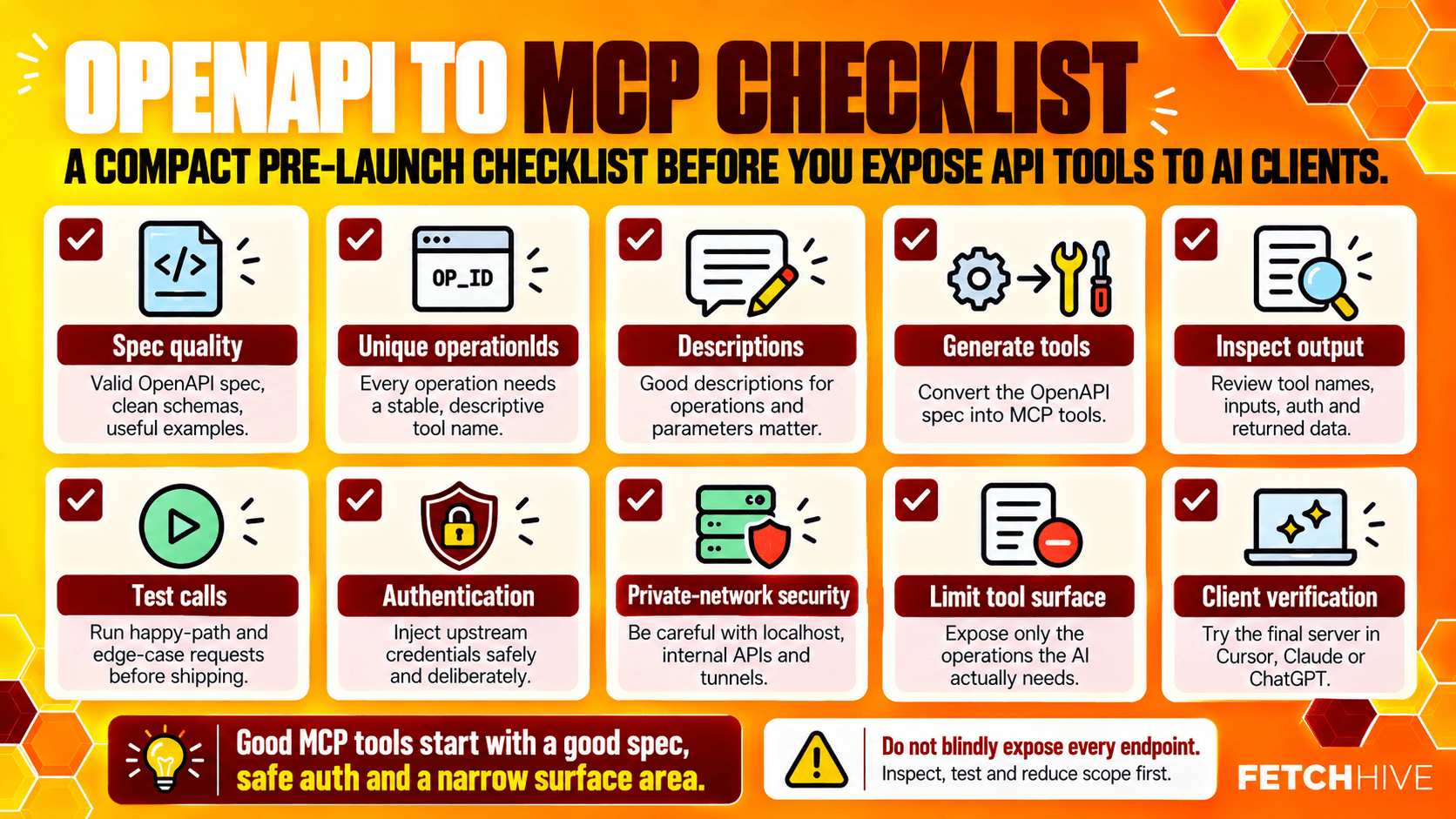
A practical OpenAPI to MCP checklist
1. Start with a valid, reasonably documented OpenAPI 3.0 or 3.1 spec.
2. Give operations unique, action oriented operationId values.
3. Add useful descriptions for tools, parameters, query filters, and request bodies.
4. Generate the MCP tools from the spec rather than maintaining a second hand-written contract.
5. Inspect the resulting tool definitions before connecting a model.
6. Test each important tool directly with realistic JSON arguments.
7. Keep API keys and other auth in environment variables or a secret manager.
8. Use explicit local/private-network permissions during local development.
9. Expose only the tools the AI assistants actually need.
10. Test with the real MCP client and real user phrasing.
11. Choose self-hosted or hosted based on operational needs, not because one sounds more enterprise.
Notice that 'buy a more expensive model' is not on the list. If the tool surface is rubbish, a smarter model mostly becomes a more expensive way to discover that the tool surface is rubbish.
So, should you build the MCP server yourself or use a gateway?
If you already have an OpenAPI specification, I would start with generation before hand-writing an MCP server. You have already done a large chunk of the boring contract work. Reuse it.
Use the open-source route when you want the server beside your code, need local development against private APIs, want full deployment control, or simply prefer running your own infrastructure. For a lot of developers, that may be the whole answer.
Use a hosted gateway when the MCP endpoint needs to stay online without your laptop, several people need access, or you want tokens, limits, logs, and tool controls without building another mini-platform around the server yourself.
Either way, the important bit is the same: keep OpenAPI as the source of truth, generate a clean MCP tool surface from it, test what the AI model actually sees, and treat security and auth like real infrastructure rather than demo glue.
Do that and 'OpenAPI to MCP' stops being a mysterious protocol conversion project. It becomes what it should have been in the first place: a practical way to let AI clients use the APIs you already built. Now go fix your operationIds before blaming the model. It has enough problems already.
Share this post