
RAG Embeddings Explained: How to Choose Embedding Models for Retrieval

By
Tom Dallimore
Published

Embedding models are one of those parts of RAG that look boring right up until they start ruining your answers. You can have a brilliant large language model, a shiny vector database, and enough infrastructure to make an AWS diagram look like modern art. If your embeddings retrieve the wrong evidence, the LLM is still going to answer from the wrong evidence. Very confidently, obviously.
The short version: RAG embeddings turn text into numerical representations so a retrieval system can find information by semantic meaning, not just keyword matching. The right embedding model can improve retrieval accuracy, retrieval quality, and ultimately the answer your RAG system produces. The wrong one quietly feeds rubbish into everything downstream.
If you’re completely new to retrieval augmented generation, start with my RAG explained guide. If you already understand the basic idea and want to know why embedding models matter so much, carry on.
What Are RAG Embeddings?
RAG embeddings are vector representations of your documents and user queries. An embedding model takes natural language and turns it into a vector representation, basically a long list of numbers that captures semantic meaning.
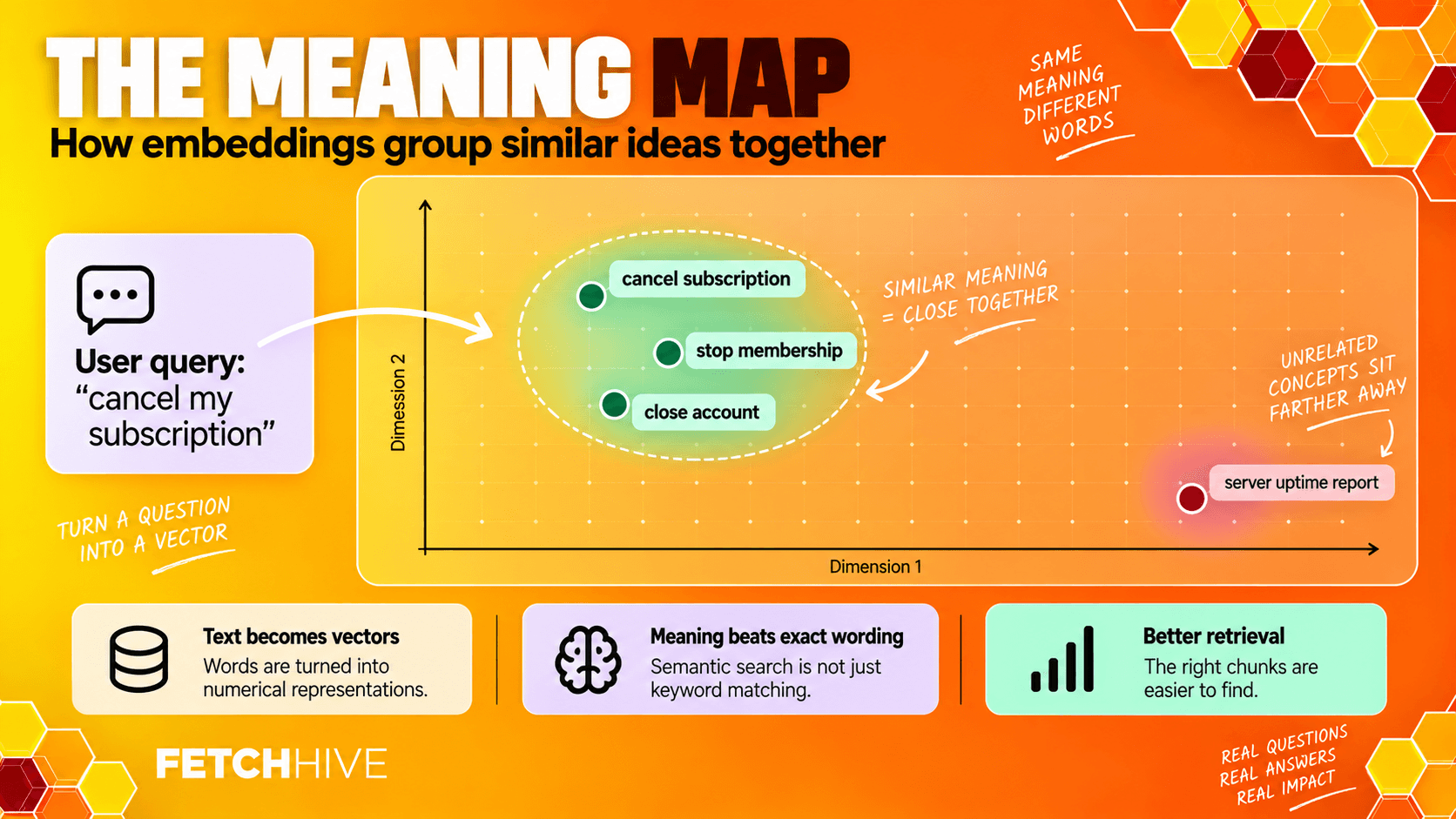
That sounds horribly abstract, so think of vector space as a giant meaning map. Text with similar meanings ends up closer together. Text about completely unrelated things lands further apart. A query about ‘stopping customers leaving’ can therefore sit close to documents about ‘churn reduction’ even though the exact words are different.
That is the useful bit. Semantic search can retrieve relevant documents because it understands semantic relationships instead of relying purely on exact matches. Keyword search is still useful, especially for product codes, names, dates, and weird internal acronyms, but embeddings let retrieval systems work with meaning rather than exact words alone.
And yes, if an SEO tool has forced the phrase ‘retrieval augmented generation RAG’ into your life, it means the same thing as retrieval-augmented generation. The phrase is ugly. I am keeping it here for the robots.
How RAG Embeddings Flow Through a RAG System
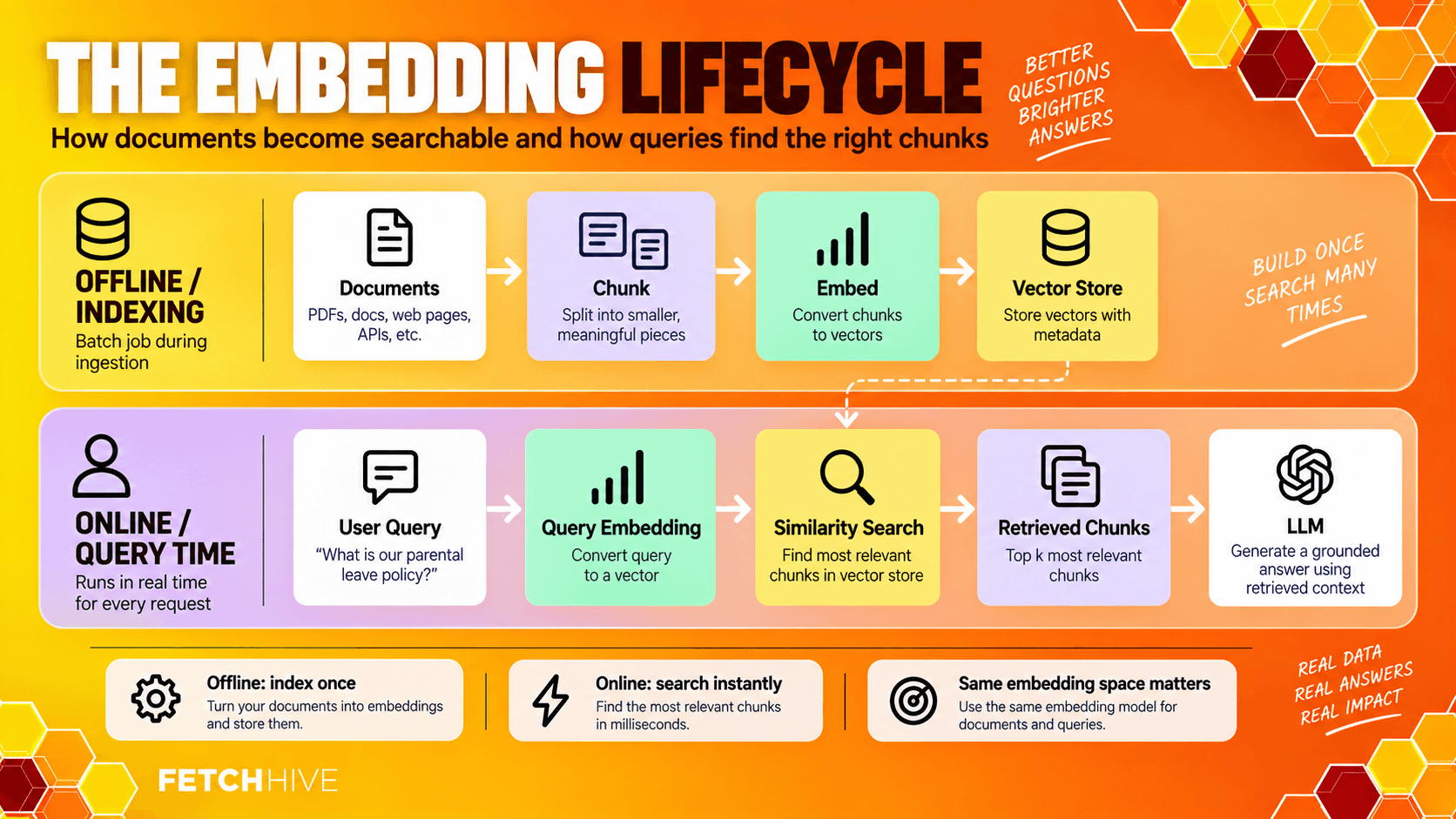
There are really two embedding jobs in a RAG system: one happens while you prepare the knowledge base, and the other happens every time a user submits a query.
Index your documents. Split documents into sensible chunks, generate embeddings for each chunk, and store the embedding vectors alongside the chunk text and metadata in a vector store or vector DB.
Embed the user query. At query time, the same embedding model converts the request into a query embedding.
Run similarity search. Compare the query embedding with your stored document embeddings using a similarity metric such as cosine similarity or dot product.
Retrieve the best matches. Return the most relevant documents or chunks, optionally combine them with keyword search, filters, and reranking.
Generate the answer. Send the strongest retrieved context to the language model for response generation.
If you want the wider plumbing around this, I broke down the full RAG architecture separately, from ingestion and chunking through retrieval, prompting, generation, and evaluation.
One important rule: documents and queries need to live in the same embedding space. In most setups that means using the same embedding model for both. If you index your corpus with one model and suddenly generate query embeddings with a completely different model, the vectors are not magically compatible. Similarity scores become nonsense and retrieval performance falls off a cliff.
From Text to Vectors: What an Embedding Actually Does
Modern text embedding models produce high dimensional numerical vectors. You might see 384, 768, 1024, 1536 dimensions or more depending on the model. More dimensions can give the model room to represent richer context, but bigger is not automatically better. Larger models and larger vectors usually mean more computational cost, more storage, and sometimes more latency.
A sentence embedding is not a human-readable summary. You cannot look at dimension 423 and say, ‘Ah yes, that one means refunds.’ The model has learned a multi dimensional space where patterns of numbers capture semantic meaning. Similar vectors tend to represent similar ideas.
This is why embeddings are useful for massive datasets. Instead of reading every document from scratch for every request, a retrieval system compares the query vector with stored vectors and pulls back the nearest candidates. The LLM only sees the handful of chunks that actually look relevant.
Cosine Similarity, Dot Product, and Euclidean Distance
Once you have vectors, you need a way to decide which ones are close. This is the similarity search part.
Cosine similarity compares the angle between two vectors. It is extremely common for semantic search because it focuses on direction rather than magnitude.
Dot product multiplies corresponding values and sums them. It works well for models trained or normalized around that similarity metric.
Euclidean distance measures straight-line distance through the high dimensional vector space. It is supported by many vector databases, although it is less common for modern text retrieval than cosine similarity.
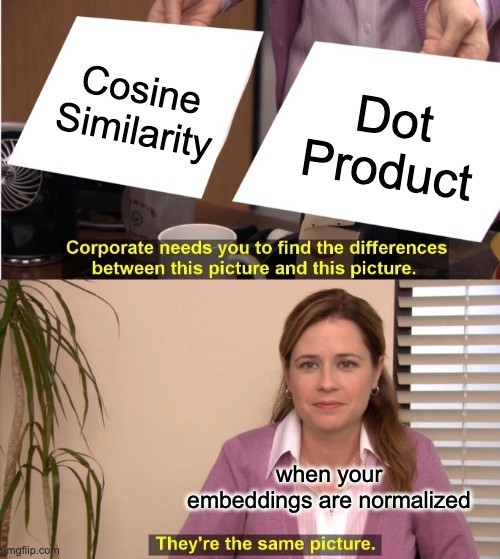
Do not pick a similarity metric because somebody on Reddit said cosine is always best. Check what the embedding model was trained to use. If embeddings are normalized, cosine similarity and dot product can produce the same ranking. The boring configuration detail matters more than the fashionable answer.
Indexing Phase: Generate Embeddings Without Butchering Your Documents
Before you generate embeddings, you need chunks worth embedding. This is where a surprising number of RAG systems sabotage themselves.
If you split a pricing table away from its heading, separate an exception from the policy it modifies, or chop code documentation halfway through an example, even the best text embedding model is working with damaged input. Embeddings capture semantic meaning from what you give them. They cannot reconstruct structure you threw away during preprocessing.
I normally prefer structure-aware chunking around headings, paragraphs, lists, tables, and logical sections, with maximum-size limits as a guardrail. Fixed token windows are easy, but easy and good are not the same thing.
Store useful metadata with each embedding vector too: document title, source, version, date, permissions, section, product, customer, or whatever your application already knows. Your vector database should not be a giant anonymous bucket of numbers.
When documents change, re-embed the changed chunks rather than rebuilding everything for fun. This lets a knowledge base stay fresh without retraining the underlying LLM or touching unrelated content.
Query Embedding: What Happens When a User Submits a Request
At query time the system needs to generate a query embedding quickly enough that nobody notices. The user submits a question, the embedding model turns it into a vector, and the vector search finds similar chunks in the index.
Some embedding models use different prefixes or modes for documents and queries, such as ‘query:’ and ‘passage:’. That does not mean you are using different embedding models. It means the same model has been trained to represent the two input types slightly differently inside the same vector space. Ignore the required format and you can quietly wreck retrieval accuracy.
This is also where latency starts to matter. Embedding generation is only one step in the request. You still have vector search, optional filters, reranking, prompt assembly, and the large language model afterwards. Saving 100 ms in one place matters if the entire pipeline is already sluggish, but do not sacrifice retrieval quality just to win a benchmark nobody using your product will ever see.
Why the Embedding Model Often Matters More Than the LLM
Retrieval augmented generation splits the job in two. Retrieval decides what evidence reaches the model. Generation decides what to do with that evidence.
If the correct evidence never makes it into the prompt, upgrading to a larger language model is often just a more expensive way of being wrong. A better embedding model can improve retrieval accuracy before response generation even starts.

This is why I would look at retrieval performance before swapping the LLM. Inspect the relevant documents being returned. Check whether the right chunk appears in the top results. Check whether near-duplicates or stale pages are winning. Then evaluate embeddings and model changes against real questions instead of assuming a leaderboard score will save you.
I go much deeper on this in my guide on how to improve RAG performance, including chunking, hybrid search, reranking, query rewriting, evaluation, latency, and cost.
Dense, Sparse, and Hybrid Retrieval
Different embedding models and retrieval approaches solve slightly different problems. You do not need to turn this into a religious argument.
Dense embeddings. Dense vector embeddings use every dimension to capture semantic meaning. They are good at paraphrases, similar meanings, and language that expresses the same idea in different ways. Models such as BGE, E5, OpenAI text embedding models, Cohere, Jina, and others fall into this general family. Most modern models use a transformer architecture trained to place related text near each other in vector space.
Sparse vectors. Sparse retrieval focuses much more heavily on exact words and term importance. BM25 and SPLADE are common examples. This is brilliant for identifiers, codes, names, numbers, and domain specific vocabulary where exact matches actually matter.
Hybrid search. Hybrid search combines dense embeddings with sparse or keyword matching, then merges or reranks the candidates. For production systems this is often a very sensible default because real users do not politely ask questions that suit one retrieval method every time.
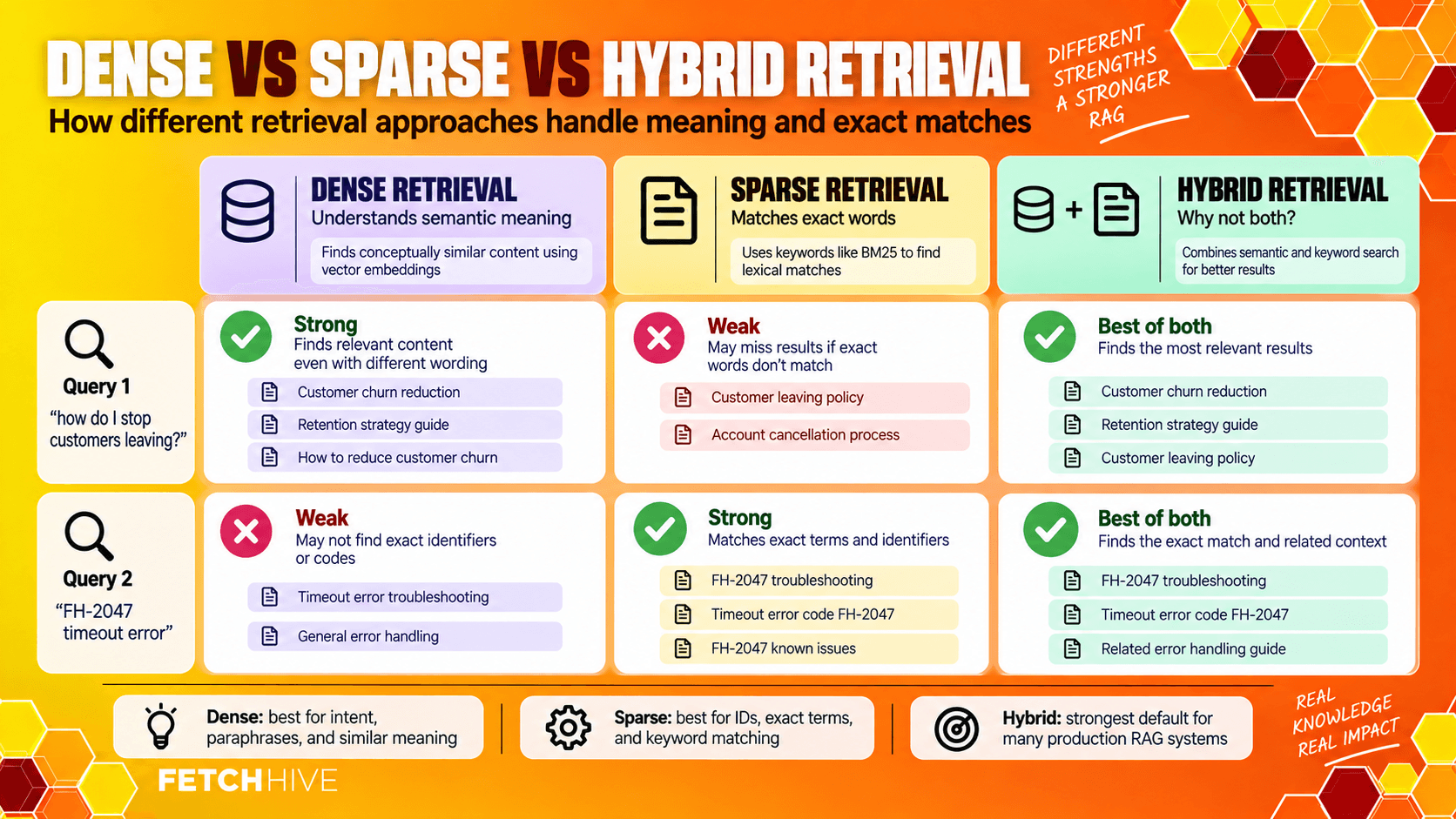
Your product docs might need semantic search for ‘how do I stop customers leaving?’ and exact keyword matching for ‘FH-2047’. A hybrid setup can do both without pretending one technique has defeated the other forever.
Open Source Embedding Models vs Hosted APIs
You basically have two camps: open source embedding models you run yourself, and proprietary or hosted models you call through an API.
Open source embedding models give you more control. You can keep domain specific data inside your own infrastructure, choose the hardware, fine-tune specialized models, and avoid per-call dependency on one provider. That makes them attractive for legal, financial, medical, or other compliance-sensitive production systems.
Hosted models are easier. You send text, get vectors back, and let somebody else worry about scaling. That is great for rapid prototyping and smaller teams that would rather build the product than become part-time GPU administrators.
The trade-off is predictable: control, privacy, maintenance, latency, cost, and lock-in. There is no universally right embedding model. There is only the right embedding model for your data, traffic, constraints, and retrieval tasks.
One thing people forget: switching models is not like changing a dropdown and carrying on. Different embedding models create different vector spaces. If you change the model used to index the corpus, you normally need to generate embeddings again and rebuild the index. Plan for that before you embed ten million chunks with the first model you found in a blog post.

How to Evaluate Embedding Models for RAG
This is the bit that matters. Do not choose an embedding model because it has a nicer product page or because it is number one on a massive text embedding benchmark.
Benchmarks such as the Massive Text Embedding Benchmark (MTEB) are useful for narrowing the field. They are not your production data. The sensible way to evaluate embedding models is to test them against questions your users actually ask.
Build a small labeled evaluation set. Fifty to two hundred query-document pairs is enough to learn a lot. Include the obvious questions, awkward wording, acronyms, exact product codes, domain specific language, and cases where several documents look annoyingly similar.
Then compare candidate models using metrics such as:
Recall@K: did the relevant document appear in the top K results at all?
MRR: how high did the first relevant result rank?
nDCG: did the system rank the most useful results near the top?
Query latency: how long did embedding generation and retrieval take?
Cost and throughput: what happens when you scale from a test notebook to production traffic?
Retrieval accuracy should be the first filter. A tiny, fast model that misses the correct document is not cheap. It is just wrong more efficiently. After that, compare latency, storage, operational complexity, and computational cost.
Domain-Specific Models and Fine-Tuning
General purpose models are trained across huge amounts of broad text. That makes them useful, but broad knowledge is not the same thing as understanding your weird little corner of the world.
Legal contracts, medical notes, engineering runbooks, financial filings, and internal SaaS terminology can contain domain specific vocabulary that general embeddings do not represent particularly well. Specialized domains sometimes benefit from domain specific models, or from fine-tuning a strong general embedder on domain specific data.
The practical test is simple. If a general model performs well on your evaluation set, leave it alone. If it repeatedly misses relationships that are obvious inside your domain, then fine-tuning becomes interesting.
You can train on positive and negative query-document pairs so the model learns which pieces of text should sit closer together. That changes the embedding space around your actual retrieval problem instead of hoping a massive general training dataset happened to learn your internal abbreviations.
Do not fine-tune because it sounds advanced. Fine-tune because your evaluation data shows a repeatable retrieval failure that better training data can fix.
Designing the Retrieval Layer Around Embeddings
Choosing an embedding model is not an isolated decision. It affects the entire retrieval layer around it.
Vector database and index type: HNSW, IVF, quantization, and other indexing choices trade memory, speed, and recall.
Similarity metric: use the metric the model expects rather than picking one at random.
Chunking: sentence embeddings, paragraph chunks, or larger section chunks can produce very different retrieval behaviour.
Top-K and thresholds: more candidates can increase recall but also send more rubbish downstream.
Metadata filters: narrow the candidate set using permissions, date, language, product, tenant, source, or document type.
Hybrid search: combine vector search with keyword search when both similar meanings and exact words matter.
Reranking: retrieve broadly, then let a stronger ranking stage decide which chunks deserve space in the prompt.
This is where building RAG systems gets more interesting than ‘pick embedding model, pick vector database, done’. Production grade RAG pipelines are a collection of small choices that interact. There is no one magical knob called ‘retrieval quality’.
Latency, Cost, and Scaling
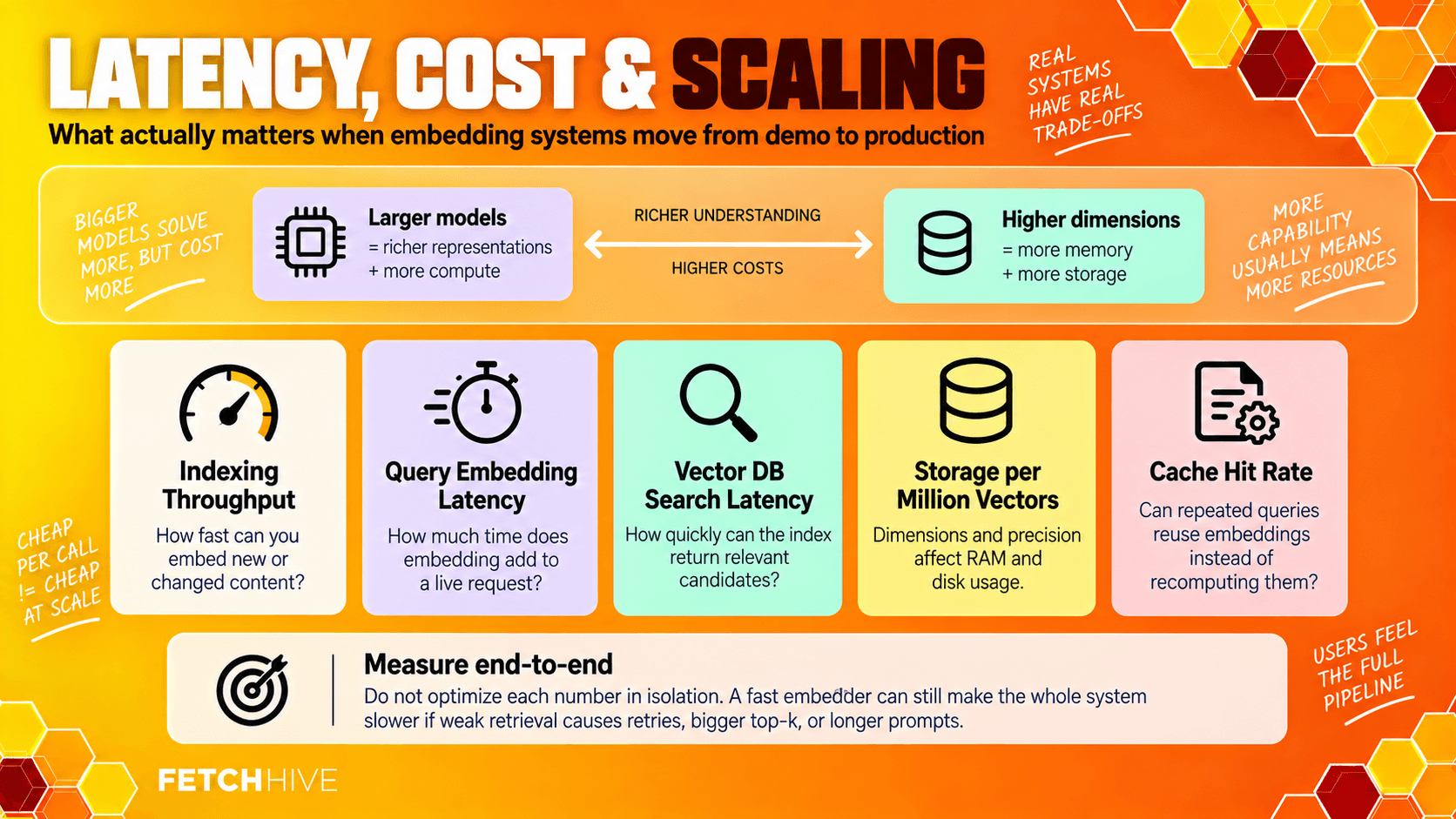
Embedding models are usually much cheaper than LLM generation, but they are not free, especially when you are indexing massive datasets or handling a large number of live queries.
Larger models can create richer context representations, but they tend to require more compute. Larger vector dimensions also consume more memory and storage in the vector store. At scale, those boring numbers turn into real infrastructure bills.
A few practical things I would measure:
Indexing throughput: how quickly can you generate embeddings for new or changed content?
Query embedding latency: how much time does embedding generation add to an interactive request?
Vector DB search latency: how quickly can the index return relevant candidates?
Storage per million vectors: dimensionality and numeric precision affect RAM and disk usage.
Cache hit rate: repeated or normalized queries may let you reuse a query embedding instead of recomputing it.
Do not optimize each number in isolation. A 20 ms embedder with mediocre retrieval can make the overall system slower if bad results trigger retries, larger top-K values, or longer prompts. End-to-end behaviour is the thing users actually experience.
Evaluate Embeddings in Production, Not Just Once
A model that wins during launch week can get worse six months later without changing at all. Your corpus changes. New product names appear. Users invent new abbreviations. Old documents hang around. The distribution of queries drifts.
So evaluate embeddings continuously. Track the retrieved chunks as well as the final answer. If users keep downvoting a response, ask whether the language model failed or whether retrieval handed it the wrong evidence in the first place.
I would monitor retrieval performance with a mix of offline and online signals: repeatable evaluation queries, hit rate, rank position, similarity scores, user feedback, failed searches, corrections, latency, and production traces.
This is also why I care so much about tracing in Fetch Hive. If retrieval quality drops, I want to see the retrieved context, model calls, cost and failures rather than just staring at a bad final answer.
When retrieval quality drops, inspect the actual top results. Maybe your chunking strategy is splitting useful context. Maybe the new documents use vocabulary your model never saw. Maybe your metadata filters are wrong. Maybe the vector database is fine and the query needs rewriting. You cannot fix what you refuse to look at.
TEST WITH YOUR OWN DATA
See what your RAG agent actually retrieves.
Build a RAG agent using your documents in Fetch Hive, then inspect the retrieved context in its traces. Use real questions to see whether your answers are grounded in the right information.
How to Choose the Right Embedding Model
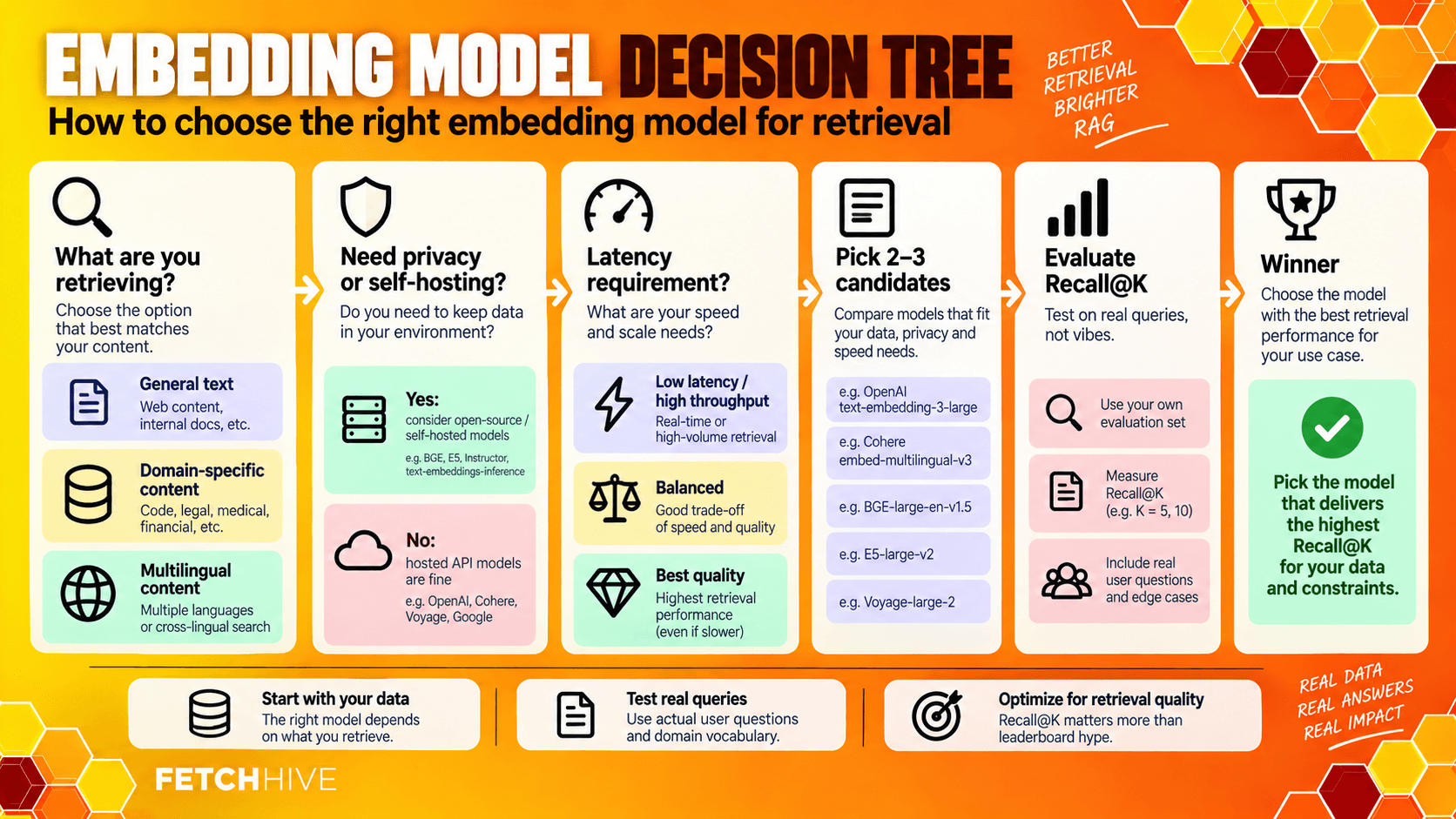
If I were choosing an embedding model for a new RAG application, I would keep the process painfully simple:
1. Define the job. What are you retrieving: support docs, technical documentation, legal text, code, research, multilingual content, product data, or something else?
2. Define the constraints. Decide your latency target, data governance rules, expected query volume, vector storage budget, and whether self-hosting is required.
3. Pick two or three candidates. Include one sensible baseline instead of benchmarking 37 models because you enjoy suffering.
4. Evaluate on your own data. Use real user queries and known relevant documents. Compare retrieval accuracy before anything else.
5. Test failure cases. Include domain specific vocabulary, exact identifiers, awkward natural language, noisy input, and near-duplicate documents.
6. Measure production cost. Look at embedding generation, vector storage, throughput, and query latency together.
7. Plan for change. If switching later requires re-embedding the whole corpus, know what that costs before you lock yourself in.
The best model on a leaderboard is not automatically the best model for you. A smaller model can beat larger models on your dataset. A domain-tuned model can beat a general one in specialized domains. A hosted API can beat self-hosting if your team needs rapid prototyping. The only useful answer comes from testing the actual retrieval task.
Where Better Embeddings Actually Matter
Better embeddings show up anywhere a RAG system has to find the right thing before it can answer: customer support, enterprise search, technical documentation, research, policy Q&A, internal knowledge assistants, agent memory, and other AI systems that depend on relevant context.
If you want the application side rather than more vector nerdiness, I have a separate guide to 7 real-world RAG use cases with examples of where retrieval actually creates useful business value.
The Takeaway
RAG embeddings are not the flashy part of retrieval augmented generation, but they are one of the parts I would care about most. They determine whether your system finds relevant documents, whether the LLM gets useful context, and whether semantic search works when users refuse to type the exact words from your documentation.
Start with a solid general model. Generate embeddings from clean, well-chunked data. Use the same embedding model or compatible query/document modes. Combine dense embeddings with keyword matching when exact terms matter. Evaluate embedding models on your own queries. Then watch retrieval performance in production instead of assuming the job is finished.
Get retrieval right and the generation model has a fighting chance. Get retrieval wrong and you have built a very sophisticated machine for finding the wrong paragraph faster.
Share this post


