
How to Improve RAG Performance Quickly and Easily

By
Tom Dallimore
Published

Hey, it’s Tom from Fetch Hive here.
RAG is brilliant when it works. When it doesn’t, you get the worst of both worlds: an expensive language model confidently answering from the wrong paragraph.
The good news is that most RAG problems are not mysterious ‘the AI is broken’ problems. They are usually retrieval problems. Bad data. Bad chunking. Weak search. Too much context. Poor query handling. Or no proper feedback loop telling you what is actually failing.
Fix those things and your answers normally get better before you even touch the LLM.
In this guide, I’ll show you how to improve RAG performance without burying you under a mountain of research papers and mathematical nonsense.
We’ll cover:
How to clean and organize your knowledge properly
How to choose a chunking strategy that does not butcher your documents
Why hybrid search is usually better than vector search on its own
How reranking can dramatically clean up the context you send to the model
How query rewriting, multi-query retrieval, and agentic retrieval improve difficult searches
How to evaluate RAG with real user questions instead of vibes
How to reduce latency and cost without destroying answer quality
Where fine-tuning actually fits into the picture
If you are completely new to RAG, you might want to read my RAG explained guide first. If you already know the basics, carry on.
Bottom line: A bigger model cannot rescue terrible retrieval. Get the right evidence into the context window first. Then worry about the fancy AI stuff. |
It’s RAGtime. Yes, that joke is still awful.
Before You Change Anything: Find the Actual Problem
One of the easiest ways to waste a week is to start swapping embedding models, vector databases, and LLMs before you know which part of the pipeline is failing.
If you want to see how all of those pieces fit together first, I’ve broken down the full RAG architecture separately, from ingestion and chunking through to retrieval, generation and monitoring.
Start with the symptom. Then work backwards.
What you see | Likely problem | First thing to test |
The correct document never appears | Retrieval / filtering | Hybrid search, metadata filters, query rewriting |
The right document appears but the wrong passage wins | Chunking / ranking | Chunk boundaries and reranking |
The right chunks are retrieved but the answer is bad | Prompt / model / context handling | Grounding instructions and model choice |
Answers are accurate but painfully slow | Pipeline latency | Top-k, reranker cost, model size, parallel calls |
It works in demos but fails on real users | Evaluation gap | Real query test set, feedback, production traces |
Different runs produce contradictory answers | Source quality / conflicting versions | Versioning, freshness metadata, source priority |
1. Fix Your Data Quality Before You Tune Anything
There is an old saying in RAG: garbage in, garbage out. Annoyingly, it is still true.
If your knowledge base is full of outdated docs, duplicate pages, contradictory policies, boilerplate navigation text, or random garbage scraped from a website footer, your retriever is going to surface that garbage very efficiently.
Then the LLM will read it and confidently turn it into a beautifully written wrong answer. Great.
Before changing models, clean the source data. I would check for:
Duplicate or near-duplicate documents
Old versions that should no longer be searchable
Conflicting policies or product documentation
Missing titles, headings, dates, and source information
Scraped menus, cookie banners, footers, and other boilerplate
Documents with broken extraction or unreadable formatting
Content that should not be available to a particular user, team, or customer
A SaaS support bot is a good example. If you have an integration guide from three years ago sitting next to the current one with no version information, the model has no magical ability to know which one you meant.
Give the retrieval layer clean sources and clear signals about freshness and authority. That alone solves a surprising amount of ‘AI quality’ problems.
Pro tip: Treat document freshness as part of data quality. A perfectly written document can still be bad retrieval data if it stopped being true six months ago. |
2. Chunk for Meaning, Not Just Token Count
Chunking is still one of the biggest levers in RAG performance, but there is no magical chunk size that works for every dataset.
The goal is simple: each chunk should contain enough context to make sense on its own without dragging half the document into the prompt.
Bad chunking usually looks like one of two things:
Chunks are too small, so the answer gets separated from the heading, definition, exception, or surrounding context that makes it useful.
Chunks are too large, so retrieval returns a wall of text with one relevant sentence buried somewhere in the middle.
I prefer structure-aware chunking whenever possible. Split around headings, sections, paragraphs, lists, tables, or logical document boundaries instead of blindly chopping every document after an arbitrary number of tokens.
For example, a pricing document might naturally split into ‘Plans’, ‘Usage Limits’, ‘Overages’, ‘Cancellation’, and ‘Refunds’. Those sections are already telling you where the meaning changes. Use that information.
You can still enforce maximum sizes and use overlap where it helps, but overlap is not free. Too much of it creates duplicate candidates, increases storage, and can stuff repeated context into the final prompt.

The right chunking strategy should be tested against real questions. If users keep asking about refund exceptions and the retriever only finds the general refund policy, your chunk boundaries are probably wrong.
3. Add Metadata and Filter Before You Search Everything
Metadata is one of the least exciting parts of RAG, which is probably why people ignore it until their system starts returning a French pricing page from 2022 to a customer in Thailand.
Useful metadata can include:
Document type
Product or feature
Customer, tenant, or workspace
Language
Country or region
Created and updated dates
Version
Author or source authority
Access permissions
Source URL or document ID
This lets you narrow the search space before semantic similarity even gets involved.
If a user is asking about billing for Product A, there is no reason to search every engineering note, HR document, and Product B support article in your entire company.
Filtering improves relevance and can also improve speed because the retriever has less irrelevant stuff to consider.
Rule of thumb: If you already know something about the user’s scope, permissions, product, language, or location, use it. Do not make vector search rediscover information your application already knows. |
4. Use Hybrid Search Instead of Betting Everything on Vectors
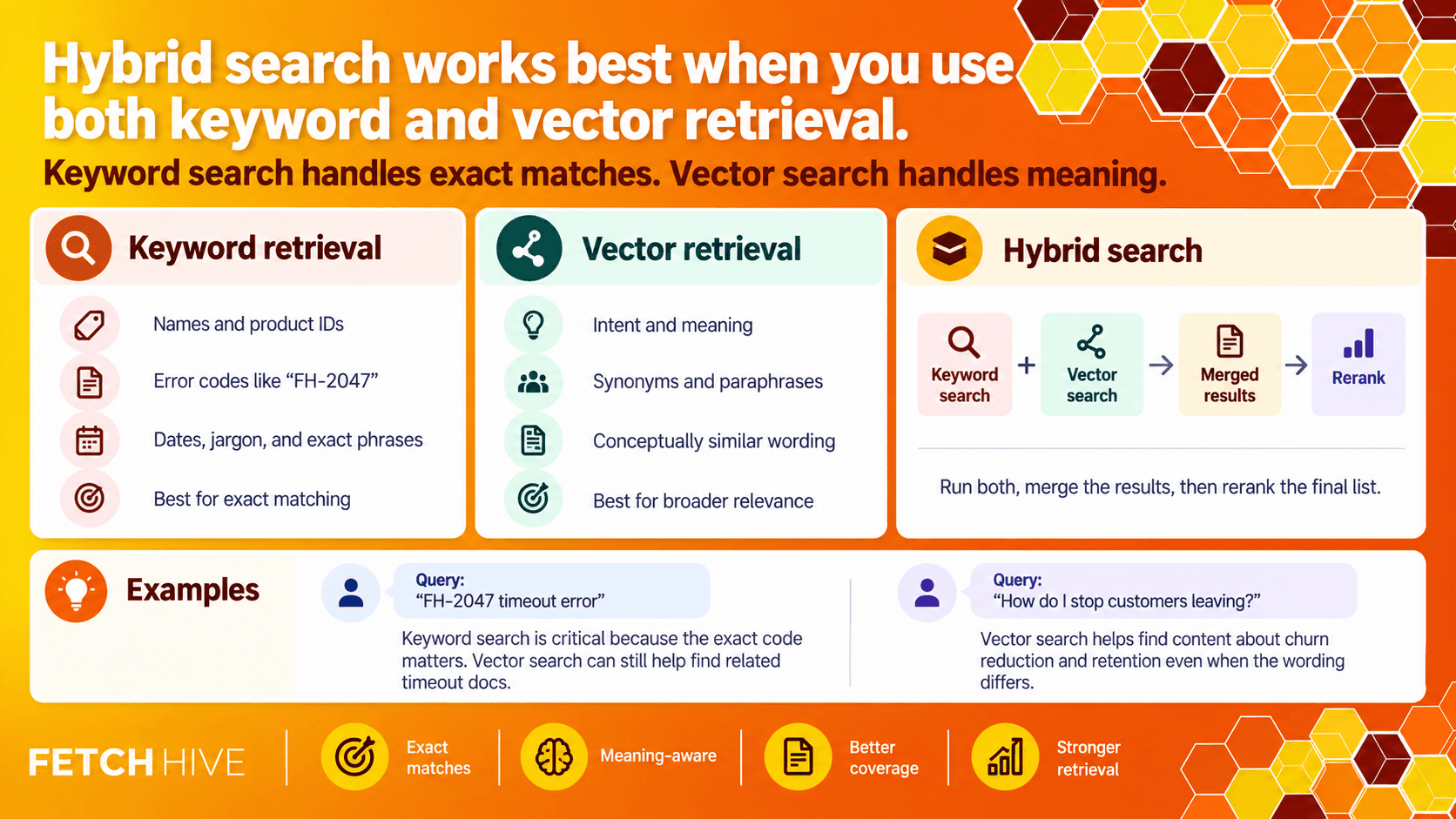
Vector search is excellent at meaning. Keyword search is excellent at exactness. RAG normally needs both.
That is why hybrid search has become such a common pattern in modern retrieval systems. You run semantic or vector search alongside normal keyword search, then merge the results into a single ranked list.
Why does that matter?
Imagine someone searches for ‘FH-2047 timeout error’. A vector search might find conceptually similar timeout documentation. Useful. But the exact product code ‘FH-2047’ is the most important part of the query, and keyword search is very good at that.
The opposite is true for a query like ‘how do I stop customers leaving?’. The source documents might talk about ‘churn reduction’ or ‘retention’, so semantic search can find relevant material even when the exact wording is different.
Hybrid search gives you both behaviours:
Keyword retrieval for names, IDs, error codes, dates, jargon, and exact phrases
Vector retrieval for intent, paraphrases, synonyms, and conceptually similar wording
The merged result set can then be reranked, which brings me to the next part.
5. Rerank the Results Before They Reach the LLM
Retrieval is usually optimized for recall. You would rather bring back a few extra possible matches than accidentally miss the one chunk that contains the answer.
The problem is that the LLM does not need every possible match. It needs the best ones.
A reranker takes the candidate results from your initial search and scores them again with a deeper understanding of the actual query. Think of it like this:
Search finds the shortlist.
Reranking decides who actually deserves to get into the prompt.
This matters because irrelevant context is not harmless. Every weak chunk consumes tokens, adds noise, and gives the model another opportunity to latch onto something stupid.
A common pattern is to retrieve a broader candidate set, rerank it, then pass only the strongest few chunks to the generation model.
The trade-off is latency and cost. Rerankers do extra work. So do not automatically throw the most expensive reranking model at every query. Measure whether it actually improves the questions your users ask.
Simple version: Retrieve wide, rerank narrow, generate from the best evidence. That is normally better than dumping 20 vaguely related chunks into a huge context window and hoping for the best. |
6. Rewrite and Break Down Difficult Queries
Users are terrible at writing search queries. I include myself in that statement.
They misspell things, leave out context, use internal slang, ask three questions at once, and expect the system to somehow know what they meant.
Modern RAG pipelines can improve retrieval before the search even starts by transforming the query.
Query rewriting
Query rewriting cleans up or expands the user’s request. That might mean correcting a typo, adding a known product name, expanding an acronym, or producing a clearer search phrase.
For example, ‘can’t login after sso thing’ could become something closer to ‘SSO login failure after authentication for workspace users’.
Multi-query retrieval
Some questions benefit from multiple searches instead of one. A system can generate several related queries, retrieve results for each, merge them, and then rerank the combined candidates.
This is useful when one phrasing is not enough to capture the user’s intent.
Multi-hop and agentic retrieval
More complex questions may need multiple retrieval steps.
Say someone asks: ‘Why did our European enterprise conversion rate drop after the pricing change?’
That question might require pricing history, analytics, CRM notes, customer feedback, and the date the change actually went live. One vector search over one index is not going to magically solve all of that.
An agentic retrieval system can plan the search, break the problem into sub-questions, choose different knowledge sources or tools, run multiple searches, and use the results to decide whether it needs another retrieval pass.
It is more powerful, but it is also slower and more expensive than classic RAG. Use it for questions that genuinely need reasoning across multiple sources, not because ‘agentic’ sounds cool in a product meeting.
7. Build an Evaluation and Feedback Loop
This is the part I still see people skipping, and it makes absolutely no sense.
You cannot improve RAG by asking it five questions yourself, nodding at the screen, and declaring it production-ready.
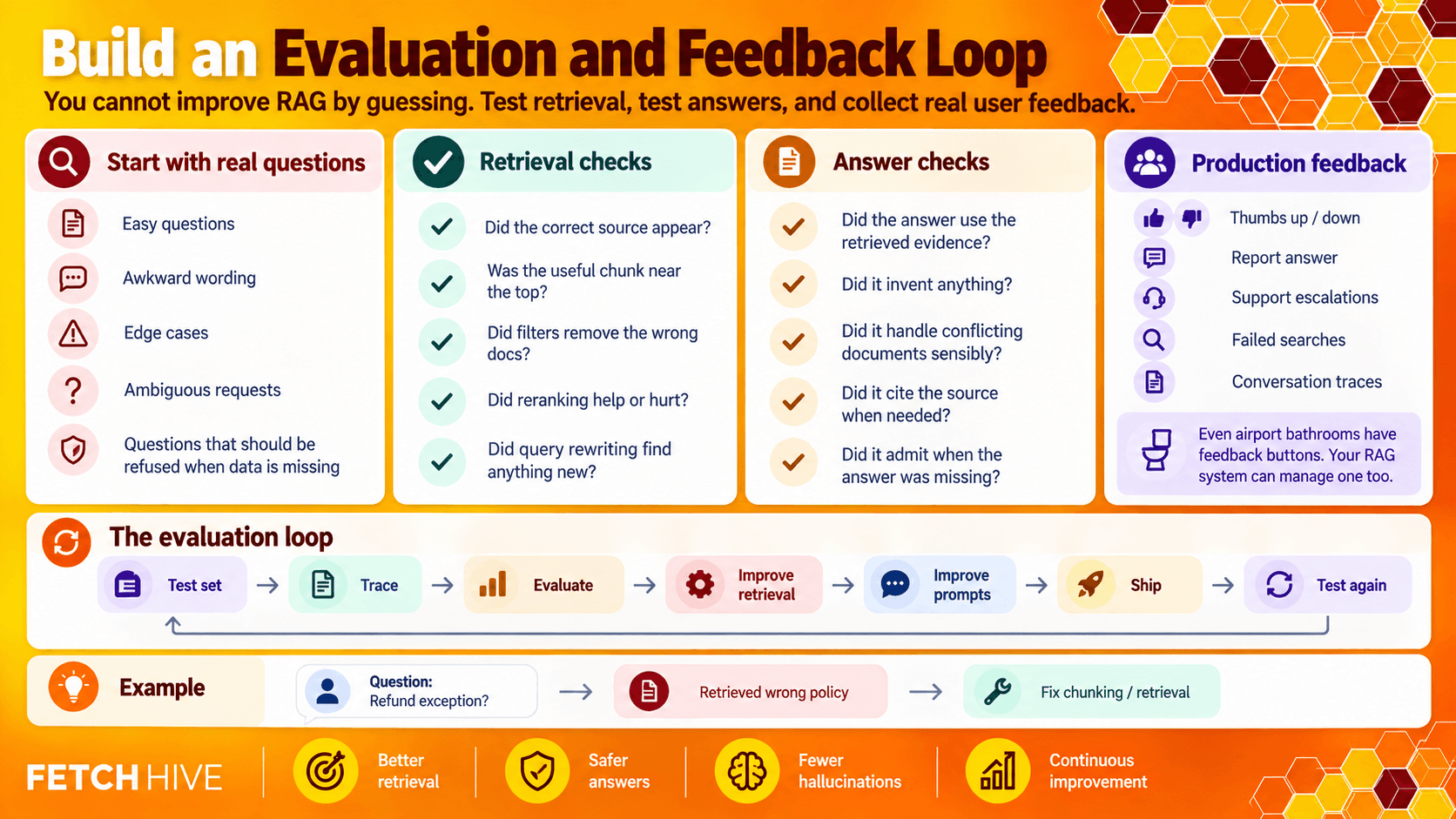
Start with a small set of real questions that represent what users actually ask. Include easy questions, awkward wording, edge cases, ambiguous requests, and questions the system should refuse to answer because the source data is missing.
For every test, check the retrieval and the answer separately.
Retrieval checks
Did the correct source appear at all?
Was the useful chunk near the top?
Did filters remove the wrong documents?
Did reranking improve or damage the order?
Did a query rewrite retrieve something the original query missed?
Answer checks
Did the answer actually use the retrieved evidence?
Did it invent anything that was not in the sources?
Did it handle conflicting documents sensibly?
Did it cite or reference the source when that matters?
Did it admit when the knowledge base did not contain the answer?
Then collect production feedback as well. Thumbs up/down buttons, ‘report answer’ controls, support escalations, failed searches, and conversation traces all tell you where the system is falling apart in the real world.
Even airport bathrooms have feedback buttons. Your RAG system can manage one too.
8. Improve the Generation Prompt, But Do Not Use Prompts to Hide Bad Retrieval
Prompt quality still matters. It just comes later than most people think.
Once you are retrieving good evidence, tell the generation model exactly how it should use it.
Useful instructions include:
Answer using the retrieved context, not assumptions.
Say when the available sources do not contain enough information.
Prefer newer or more authoritative sources when documents conflict.
Cite the source document or URL for important claims.
Do not merge facts from unrelated customers, products, or versions.
Keep the answer in the format the user actually needs.
You can also pass useful application context into the prompt, such as the user’s role, product, account, language, or current workflow state.
But there is a limit. If the retriever sends the wrong documents, a beautifully engineered prompt is just lipstick on a retrieval pig.
9. Measure Latency, Cost, and Every Step in the Pipeline
RAG quality is only half the battle. A support agent that takes 18 seconds to answer a basic question is still a bad support agent.
Do not treat latency as one giant number. Break the run down into stages:
Query transformation time
Embedding time
Search / retrieval time
Reranking time
Tool or external API time
Generation time
Total tokens and cost
Once you can see where the time and money are going, optimization becomes much less mysterious.
Common wins include:
Filter before retrieval instead of searching the entire corpus
Reduce the number of chunks you send after reranking
Use smaller or faster models for query rewriting and simple classification jobs
Cache stable retrieval results where it makes sense
Run independent retrieval or tool calls in parallel
Avoid agentic multi-step retrieval for simple fact lookups
Set sensible timeouts and fallbacks for external tools
The important part is visibility. If all you can see is ‘the answer took 8.4 seconds’, you have no idea what to fix.
What About Fine-Tuning?
Fine-tuning can be useful, but it is not a replacement for RAG and it does not fix a bad retriever.
This gets confused all the time.
RAG gives a model access to external information at run time. Fine-tuning changes the model’s behaviour based on training examples.
Fine-tuning makes more sense when you want a model to consistently:
Follow a specialist output format
Use a particular style or classification scheme
Perform a narrow task with examples it repeatedly struggles with
Choose tools or actions in a predictable way
Reduce the amount of instruction you need to repeat in every prompt
It is not the best way to keep changing product docs, customer records, prices, policies, or research up to date. That is exactly the type of information retrieval is designed for.
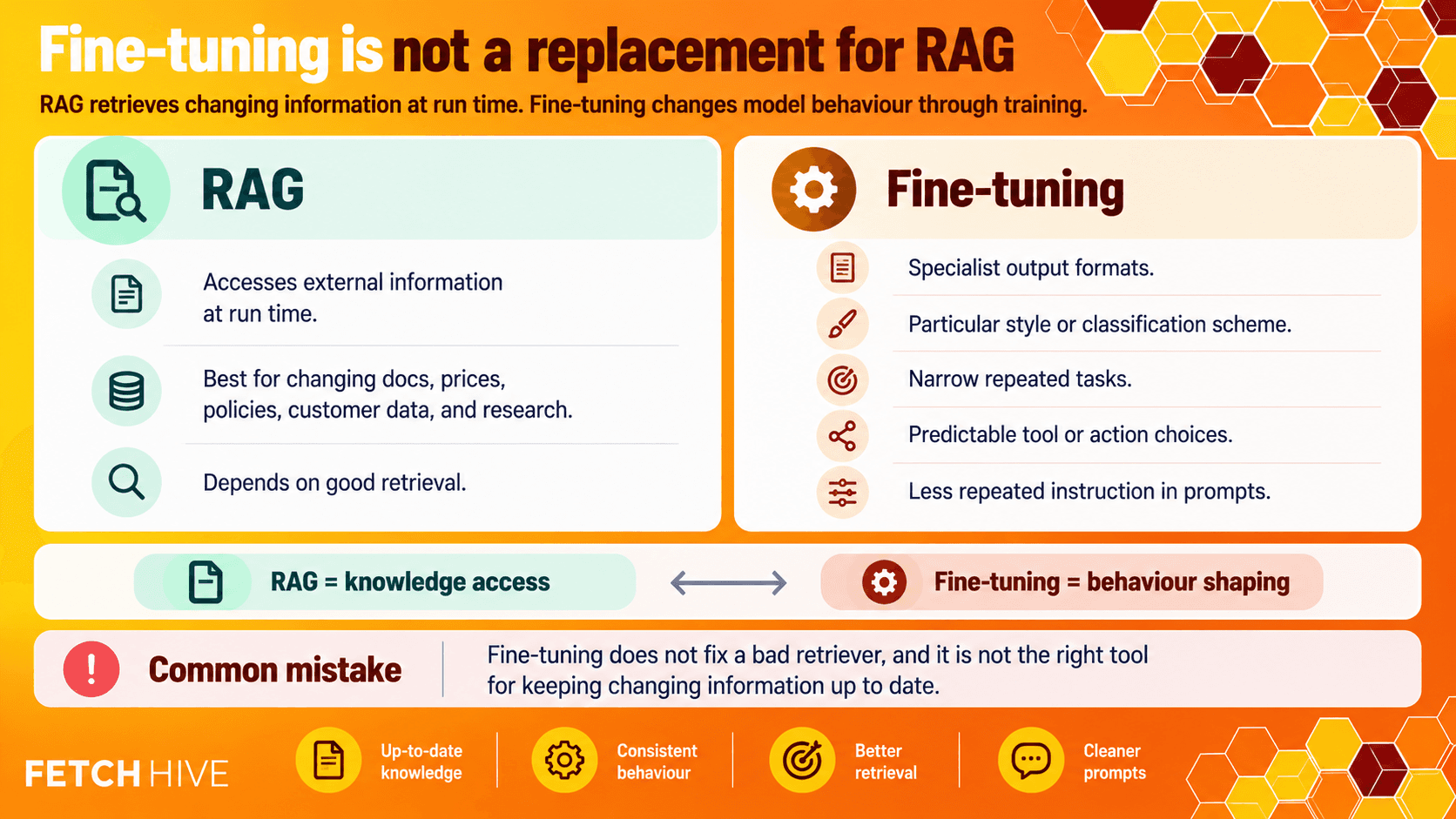
Easy distinction: Use RAG when the knowledge changes. Consider fine-tuning when the behaviour needs to change. |
Classic RAG vs Agentic RAG: Which One Should You Use?
You do not need an agent planning twelve searches to answer ‘what is our refund window?’.
For straightforward question answering, classic RAG is still excellent:
Take the query
Run filtered hybrid retrieval
Rerank the candidates
Send the best evidence to the LLM
Generate an answer with sources
Agentic RAG makes sense when the problem is genuinely more complex. For example:
The query requires information from multiple knowledge bases or applications
The system needs to choose between search, databases, APIs, or other tools
The question needs to be decomposed into several sub-questions
The first retrieval pass may reveal that another search is required
The task includes actions after retrieval, not just answering a question
The more intelligence you add to retrieval, the more important tracing and evaluation become. Otherwise you have just built a more complicated system that can fail in more creative ways.
A Simple RAG Performance Checklist

If your RAG quality is poor, I would work through the problem in roughly this order:
1. Clean stale, duplicate, broken, and conflicting source data.
2. Check that permissions and metadata filters are correct.
3. Test chunk boundaries against real questions.
4. Use hybrid keyword + vector retrieval where exact terms matter.
5. Retrieve enough candidates, then rerank before generation.
6. Rewrite or split complex queries when one search is not enough.
7. Pass only the strongest context into the LLM.
8. Use clear grounding instructions and require the model to admit uncertainty.
9. Create a repeatable evaluation set from real user questions.
10. Trace latency, cost, tool calls, and retrieval quality in production.
11. Only add agentic retrieval or fine-tuning when you have a clear reason.
Notice how ‘buy the biggest model available’ is not on that list.
Of course, none of this matters if RAG isn’t actually a good fit for the problem you’re solving. If you’re still figuring out where it makes sense, I’ve covered 7 real-world RAG use cases separately, with examples from actual companies.
How Fetch Hive Helps You Build and Improve RAG
This is the bit where I shamelessly mention the product I built. You knew it was coming.
A production RAG system normally ends up needing more than a vector search and one prompt. You need knowledge, models, tools, workflow logic, testing, deployment, monitoring, and some way of figuring out what happened when an answer goes completely sideways.
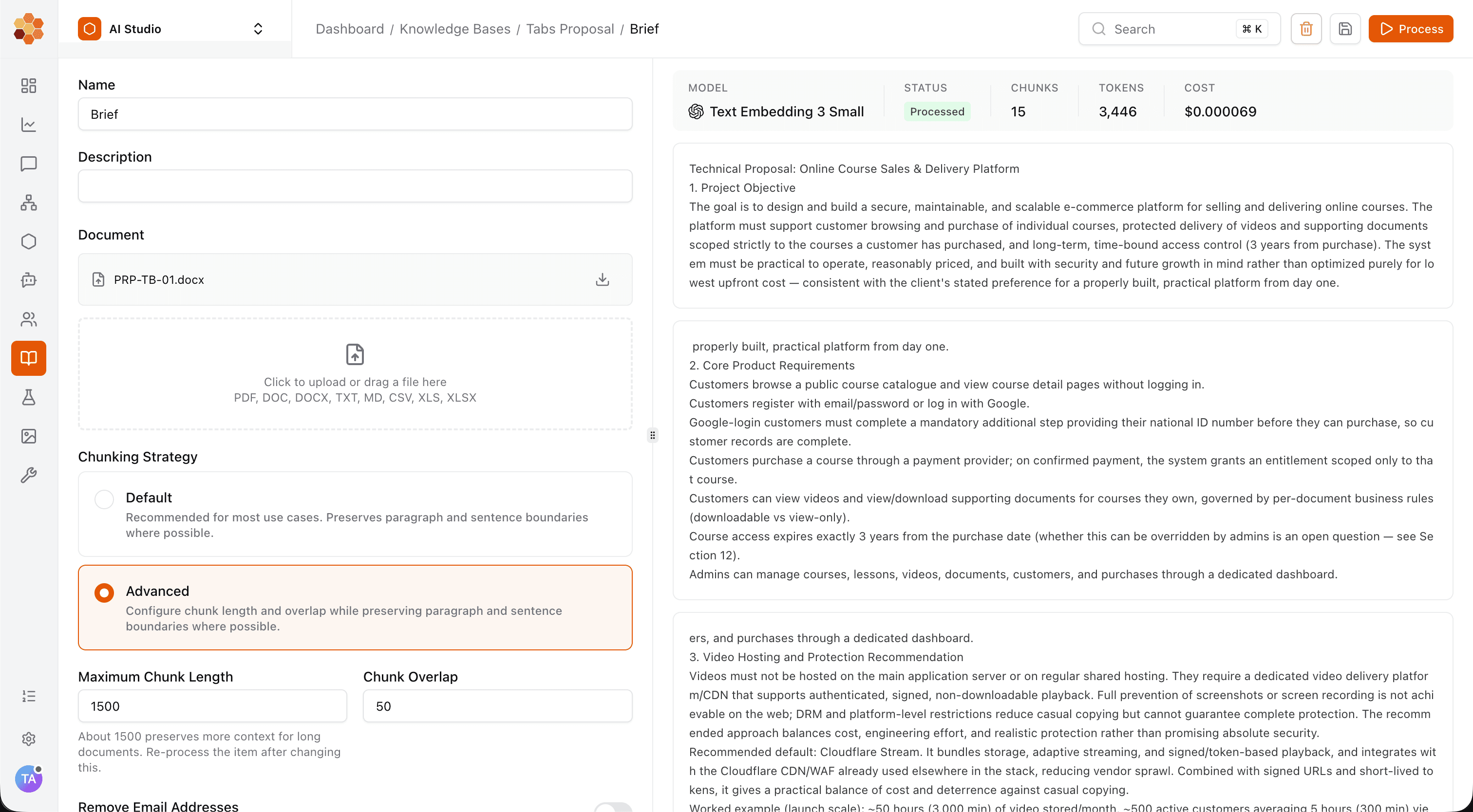
Fetch Hive brings those pieces into one place.
You can use Fetch Hive to:
Ground agents on custom knowledge bases built from your own company data and documents
Build prompts, multi-step workflows, and autonomous or multi-agent systems
Connect agents to tools, applications, search, and downstream workflows
Test different models without rebuilding the entire application around one provider
Trace every run, including steps, tool calls, usage, duration, and cost
Inspect what failed, change the logic, and improve the workflow from one dashboard
Deploy AI workflows and agents into your own products and processes
That matters for RAG because optimization is iterative. You are going to change the data, retrieval strategy, prompt, models, and tools. If every experiment requires rebuilding half your stack and digging through five different dashboards, you will eventually hate your life.
With proper traces, you can see whether a bad answer came from the wrong source, a tool failure, an unnecessary retrieval step, the prompt, or the generation model. That is a lot more useful than staring at the final response and guessing.
IMPROVE RAG WITH EVIDENCE
Find what’s holding your RAG back.
Test a RAG agent against real questions in Fetch Hive. Inspect retrieved context, tool calls, duration and cost, then refine the knowledge, prompt or workflow with evidence from each run.
Build a Better RAG System Without All the Plumbing
RAG performance is not about stuffing as much information as possible into a giant context window.
It is about getting the right evidence in front of the model, in the right order, at the right time.
Clean the data. Chunk it properly. Add metadata. Use hybrid search. Rerank. Rewrite difficult queries. Evaluate real questions. Trace what happens in production. Then reach for more advanced agentic retrieval when the simple version genuinely stops being enough.
Do that and RAG stops feeling like black magic and starts behaving like an actual system you can improve.
If you want to build, test, deploy, and trace RAG agents and AI workflows without spending your week gluing the infrastructure together, check out Fetch Hive.
Now go fix your retrieval before blaming the model. It has enough problems already.
Share this post


