
How to Build a RAG Pipeline: Ingestion to Generation

By
Tom Dallimore
Published

A RAG demo is easy to make look clever. Upload a few documents, ask a friendly question, get a decent answer back, and suddenly everyone thinks the hard part is finished.
It is not.
A production RAG pipeline has to deal with stale documents, duplicate data, weird PDFs, permissions, bad chunk size choices, noisy retrieval, latency, cost, and users who ask questions in ways nobody predicted. The LLM is only one part of the system. Most of the work happens before the prompt reaches it.
This guide walks through the full retrieval augmented generation pipeline from ingestion to generation. We will take raw data from internal documents, databases, APIs, and other external data sources, turn it into something searchable, retrieve the right evidence for a user query, build an augmented prompt, generate a response, and then evaluate whether the whole thing actually worked.
If you are completely new to RAG, start with my RAG explained guide first. If you already understand the basics and want the bigger system view, the RAG architecture guide shows how these pieces fit together in production. This article is the practical build path between the two.
What Is a RAG Pipeline?
Retrieval augmented generation, RAG for short, connects a generative AI model to knowledge that lives outside its static training data. Instead of asking the underlying model to answer from memory alone, a RAG system retrieves relevant documents at request time and gives that retrieved information to the model as context.
That sounds simple because the diagram is simple. User submits question. Retrieval model finds relevant information. Large language models (LLMs) produce the answer. Lovely.
The interesting part is everything hidden between those boxes.
A real RAG workflow has two broad sides. The offline side prepares and indexes your own data. The online side handles each live request. Together they let AI applications answer questions using up to date information, proprietary domain knowledge, and authoritative sources without baking every fact into training data.
RAG reduces dependence on what the model happened to learn during pretraining. It can also reduce hallucinations when the retrieved data is good and the prompt forces the model to stay grounded. Notice the wording there: can reduce. Bad retrieval still gives you a very fluent way to be wrong.
The RAG Pipeline in One Minute
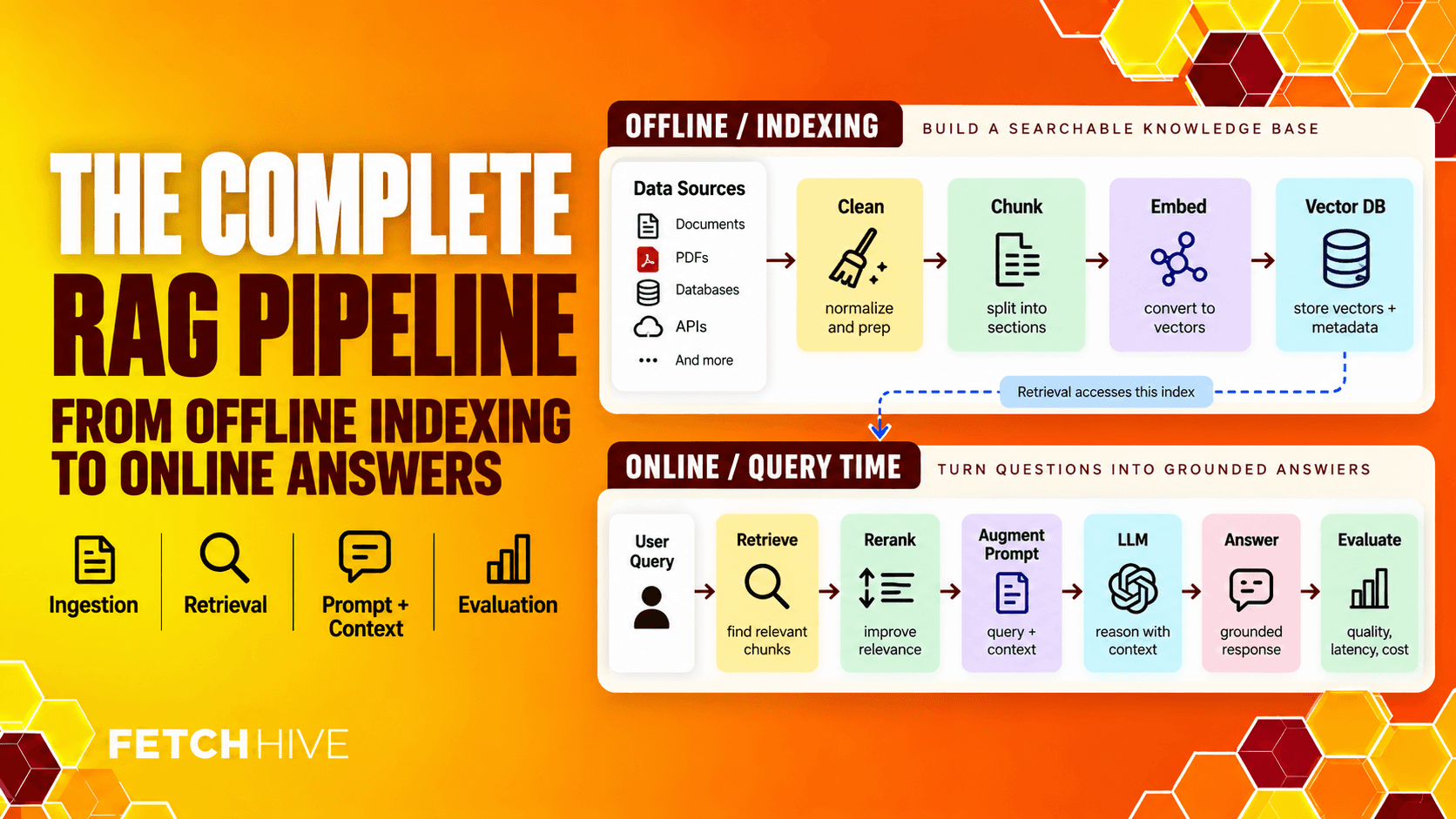
If you want the whole process before we get into the plumbing, here it is:
Ingest data from documents, databases, APIs, websites, search engines, and other data sources.
Clean and normalize the raw content so the system is not indexing garbage.
Split documents into useful chunks and attach contextual information such as source, date, product, language, and permissions.
Use an embedding model to turn each chunk into numerical representations and store them in vector databases.
When a user submits a question, embed the user input and run retrieval against the knowledge base.
Rerank or filter the retrieved documents so the strongest evidence wins.
Combine the user query and retrieved context into an augmented prompt.
Send that prompt to a large language model and produce a grounded generated response.
Evaluate retrieval quality, response quality, latency, cost, citations, and failures in production.
Stages 1 through 4 are mostly indexing work. Stages 5 onward happen at query time. Keeping that distinction clear makes debugging much easier because you can ask a basic question: did we prepare the knowledge badly, retrieve the wrong thing, or generate badly from good evidence?
Stage 1: Ingest the Data You Actually Want the Model to Know
Without useful domain specific data, there is nothing useful to retrieve. This sounds painfully obvious, yet teams still connect every folder they can find and call it a knowledge base.
Start with the sources that contain the information users genuinely need. That might include:
Internal documents such as product docs, policies, contracts, SOPs, and technical manuals
Databases containing structured data, customer records, product data, or operational data
Support tickets, CRM notes, and customer questions
Company wikis and internal data from tools like Google Drive or Confluence
APIs, code repositories, and external knowledge bases
Web pages, search engines, research feeds, and other external knowledge
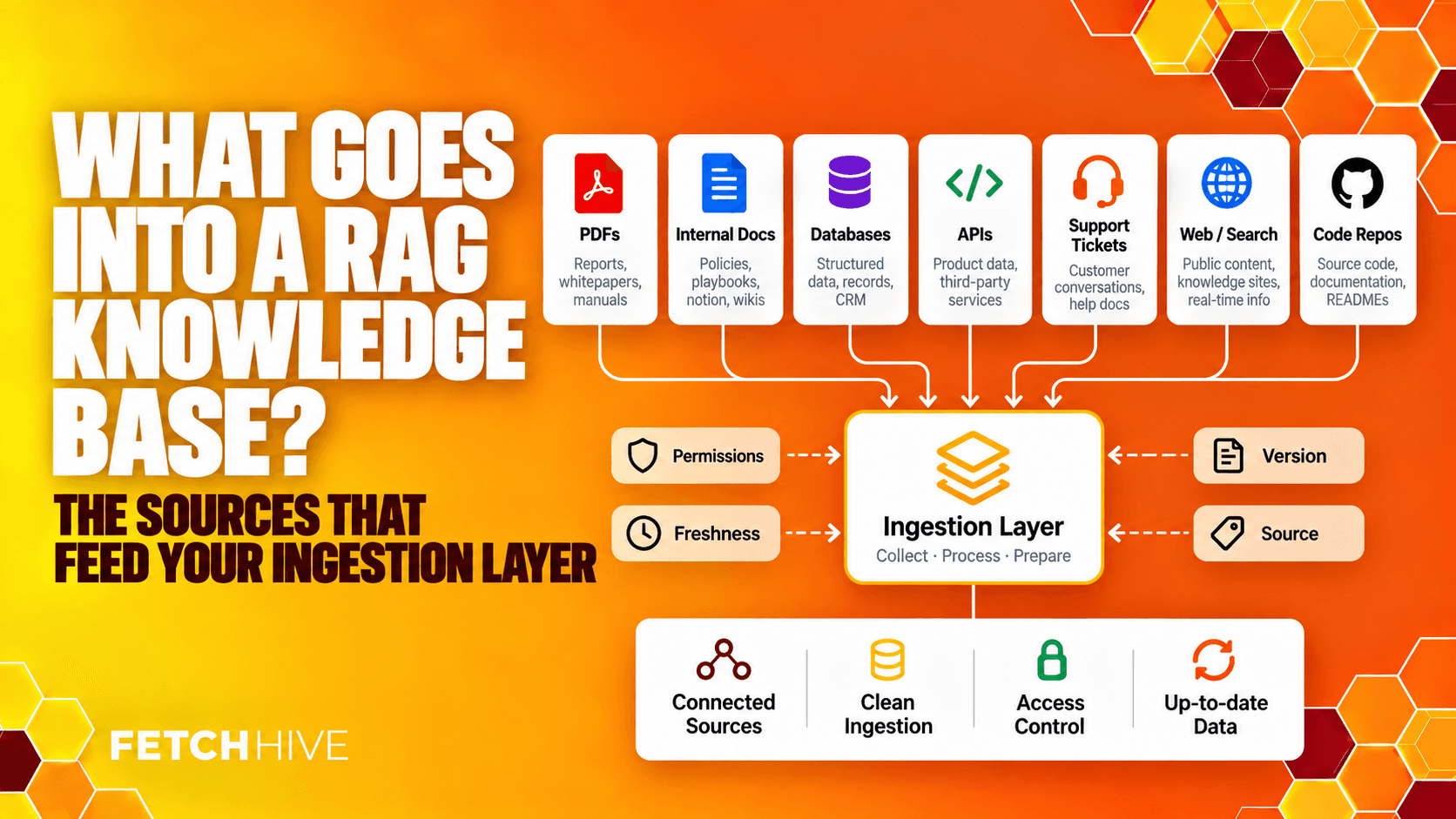
The goal is not to ingest a large dataset because large datasets sound impressive. The goal is to make the right relevant data available with enough source information to trust it later.
You also need to think about sensitive data before it ever reaches retrieval. If one customer should not see another customer’s documents, access control is not something you bolt on after launch. Permissions, tenant IDs, document status, region, and other scope information should travel with the content from ingestion onward.
And handle deletion. If a document is removed or replaced, its old chunks should not stay stored forever in the index like some kind of corporate ghost.
Stage 2: Clean, Normalize, and Chunk the Content
Raw documents are messy. PDFs contain repeated headers. Scraped sites contain navigation, cookie banners, and footer junk. OCR introduces strange characters. Tables lose structure. Old versions sit beside new ones. If you embed all of that exactly as it arrives, the retrieval system will faithfully search your mess.
Preprocessing should remove obvious noise, normalize formatting, preserve useful structure, and then split the content into chunks that still make sense on their own.
Chunk size matters because retrieval happens at the chunk level. Make chunks too small and you separate an answer from the heading, exception, or table row that explains it. Make them too large and one useful sentence gets buried inside a wall of irrelevant context.
I prefer structure-aware chunking wherever possible. Headings, paragraphs, lists, tables, sections, and document boundaries already tell you where the meaning changes. Use those signals before blindly cutting every document after an arbitrary token count.
Then add metadata. Good metadata might include document type, source URL, author, created date, updated date, version, language, product, department, access scope, and whether the content is still authoritative.
If you want the deeper version, I cover chunking, metadata, hybrid retrieval, reranking, and other fixes in the RAG performance guide. This stage is one of the easiest places to quietly wreck a perfectly good pipeline.
Stage 3: Generate Embeddings and Build the Vector Index
Now we need to make the chunks searchable by meaning, not just keyword matching.
An embedding model converts each chunk into numerical representations, usually dense vectors that capture semantic relationships. Similar ideas end up close together in vector space even when they use different wording.
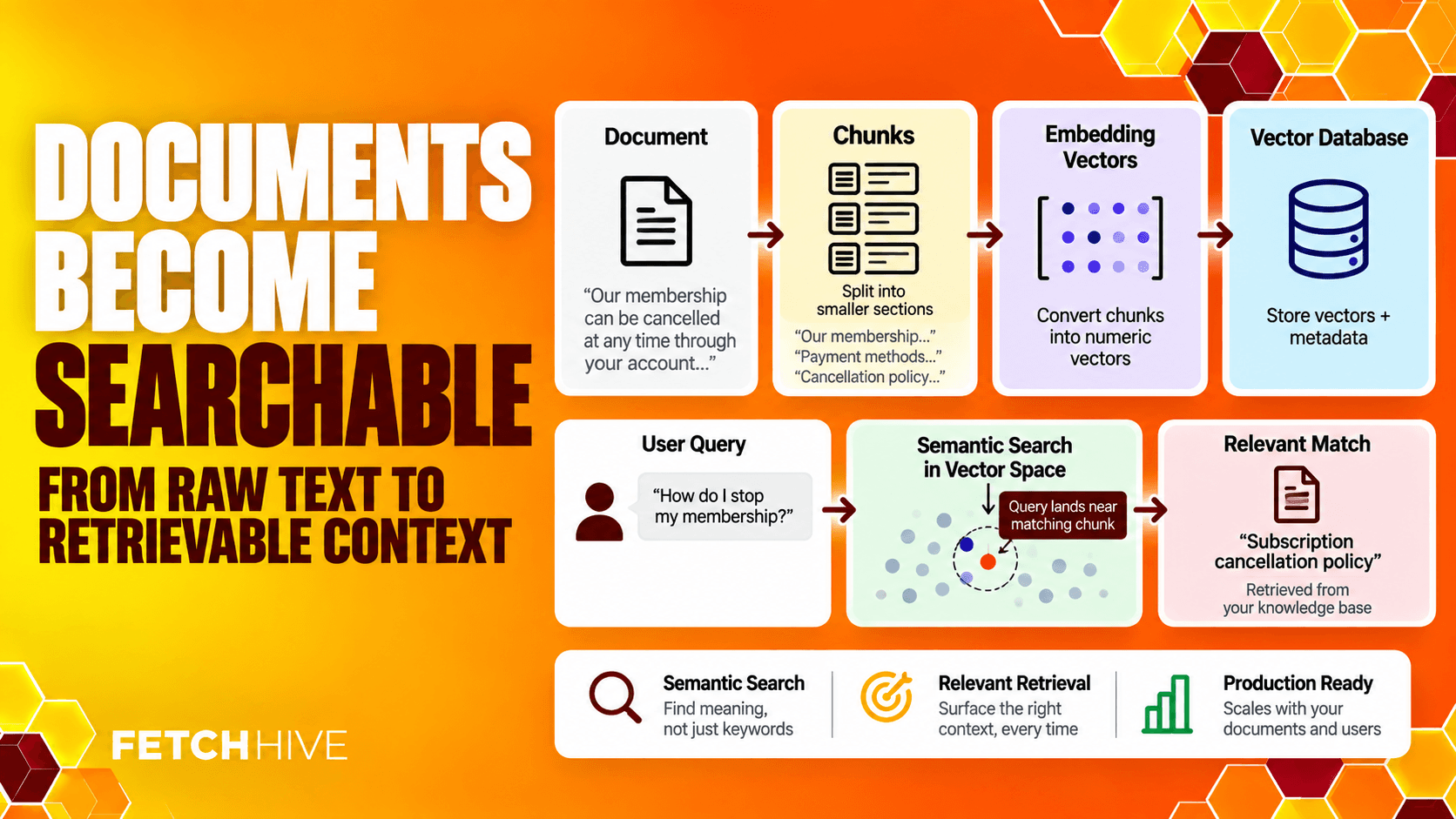
That is why a query about ‘customers leaving’ can retrieve a document about ‘churn reduction’. The exact words are different, but the semantic meaning is similar.
Those embeddings are stored in a vector database alongside the original text and metadata. Vector databases are designed to perform similarity search across huge collections of vectors quickly. This is the retrieval engine behind a lot of modern RAG models.
A few rules matter here:
Use the same embedding model, or a model aligned to the same vector space, for document embeddings and the query embedding.
Pick the similarity metric the model expects. Cosine similarity and dot product are common choices.
Store enough metadata to filter results before or during retrieval.
Re-embed changed content when the source changes.
Plan for indexing throughput and storage if you are dealing with large datasets.
Choosing an embedding model is not a leaderboard contest. The right model is the one that retrieves your relevant documents accurately enough, fast enough, and cheaply enough for your data. A model that is brilliant on general text can still be mediocre on domain specific vocabulary.
Stage 4: Retrieve the Right Evidence
This is the bit I would obsess over.
When the user submits a question, the system creates a query embedding and searches the vector index for similar content. The retriever returns candidate chunks, usually top-k results, and those candidates become the raw material for the answer.
If the right evidence never appears here, a bigger LLM will not save you. It cannot reason over a document it never received.
Pure vector search is useful, but production systems often need more. A good retrieval layer can combine:
Vector retrieval for semantic meaning and paraphrases
Keyword retrieval for exact IDs, names, codes, dates, and phrases
Metadata filters for permissions, product, region, language, date, and status
Reranking to score the retrieved documents again against the original user query
Query rewriting for vague or badly phrased customer questions
Multi-step retrieval for complex queries that need several sources
Hybrid retrieval is often the safest default because semantic search and keyword search are good at different things. Search for ‘how do I stop customers leaving?’ and vectors can find retention content. Search for ‘FH-2047 timeout error’ and exact matching suddenly matters a lot.
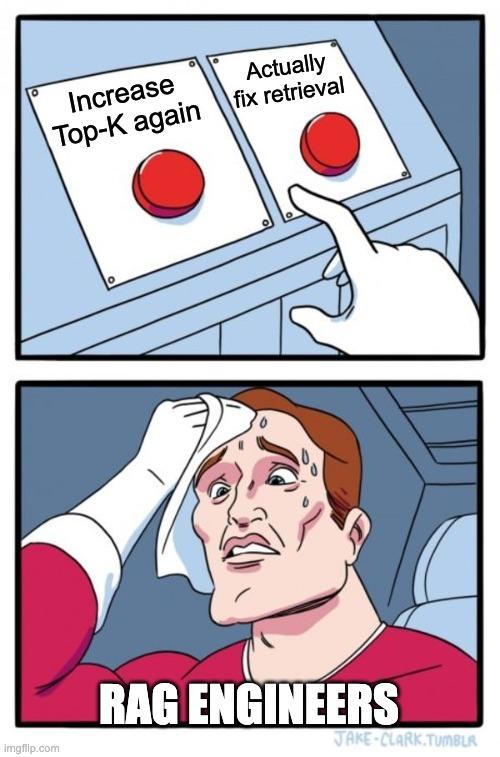
Do not blindly increase k either. More context is not automatically better context. Pulling twenty mediocre chunks into the prompt increases cost, adds noise, and gives the model more irrelevant information to misread.
Stage 5: Build the Augmented Prompt
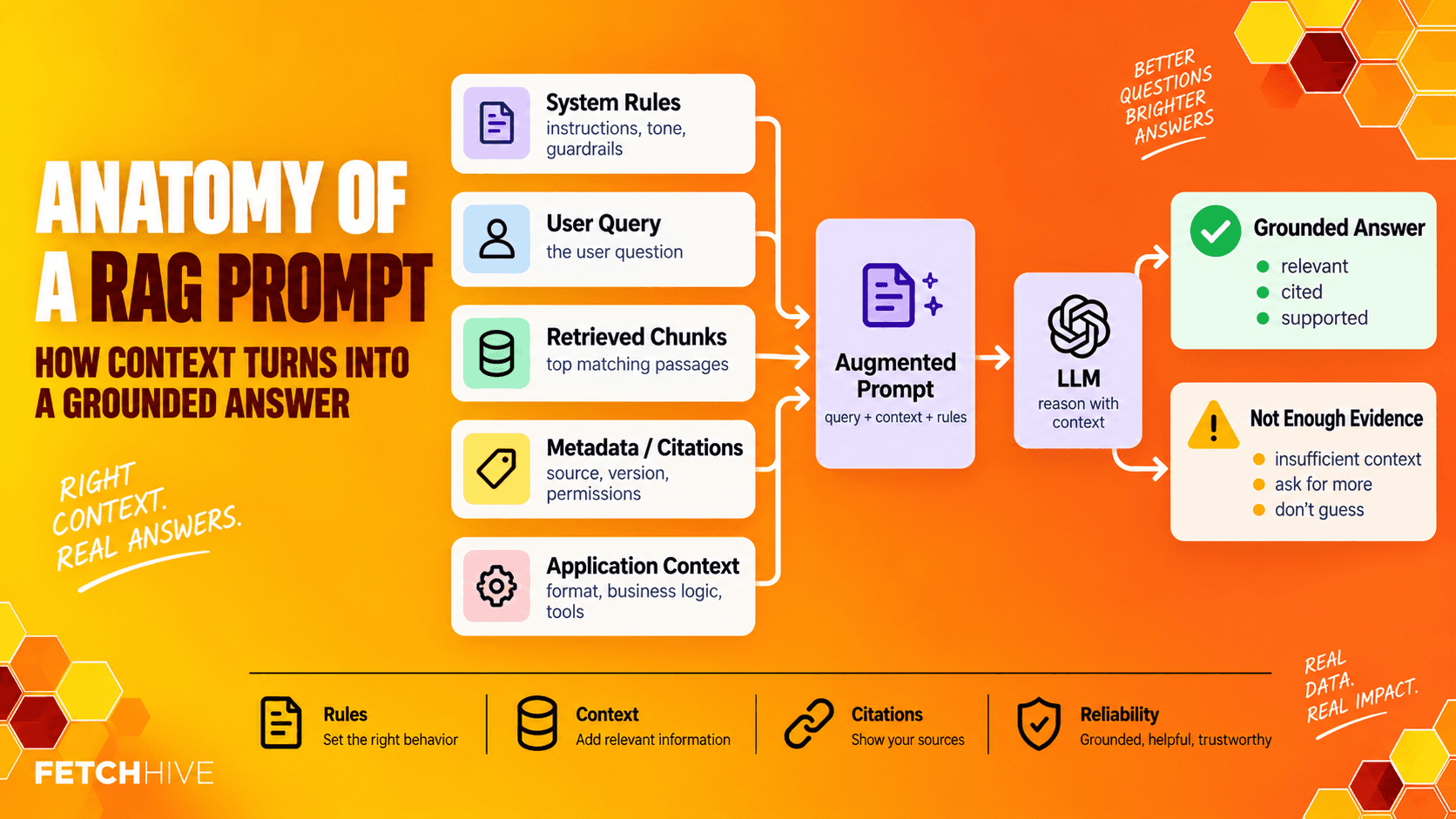
Retrieval is not the final answer. The retrieved data now has to be packaged into a prompt the model can actually use.
Prompt engineering in a RAG pipeline is mostly about grounding and boundaries. The system should tell the model what evidence it may use, what to do when sources disagree, how to cite them, and what to do when there is not enough information.
A useful augmented prompt normally contains:
System instructions and response rules
The original user query
The strongest retrieved documents or chunks
Source metadata and citations
Any relevant application context such as user role, product, account, or workflow state
An explicit instruction to say when the evidence is insufficient
That last bit matters. You want the model to answer questions when it has evidence and admit uncertainty when it does not. ‘I don’t know from the available sources’ is vastly more useful than a beautifully formatted hallucination.
Stage 6: Generate the Answer
Now the large language model finally gets its turn.
The generation process takes the augmented prompt and produces the model’s response. At this point the underlying model should be working from retrieved information rather than improvising from static training data.
The exact generative AI model depends on your constraints. You might care about latency, price, privacy, context window size, structured output, tool use, or whether sensitive data can leave your infrastructure. There is no universal winner.
For a customer support chatbot, you may want a short direct answer with citations to current product docs. For enterprise search, you may want a summary with links to the relevant documents. For an internal analyst, you might want structured output that combines retrieved data with business rules.
Good generation does not mean verbose generation. It means accurate answers and relevant responses that are supported, useful, correctly scoped, and presented in the format the user actually needs. When retrieval is clean, you usually get more accurate answers without simply reaching for a larger model.
RAG vs Fine Tuning: Stop Treating Them Like the Same Thing
RAG and fine tuning solve different problems, and people still mix them up.
Use retrieval augmented generation when the knowledge changes or lives outside the model. Product documentation, prices, internal policies, customer records, research, regulations, and new data are obvious examples.
Fine tuning changes model behaviour. It is more useful when you want a model to follow a specialist format, classify things consistently, adopt a particular style, or improve a narrow repeated task.
You can use both. Plenty of production systems use fine tuning for behaviour and a RAG system for current domain knowledge. The important bit is knowing which problem you are actually trying to solve before you spend a week retraining something that just needed better retrieval.
Evaluate the Pipeline Before Users Do It for You
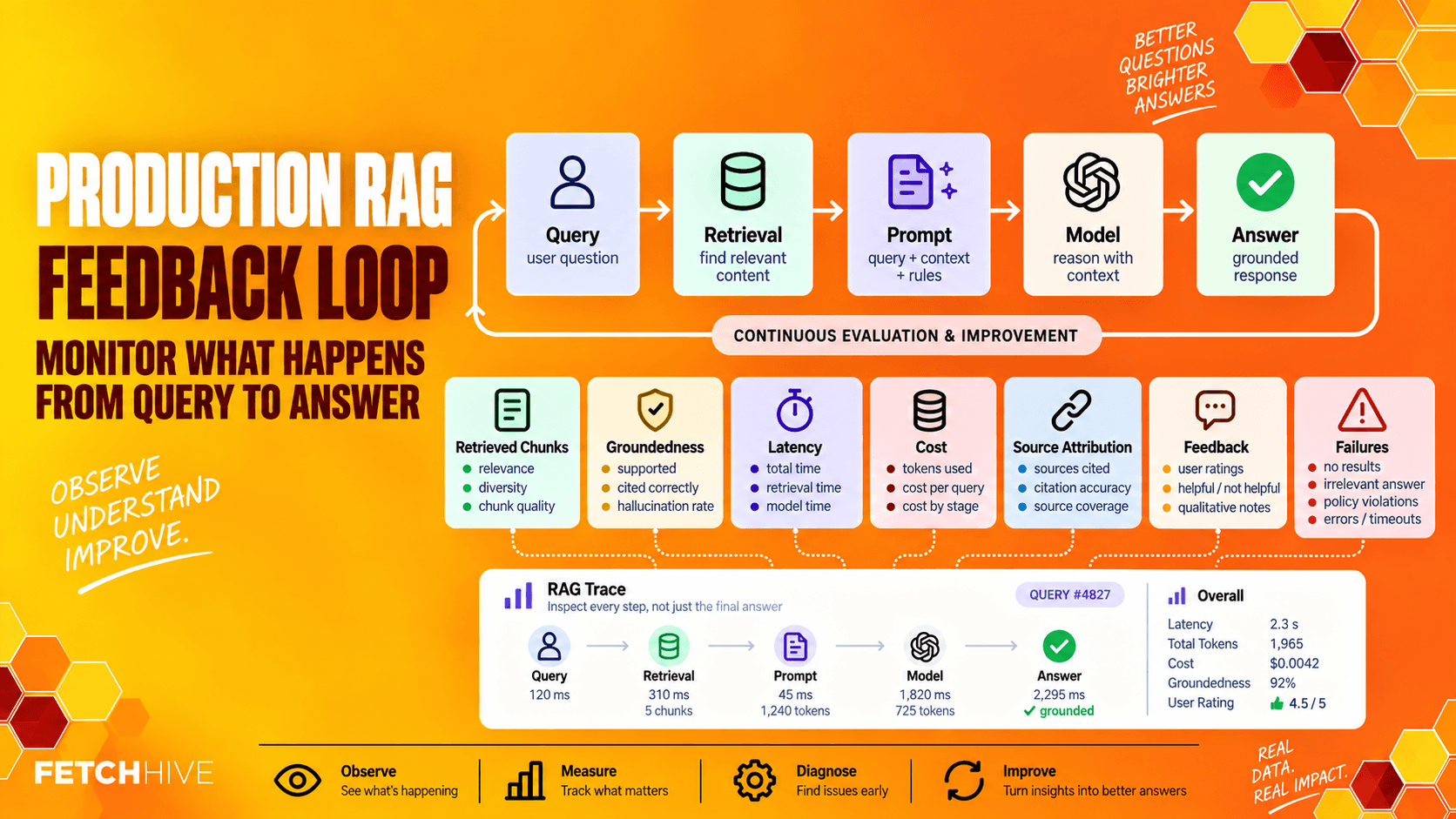
A RAG application that worked on five questions from the engineering team is not production ready. Sorry.
Build a small evaluation set from real user questions and test retrieval separately from generation. Otherwise one good final answer can hide a terrible retrieval process, and one bad answer can make you blame the model when the retriever was the real problem.
For retrieval, measure whether the correct source appeared, where it ranked, whether filters removed anything important, and whether reranking improved the order. For generation, check whether claims are supported by retrieved context, whether citations point to authoritative sources, and whether the system refuses unsupported questions instead of making things up.
After launch, keep watching the same pipeline. Track retrieval quality, response quality, low-confidence searches, latency, cost, user feedback, source freshness, and failures.
This is exactly why I care so much about tracing in Fetch Hive. If a generated response is bad, I want to see the retrieval, prompt, model calls, tool calls, duration, cost, and failures instead of staring at the final answer and guessing.
Common RAG Pipeline Failures
Most production failures are painfully normal engineering problems wearing an AI hat.
Irrelevant retrieval: improve data quality, chunking, filters, query rewriting, hybrid search, or reranking.
Context overflow: reduce top-k, remove weak chunks, summarize where appropriate, and enforce a context budget.
Permission leaks: filter by user, tenant, workspace, or role before private content can reach the model.
Stale answers: version documents, track freshness, delete retired content, and re-index changed data.
Embedding drift: if the embedding model changes, rebuild the stored vectors rather than mixing incompatible spaces.
Conflicting documents: attach dates and authority metadata so newer or more authoritative sources can win.
Slow responses: measure each step instead of calling the entire RAG workflow slow.
Hallucinations: fix retrieval first, then tighten grounding instructions and refusal behaviour.
RAG does not magically make large language models truthful. It gives them better evidence. If that evidence is irrelevant, stale, or contradictory, you have simply built a more sophisticated way to feed the model rubbish.
Architecture Patterns: Monolith, Services, or Managed Components?
There is no single correct RAG architecture. The shape depends on scale, team size, privacy, and how much control you need.
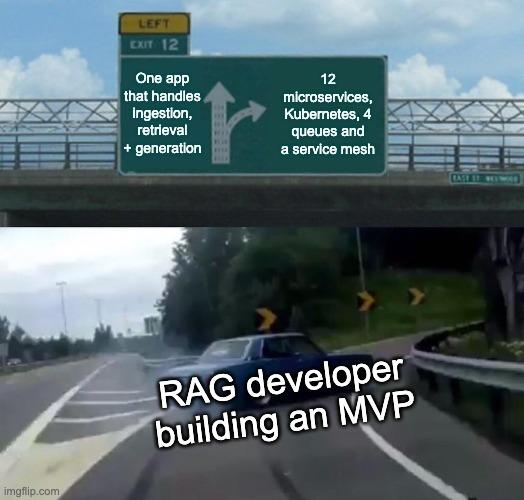
For a prototype, a single LLM application can handle ingestion, embedding, retrieval, and generation. That is completely fine. Do not start with twelve microservices because a diagram on LinkedIn looked impressive.
As the system grows, separating ingestion, indexing, retrieval, and generation can make scaling and failure handling easier. You might run ingestion asynchronously, keep retrieval behind its own service, use hosted vector databases, and call one or more model providers for generation.
Managed services reduce infrastructure work but give you less control. Self-hosted components can help with sensitive data and predictable cost, but now you own the operational burden. Again, no free lunch.
A Practical Build Order
If I were building a new RAG pipeline today, I would do it in this order:
Pick one narrow use case and define the customer questions it must answer.
Collect representative source documents and remove obvious garbage.
Build ingestion with versioning, deletion, metadata, and permissions from day one.
Choose a sensible chunking strategy and one embedding model as a baseline.
Create the vector index and test retrieval before connecting the LLM.
Add hybrid search or reranking only when your evaluation data shows you need it.
Build the generation prompt with citations and a clear not-enough-evidence fallback.
Run the whole pipeline against a repeatable test set.
Pilot with real users and collect feedback.
Trace the production system, then optimize the stage that is actually failing.
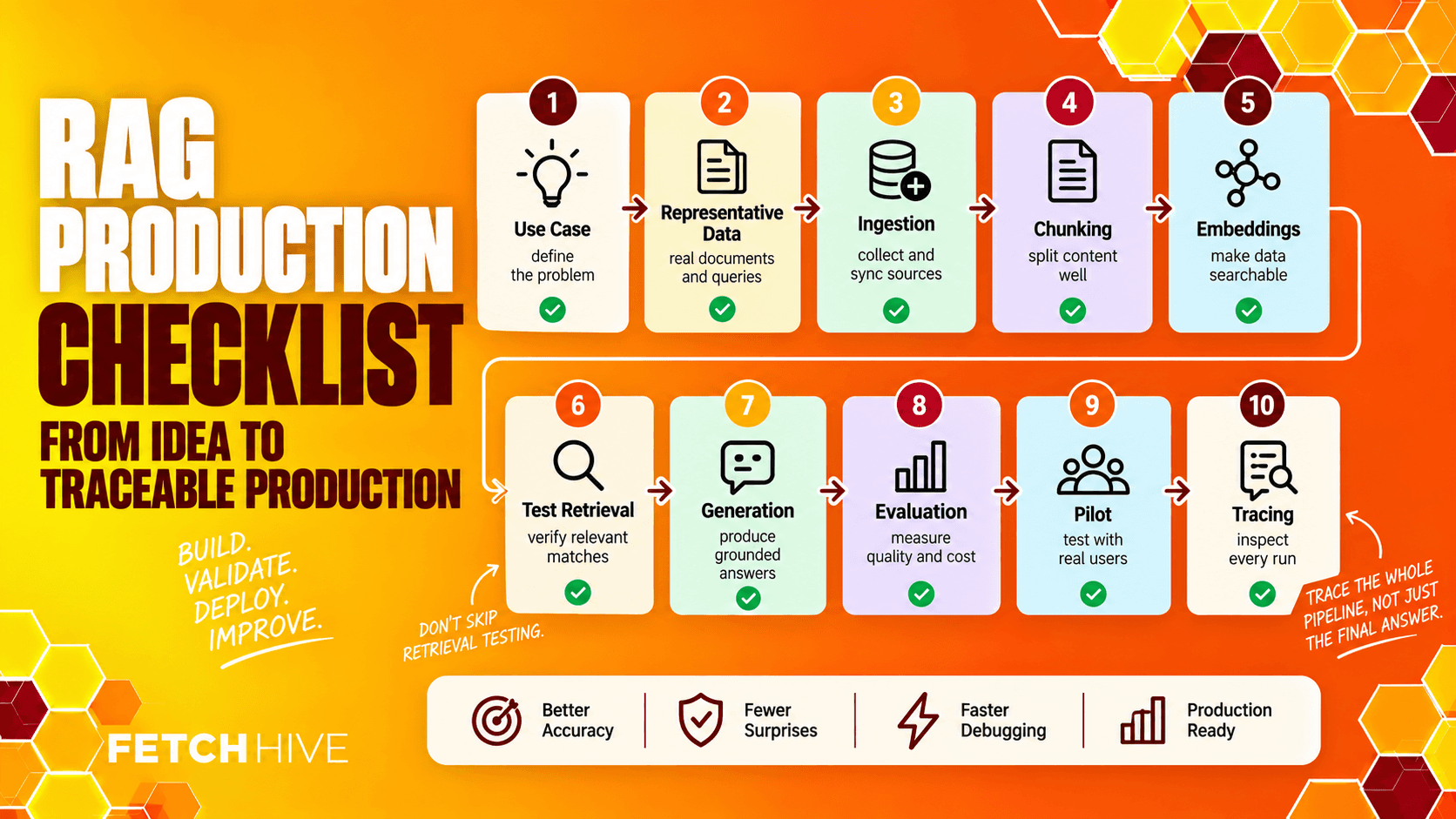
Notice what is not on that list: spend three weeks arguing about which generative AI model is cleverest before you know whether retrieval works.
BUILD YOUR FIRST RAG PIPELINE
Turn this pipeline into a working RAG agent.
Add your documents to Fetch Hive and build a RAG agent around one focused use case. Test it with real questions, then use traces to follow retrieval, model calls, costs and failures.
Where RAG Pipelines Are Going
RAG pipelines are getting more capable, but the core process is not disappearing. We are seeing hybrid systems combine unstructured documents with structured data, databases, tools, live feeds, and external knowledge. Retrieval can also become agentic, where the system decides which source to query, rewrites the search, and runs another retrieval pass when the first one is not enough.
Larger context windows will reduce pressure in some cases, but they do not remove the need for retrieval when the corpus is huge, frequently changing, permissioned, or expensive to shove into every prompt.
The boring parts are becoming more important, not less: source quality, permissions, evaluation, observability, latency, and cost. The more complex the AI systems become, the more you need to know exactly which data went in and why a particular answer came out.
Build the Boring Bits Well
A good RAG pipeline is not ‘vector database + LLM’. It is a chain of decisions about what data enters the system, how it is cleaned, how chunks are created, how embeddings are stored, how retrieval works, how context reaches the model, and how you measure whether the final response is actually any good.
Get those stages right and RAG becomes genuinely useful and starts delivering obvious business value for customer support chatbots, enterprise search, research, internal knowledge tools, technical documentation, and other AI applications that need current accurate responses from real data.
Get them wrong and you will spend your afternoon swapping models while the real problem is a stale PDF from 2023 sitting at rank one.
If you want examples of where this is worth deploying, I have a separate guide to 7 real-world RAG use cases. If your pipeline is already built but the answers are a bit rubbish, start with the RAG performance guide and work backwards from the failure.
And if you want to build, test, deploy, and trace RAG agents and workflows without gluing every part together yourself, that is exactly what Fetch Hive is for.
Share this post


