
The 5 Best Generative AI Text Generators to Improve Your Writing in 2026

By
Tom Dallimore
Published

Two years ago, I opened this article with two reasons I hate writing blog posts:
Writing is a B***
I’m lazy
Unfortunately, both are still true.
The good news is that AI writing tools have become ridiculously better since 2024. The best ones can now research the web, work through huge piles of source material, remember project context, edit entire documents, and reason about what you are actually trying to say instead of just vomiting 2,000 words because you asked for a blog post.
The bad news? Everyone and their mother still has an AI writing tool, and you can still generate absolute garbage in seconds if you use one badly. We have simply made the garbage faster and more confident.
So I have updated the original guide for 2026. A few of the old picks are still here, one has been kicked out, and the way I judge these tools has changed quite a lot.
I’m not looking for a magic ‘write article’ button. I care about whether a tool helps you research properly, control the angle, match a real voice, edit quickly, and produce something a human might willingly read.
Here is what we are covering:
The five AI text generators I would actually shortlist in 2026
The real pros and cons of each one
Who each tool makes sense for
How to stop your writing sounding like generic AI sludge
The workflow I would use to go from research to a publishable article
Ready? Let’s do it.
The Best AI Text Generators in 2026: Quick Comparison
Tool | Best For | Paid Plan | My Take |
ChatGPT | Best all-rounder and editing partner | $20/mo Plus | Best if you want control and are willing to give it proper context. |
Claude | Long-form prose and editing | $20/mo Pro | My pick when I want the cleanest raw prose with less AI fluff. |
Gemini | Research-heavy writing and Google Workspace | $19.99/mo AI Pro | A research monster, especially if your work already lives in Google. |
Surfer | SEO content and optimization | $49/mo billed yearly | Excellent optimization layer. I still would not let it publish unsupervised. |
Writesonic | Agencies and content pipelines | $79/mo Starter | Powerful end-to-end system, but total overkill if you just write a blog now and then. |
The short version: If you are a good writer who wants an AI partner, start with ChatGPT or Claude. If research is the bottleneck, Gemini deserves a serious look. If ranking is the job, add Surfer. If you run a content operation with lots of moving parts, Writesonic starts to make more sense. |
What Is an AI Text Generator in 2026?
An AI text generator is software that uses a large language model to create, rewrite, summarize, or analyze text based on your instructions and the context you give it.
That definition sounds almost embarrassingly basic in 2026 because the better tools do far more than ‘generate text’ now. They can search the web, read PDFs, compare source documents, work inside projects, pull information from connected apps, use tools, and spend more time reasoning through complicated jobs.
For writing, that means AI can now help with pretty much the entire process:
Researching a topic and collecting sources
Finding useful angles and gaps in competitor content
Building an outline and editorial brief
Drafting sections
Rewriting weak paragraphs
Matching a tone of voice from examples
Fact-checking claims and finding citations
Repurposing a long article into emails or social posts
But do not confuse capability with judgment. The model can write the sentence. It cannot magically know which sentence is worth writing unless you give it enough context and direction.
NOTE: Sorry if you already knew what an AI text generator was. Search engines and AI search engines both enjoy clear definitions, so here we are feeding the robots again.

1. ChatGPT - The Best All-Rounder If You Know What You Are Doing
ChatGPT was my number-one pick in the original article, and it stays near the top in 2026 for the same basic reason: control.
OpenAI’s current ChatGPT experience gives paid users access to GPT-5.6 Sol, which OpenAI positions for more involved work like research and writing. ChatGPT also supports file uploads, Deep Research, projects, and broader tool access depending on your plan.
Key Features
Strong drafting, rewriting, summarizing, and editing
Projects and files for keeping source material and instructions together
Web research and Deep Research for source-backed work
Good control over structure, tone, length, and formatting
Excellent general-purpose tool if your writing job includes analysis, research, or data
Pros
Very flexible - it can be your researcher, editor, critic, and writer in the same workflow
Easy to give detailed editorial instructions
Strong at rewriting individual sections without rebuilding the whole article
Useful beyond writing, so the subscription is easy to justify if you use AI for work generally
Can work from your own files instead of relying only on generic model knowledge
Cons
Lazy prompts still create painfully generic copy
It can over-explain or add unnecessary structure unless you tell it not to
Model availability and limits move around as OpenAI changes plans
You still need to fact-check anything important
Pricing: Free tier available. ChatGPT Plus is $20 per month. Official pricing
The biggest mistake people make with ChatGPT is treating it like a vending machine. They type ‘write me a 2,000-word article about AI agents’, press enter, and then act surprised when the result sounds like a LinkedIn post written by an enthusiastic toaster.
ChatGPT gets much better when you treat the writing job as a process instead of one prompt.
For example, I would give it:
Source material: existing articles, research, product docs, interview notes, and anything else the piece should be grounded in.
Audience: who is reading, what they already know, and why they clicked.
Editorial rules: tone, paragraph length, banned phrases, formatting, level of detail, and how opinionated it should be.
A real outline: not just headings, but what each section must actually accomplish.
Section-by-section instructions: what evidence to use, what examples to include, and what not to repeat.
Then I would have it draft one section at a time and edit the output as I go. That sounds slower than a one-click article until you remember that editing 2,000 words of AI sludge is its own form of punishment.
The other thing ChatGPT is genuinely useful for is editing. If a paragraph sounds AI-generated, do not regenerate the whole article. Highlight the problem, explain why it is bad, and ask for three tighter alternatives. Keep the good stuff. Fix the bad stuff. Move on.
Bottom line: ChatGPT is still the best all-round choice if you want maximum control over the final result. It rewards people who already know what good writing looks like and are willing to direct the model properly. |
2. Claude - The Best for Long-Form Prose and Editing
Claude was the other tool I rated highly in 2024, especially for long-form writing. That basic opinion has not really changed.
Anthropic’s current Sonnet 5 model is built for reasoning, tool use, coding, and knowledge work, while Claude itself now includes web search, memory, files, projects, Research, and connectors depending on plan.
For pure prose, Claude is still the tool I would reach for when I want a first draft that needs less wrestling before it sounds readable.
Key Features
Very good long-form drafting and document editing
Projects for organizing chats and source documents
Web search and Research on supported plans
Large context window for working with long source material
Strong ability to follow nuanced stylistic instructions
Pros
Usually produces cleaner, less frantic prose out of the box
Good at preserving context across long documents
Strong editor when you ask it to tighten, simplify, or reorganize writing
Less likely to pad every answer with ten headings and a motivational conclusion
Useful free plan and straightforward Pro pricing
Cons
Its default voice can become a bit too polished and neutral
It can smooth out personality if you ask it to “improve” copy without clear guardrails
Usage limits can matter on large projects
A good raw draft is still not the same thing as a finished article
Pricing: Free tier available. Claude Pro is $20 per month, or $17 per month on the annual plan. Official pricing
The easiest way I can explain the difference between ChatGPT and Claude is this: ChatGPT feels more like a powerful general-purpose workbench. Claude often feels more like an editor who has already read far too many books.
That does not mean Claude always wins. Give it a vague prompt and it can absolutely produce generic AI copy. It is just more likely to give me a calm, readable starting point without stuffing every sentence with ‘crucial’, ‘transformative’, or ‘in today’s rapidly evolving landscape’.
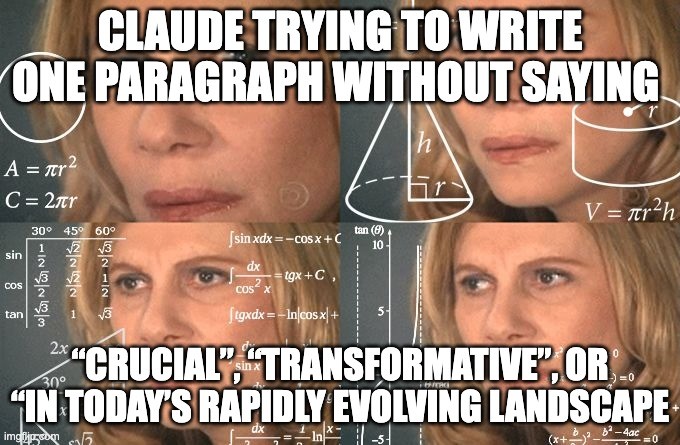
Man, I still hate that stuff.
Claude is especially good when you already have messy material and need to turn it into coherent prose. Give it interview notes, research, rough bullet points, or an ugly first draft and ask it to preserve the actual ideas while fixing the structure. That is a much better use of AI than asking it to invent expertise you never had in the first place.
I also like using Claude as a second-pass editor. Once another model has created a draft, ask Claude to find repetition, vague claims, weak transitions, fake-sounding language, and sections that do not actually answer the reader’s question. You do not have to accept every edit. The point is to get another pair of eyes without booking a meeting with another human.
Bottom line: If your main concern is readable long-form prose, Claude is probably the easiest recommendation on this list. ChatGPT gives me more control as an all-round workbench; Claude often gives me the nicer raw writing. |
3. Gemini - The Best for Research-Heavy Writing
Gemini is the biggest change from my 2024 list. Koala Writer is out, and Google’s Gemini is in.
The reason is simple: the writing bottleneck in 2026 is not always generating words. Half the battle is getting the right information into the model before it starts writing.
Gemini is extremely strong when your article depends on research, source documents, or information already spread across Google Drive, Docs, Gmail, and the web. Google now lets Gemini in Docs draft from connected sources, pull facts and citations into a document, and even reference an existing file to match its writing style, sentence structure, and vocabulary.
That is far more useful to me than another magical ‘AI blog writer’ button.
Key Features
Deep Research for multi-source research jobs
Gemini in Google Docs for drafting and editing in the document itself
Can use Drive, Gmail, Chat, and web sources as context in supported experiences
Can reference an existing document to match writing style and formatting
Large context support on higher plans for big source collections
Pros
Excellent if research quality matters more than raw one-shot prose
Very convenient if your source material already lives in Google Workspace
Can bring sources and citations directly into the writing process
Strong for summarizing and comparing lots of documents before drafting
Google AI Pro bundles Gemini with broader Google services rather than selling you only a chatbot
Cons
The default prose can feel flatter and more corporate than Claude
The best experience depends heavily on whether you already use Google’s ecosystem
Feature availability varies by plan, product, and account
You still need a strong brief if you want a distinctive voice
Pricing: Gemini has a free experience. Google AI Plus is $9.99 per month and Google AI Pro is $19.99 per month in the US pricing currently shown by Google. Official pricing
Where Gemini becomes interesting is at the start of the article, before you should be writing anything at all.
Say you are creating a serious comparison article. You might have five competitor pages, product documentation, customer interviews, an old blog post, a spreadsheet, and a few emails from the sales team. That is exactly the sort of mess where people normally start copying things into random tabs and lose the will to live.
Gemini can help you turn that pile into a research brief: common themes, useful statistics, disagreements between sources, missing evidence, customer language, and questions the article still needs to answer.
Then you write from the brief instead of asking AI to make things up from vibes.
The style-matching features in Docs are also genuinely useful. You can point Gemini at a previous article and have it use that as a reference for tone, sentence structure, and vocabulary. I would still review the result closely because AI is ridiculously capable of turning ‘casual’ into ‘hello fellow humans’, but it is a much better starting point than selecting a dropdown that says Friendly.
Bottom line: Gemini is the best pick here if your writing is research-heavy or your company already lives inside Google Workspace. I would choose Claude for prettier raw prose, but Gemini can make the research and source-gathering stage much easier. |
4. Surfer - The Best AI Writing Tool for SEO
Surfer stays on the list because it solves a different problem from ChatGPT, Claude, and Gemini.
I do not really think of Surfer as the world’s best writer. I think of it as an SEO system with writing built into it. And if ranking content is your job, that distinction matters.
Surfer’s current product combines its Content Editor with AI optimization, Surfy, brand knowledge, competitive context, content scoring, humanizing, and higher-plan features such as automated internal linking and AI visibility tracking.
Key Features
SERP-driven content guidance and optimization
AI writing assistant and humanizer
Brand knowledge and custom instructions
Content scoring and one-click optimization
Internal-linking tools and AI-search visibility features on higher plans
Pros
Excellent at showing you what a page may need to compete in search
Makes briefs and outlines much faster for SEO teams
Useful for updating existing pages rather than constantly generating new ones
Brand context and custom instructions reduce some of the generic output problem
Built for teams that care about repeatable optimization, not only nice prose
Cons
It is expensive compared with a normal AI chat subscription
Optimization can push writers toward samey competitor-shaped content if followed blindly
A high content score does not mean the article is interesting
AI-generated links and facts still need reviewing
Pricing: Discovery starts at $49 per month billed yearly. Standard is $99 per month billed yearly, with higher tiers above that. Official pricing
Surfer is the tool I would use after I know what I want to say, not before.
That is important because SEO tools can accidentally encourage the worst habit in content marketing: looking at ten ranking articles, blending them together, increasing the word count, and creating the eleventh version of the same boring page.
Yes, you should understand the SERP. Yes, you should cover the questions readers clearly care about. No, you do not need to surgically insert every suggested phrase until the article reads like it was written during a hostage negotiation.
Surfer’s 2026 updates are clearly trying to fix some of that by loading brand knowledge, custom voice, templates, competitor data, and other context before the writing starts. That is the right direction. More context normally means less generic output.
Still, I would use Surfer as an optimization layer. Build the article around an actual idea, use research and examples, write something useful, then let Surfer point out the SEO gaps you missed.
And please, for the love of all that is good and decent in the world, EDIT YOUR ARTICLE BEFORE PUBLISHING. A green score is not a personality.

Bottom line: If organic search is a serious acquisition channel for you, Surfer earns its place. Use it to improve coverage, structure, internal linking, and optimization. Do not let an SEO score make every creative decision for you. |
5. Writesonic - The Best for Agencies and Content Pipelines
Writesonic was on the original list as the all-in-one option, and in 2026 it has leaned even harder into that position.
Its current AI Article Writer is not really pretending to be a single prompt anymore. Writesonic describes it as a ten-phase, 100+ step pipeline that handles research, outlines, section-by-section writing, citations, brand voice, expert review, humanizing, internal links, and publishing-related work.
That sounds excessive if you write two articles a month. If you run an agency or a content team shipping at scale, it starts to make a lot more sense.
Key Features
Multi-stage AI article pipeline rather than a single generation step
Research from your own knowledge and the web
Brand and author voice profiles
Citation verification, FAQs, internal linking, and SEO/AI-search optimization
CMS export and broader AI search visibility tooling
Pros
Automates a huge amount of content-production grunt work
Useful for agencies managing many topics, brands, or clients
Better process discipline than a one-shot article generator
Grounding content in first-party material helps reduce generic output
Covers research, production, optimization, and distribution in one system
Cons
Expensive if you only need help writing
There is a lot going on, which means a bigger learning curve
An automated pipeline can still scale bad editorial decisions if your inputs are weak
Overkill for most solo founders and occasional bloggers
Pricing: Starter is currently $79 per month, Basic $199, Growth $399, with Enterprise on custom pricing. Official pricing
The biggest change since 2024 is that Writesonic now looks more like a content operation in software than a collection of little AI writing widgets.
I actually think that is the right direction. The old AI-writing market was full of tools with 85 buttons like ‘YouTube Hook Generator’, ‘Email Subject Generator’, and ‘Magic Blog Intro Writer’. Half of them were the same model wearing a different hat.
A real content team does not have a button problem. It has a process problem: research needs to be gathered, claims need evidence, brand rules need to be followed, drafts need review, pages need internal links, and the final thing has to go somewhere.
Writesonic is trying to automate that chain.
Would I blindly publish whatever comes out the other end because the product says ‘ready to publish’? Absolutely not. I do not blindly publish my own first drafts either, and I am at least legally a human.
But for a high-volume team, getting a structured, source-backed draft with the repetitive work already handled is valuable. Your skilled writer or editor can spend time on the argument, examples, originality, and accuracy rather than manually doing 30 boring setup tasks.
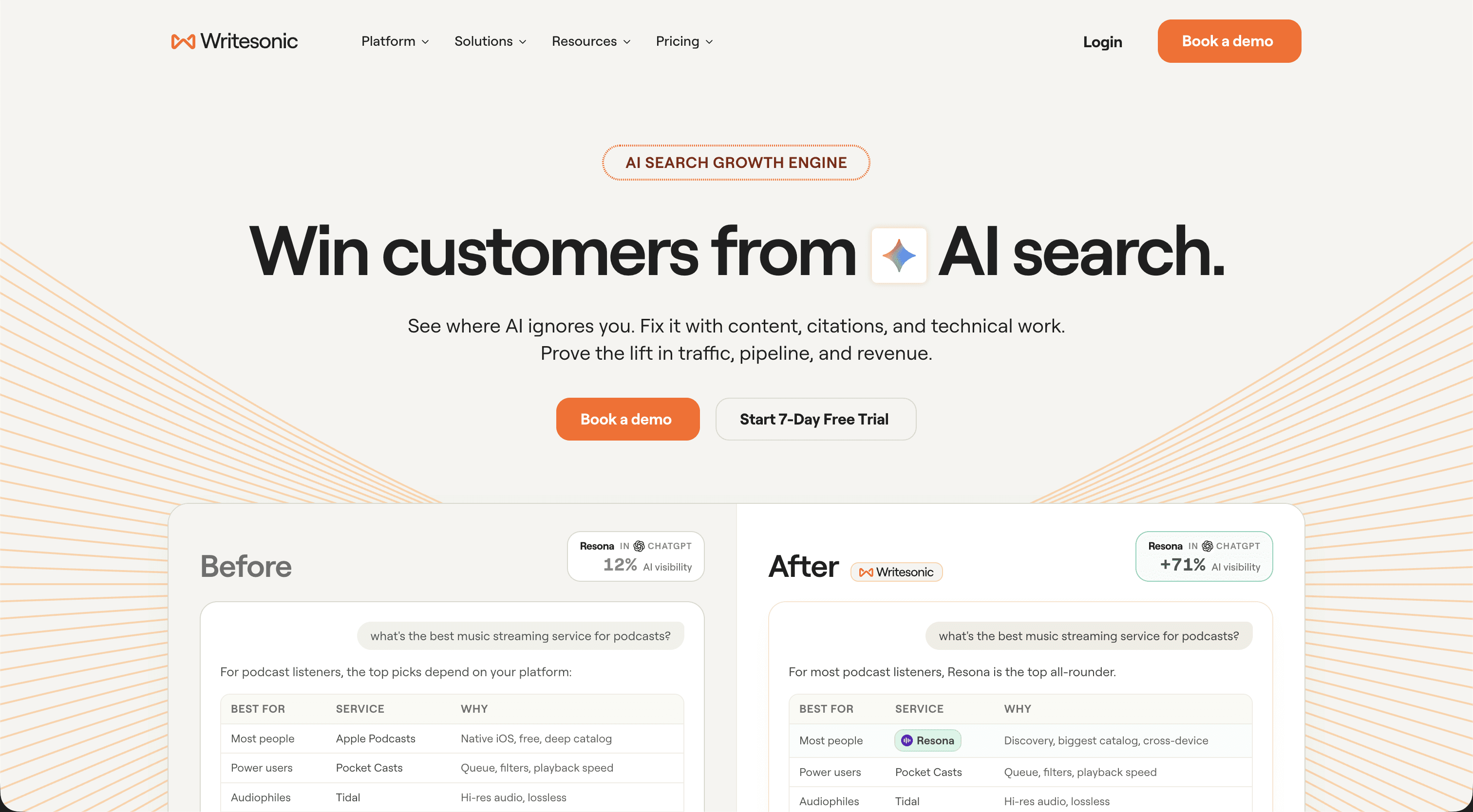
Bottom line: Writesonic makes the most sense when content production itself is an operation you need to scale. Solo writer? Start with ChatGPT or Claude. Agency with ten clients and a publishing calendar that looks like a war map? Now we are talking. |
Which AI Text Generator Should You Choose?
If you only take one thing from this guide, do not choose based on which company has the loudest homepage or the newest model name.
Choose based on the bottleneck in your writing process.
Choose ChatGPT if you want the most flexible all-round writing and editing partner, and you like controlling the process.
Choose Claude if you care most about long-form prose, editing, and getting a cleaner first draft with less fuss.
Choose Gemini if research and source gathering are the painful part, especially if your work is already in Google Workspace.
Choose Surfer if SEO optimization is a core requirement and you need data-driven guidance after the editorial brief is clear.
Choose Writesonic if you run a content operation and want to automate a much larger chunk of the production pipeline.
And yes, using more than one can be better. The best researcher does not have to be the best writer. The best writer does not have to be the best SEO optimizer. That idea becomes important in a minute.
How I’d Actually Use AI to Write a Blog Post in 2026
The biggest improvement you can make is to stop asking one model to do the entire job in one message.
Here is the simple workflow I would use instead:
Research first. Collect first-party sources, useful web research, competitor coverage, customer language, and the facts the article actually needs.
Build a proper brief. Define the audience, search intent, angle, key questions, evidence, examples, and the job of each section.
Give the model your voice. Use real examples of your writing plus clear rules. Do not rely on a tone dropdown that says Casual.
Draft section by section. Small chunks are easier to direct, review, and correct than a 3,000-word hallucination delivered in one majestic slab.
Fact-check claims. Open the sources. Check dates, numbers, product features, quotes, and anything that would make you look stupid if it were wrong.
Do a human edit. Remove repetition, AI-isms, fake enthusiasm, empty transitions, and any paragraph that technically says words but communicates nothing.
Run the SEO pass last. Make sure the page covers the query and is structurally competitive without letting optimization flatten the personality out of it.
That process is not as sexy as clicking Generate Article. It also produces much better work.
My rule: AI should reduce the boring parts of writing without removing the thinking. The moment you outsource the thinking as well, your article starts sounding exactly like everyone else’s. |
5 Quick Ways to Make AI Writing Sound More Human
1. Give it examples, not adjectives. A real article in your voice is worth far more than saying “make it witty, warm, authoritative, conversational, but professional”.
2. Ban your AI-isms. Create a short list of phrases you hate. Mine would happily include things like “delve”, “game-changer”, “in today’s fast-paced world”, and any sentence that begins by declaring something “crucial” for no reason.
3. Use specific examples. Generic writing comes from generic inputs. Give the model customer stories, numbers, product details, mistakes, opinions, and real situations.
4. Vary the rhythm. Humans do not write every paragraph at the same length with a neat summary sentence at the end. Break the pattern.
5. Let yourself have an opinion. The internet already has enough neutral summaries. If you have actual experience or a useful point of view, put it in the article.
The Bigger Shift in 2026: Stop Picking One AI Tool for Everything
In 2024, this article was mostly about picking the best AI writer.
In 2026, I think the more useful question is: what writing workflow do you want?
Your research step might work best with Gemini or a dedicated search tool. Your first draft might be Claude. A structured rewrite might go through GPT. SEO might go through Surfer. Then a human reviews the output before anything gets published.
That is a much better system than forcing one model to be world-class at every step.
The stupid part is doing all of that manually: copying research between tabs, losing prompts, forgetting which model produced which version, pasting brand rules over and over, and having absolutely no idea what the entire process cost after a month.
WARNING: Shameless self-promotion incoming. I built Fetch Hive because I got sick of that exact mess. |
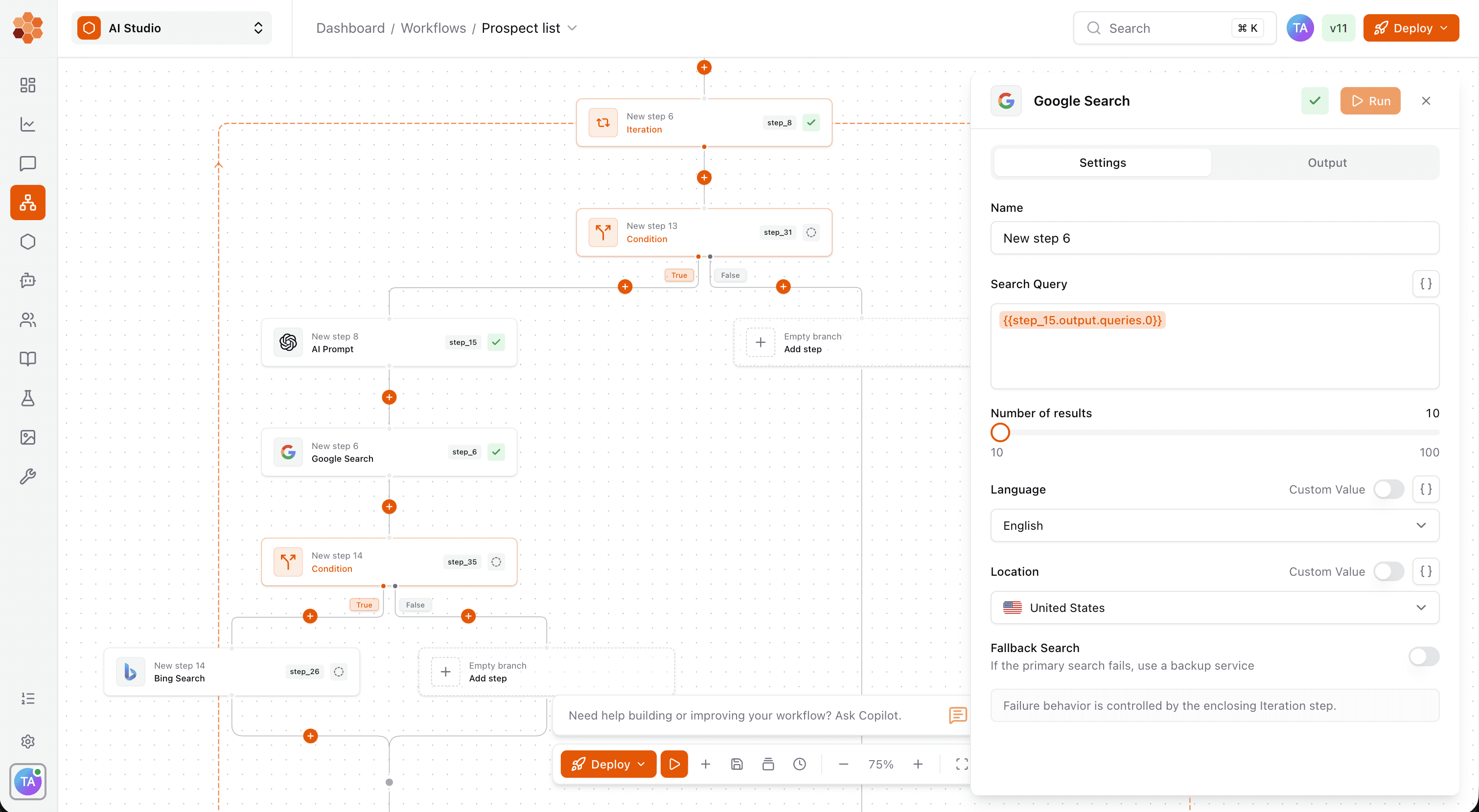
Fetch Hive lets you build prompts, multi-step workflows, and AI agents in one place, then connect them to models, tools, and your own knowledge. You can test the process, trace what happened on every run, inspect tool calls and costs, and deploy the workflow once it is reliable.
So instead of having one giant prompt that says ‘write me a blog post’, you can build something repeatable:
Research the topic and collect sources
Generate an editorial brief
Draft the article with the model you prefer
Run a fact-check and citation pass
Rewrite weak sections against your tone-of-voice rules
Send the draft to a human for approval
Publish or hand the finished output to the next system
And because the steps are separate, you can use different models where they are strongest instead of marrying one AI provider and hoping for the best.
That is where AI writing gets genuinely useful for teams. You are no longer generating random chunks of copy. You are building a process you can inspect, improve, and run again.
MAKE YOUR WRITING PROCESS REPEATABLE
Build your writing workflow. Stop juggling tabs.
Connect research, briefing, drafting and editing in a Fetch Hive workflow. Use your own knowledge and preferred models, inspect each run and its cost, and keep human review before publishing.
Final Verdict: The Best AI Text Generator in 2026
If you want one answer, ChatGPT is still my best all-round recommendation. It is flexible, powerful, easy to direct, and useful for far more than writing.
If I cared mainly about long-form prose, I would look hard at Claude. If I had a research-heavy workflow living in Google, Gemini would be difficult to ignore. Surfer remains excellent when SEO is the job, and Writesonic makes the most sense when you are scaling a real content operation.
But the important change since the 2024 version of this article is that the model is no longer the whole story.
The workflow matters more.
Give AI good sources, a real brief, clear constraints, examples of your voice, and a human who is willing to call BS when the output is bad. Do that and these tools can save you a ridiculous amount of time without filling your website with robotic nonsense.
Do none of that, hit Generate, and publish whatever comes back?
Well… if that’s amazing writing, then I’m bloody Spider-Man.
Share this post


