How to Build a RAG Chatbot That Uses Your Own Data

By
Tom Dallimore
Published

A practical guide to retrieval, chat history, vector search, evaluation and production.
A RAG chatbot demo is ridiculously easy to make look clever. Drop a couple of PDF files into a vector store, ask it a question you already know it can answer, and congratulations: you have a demo.
Then real users turn up.
They ask vague follow-ups. They use the wrong product name. They want an answer from a policy that changed last week. They ask something that is not in the documents at all. Suddenly the impressive chatbot starts confidently inventing things.
That is the actual problem retrieval augmented generation (RAG) is trying to solve: not simply connecting a model to documents, but consistently getting the right relevant information into the model at the exact moment it needs it.
In this guide, I will walk through how a RAG chatbot works, how to build one using your own data, and the bits that normally cause trouble once you move beyond the happy-path demo.
What Is a RAG Chatbot?
A RAG chatbot is an AI assistant that retrieves relevant documents or data before it generates a response. Instead of expecting a large language model to magically know your internal policies, support history or product documentation, the system looks that information up first.
At a high level, the retrieval augmented generation RAG pattern is simple:
A user asks a question.
The system searches your data for relevant context.
The best evidence is added to the prompt.
The model produces a final answer based on that evidence.
That sounds almost too simple, and conceptually it is. The hard part is everything hiding inside "searches your data".
A normal chatbot primarily relies on the model's pre-trained knowledge plus whatever you put into the current prompt. A RAG chatbot can reach into internal documents, databases, APIs, product manuals and other source documents at query time. If the source changes, you update the data rather than retraining the model.
That makes RAG useful when you need accurate answers from information that is private, changing, too large to squeeze into every prompt, or simply newer than the model's training data.
Classic keyword search also solves a different job. Search returns documents for the user to inspect. A RAG chatbot retrieves the documents, extracts the relevant information and turns it into a direct answer. It can answer questions against material the base model never saw during training. That difference matters when somebody wants "What is our refund window for enterprise customers?" rather than ten blue links and a scavenger hunt.
If you want the broader foundation first, our guide to RAG explained covers the underlying idea and common use cases in more detail.
How a RAG Chatbot Works in Practice

When a user question reaches a RAG chatbot, there are really two systems working together: information retrieval and generation.
The following diagram shows the basic flow, but the runtime process looks like this.
1. Turn your own data into something searchable
You start with files and systems the business already uses: PDF files, Markdown docs, help-center articles, database rows, tickets, wiki pages or API responses.
The ingestion process cleans that data, split documents into text chunks, and runs each chunk through an embedding model. The embedding model converts text into numerical vectors that capture semantic meaning.
Those vectors are stored in a vector DB or another vector store alongside useful metadata such as document title, source, permissions, date and section heading.
This is the offline side of the system. You do it before the user asks anything.
2. Convert the user question into a search
At runtime, the user input becomes an input query. The system can first rewrite it using chat history if necessary, then the same embedding model turns the question into a question vector.
The retrieval system performs vector search or another search type against the indexed content. With similarity search, it looks for chunks whose meaning is closest to the query rather than only matching exact words.
A production system may combine semantic retrieval with keyword search, metadata filters or SQL. The point is not to worship vectors. The point is to retrieve the right evidence.
3. Build the prompt from retrieved context
The retriever object returns the most relevant chunks. Those retrieved documents are then assembled into a prompt alongside the user question, system instructions and any conversation context the model actually needs.
This is the augmentation part of RAG.
The model is no longer answering from memory alone. It receives contextual information from your systems and can produce an answer based on that retrieved context. The chatbot responds from evidence rather than hoping its generative AI model happens to remember the right fact.
4. Generate the answer and show the evidence
Finally, the model generates the response. A good implementation asks it to stay grounded in the retrieved context, cite the source documents where possible, and explicitly say when there is not enough information.
That last part matters. A chatbot that says "I don't know" when retrieval fails is considerably more useful than one that manufactures false information with perfect grammar.
For a deeper look at ingestion, retrieval, augmentation and generation as a complete system, see our RAG pipeline guide.
The Core Building Blocks of a RAG Chatbot

Most RAG systems use the same handful of components. Frameworks change. Model names change. The basic jobs do not.
Data sources. This is the actual knowledge the chatbot is allowed to use: internal documents, PDF files, database records, knowledge-base articles, support tickets, APIs and sometimes web content. Do not treat this layer as an afterthought. If your data is duplicated, stale or badly permissioned, RAG technology will retrieve bad information very efficiently.
Embedding model. The embedding model converts text into vectors for similarity search. It is one of the most important choices in retrieval because it directly affects which chunks look relevant to a user's query. Different models behave differently across code, legal text, support content and multiple languages. Test embedding models against real queries from your own users rather than picking one because a benchmark chart looked impressive.
We go deeper into this in RAG embeddings explained.
Vector store. The vector store holds the embedded chunks and lets the system retrieve similar content quickly. Depending on the application, that might be Postgres with pgvector, Qdrant, Weaviate, Pinecone, Chroma or another vector database. For small projects, the simplest option is usually the best one. You do not need a distributed vector database because you indexed two employee handbooks.
Our vector databases for RAG guide covers what actually matters when you choose one.
Retriever. The retriever decides what comes back from search. It can use vector search, keyword search, hybrid retrieval, metadata filtering or a mixture of approaches. This is where many RAG applications quietly succeed or fail. The model cannot answer user questions from evidence it never received.
Language model. The model takes the prompt plus relevant context and generates the final answer. Under the hood, it is still a machine learning model with its own fixed parameters; RAG simply changes the evidence available at query time. You can use cloud APIs or local LLMs depending on privacy, performance, cost and deployment requirements. A cloud model usually means an API key, network calls and per-request cost. Local LLMs let you run locally and keep more of the stack under your control, but you also own the hardware and operational trade off.
Orchestration and application logic. Something still needs to load the conversation, run retrieval, assemble the prompt, call the model, handle errors, store chat history and return a relevant response. You can use LangChain, LlamaIndex or another framework, but you can also build the whole thing in a normal Python file. Frameworks can get you a demo in just a few clicks. They do not remove the need to understand what your system is doing.
Designing the Data Pipeline: PDFs to Searchable Context
The quality of a RAG chatbot is heavily constrained by the quality of its data pipeline.
You can have a brilliant model and a beautiful chat UI, but if the retrieval layer is searching junk, the answer will still be junk. Lovely.
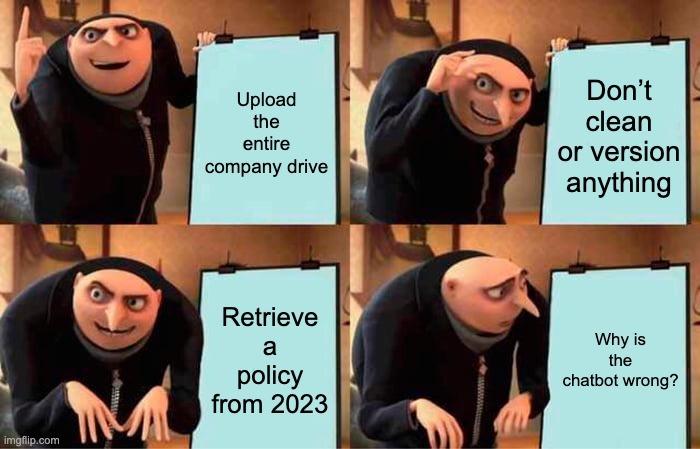
Load the data you actually trust. Start small. Pick a set of source documents where you know what good answers should look like. A handful of clean documents is more useful for early testing than dumping an entire company drive into the index and hoping for the best. Load the files, extract the text and preserve the metadata you will need later: source, title, version, customer, permissions, product, date and section.
Split documents deliberately. You then split documents into text chunks. Chunking is not busywork; it changes what the retriever can find. Chunks that are too small may lose the surrounding meaning. Chunks that are enormous can contain one useful sentence buried inside a pile of irrelevant content. Start with sensible defaults, then test against your actual query set. Structure matters too. If a heading says "Enterprise Refund Policy" and the next paragraph contains the answer, keep them together.
Embed and store the chunks. Run the text chunks through your chosen embedding model and write the results into the vector store. Store the original text and metadata with each vector so the application can reconstruct useful context and show citations later.
Keep the index fresh. RAG is valuable precisely because you can update knowledge without training a new model. That advantage disappears if your index quietly becomes six months out of date. Re-index changed files, remove deleted documents and version content where older policies must not be returned. If a new document replaces an old one, make that relationship explicit rather than expecting similarity search to understand company policy history.
For the wider production architecture around ingestion and indexing, the RAG architecture guide is the useful next read.
Handling User Queries, Search and Chat History
Single-turn RAG is easy. Conversations are where things get more interesting.
A user asks:
What is the refund window for enterprise plans?
Retrieval works nicely.
Then they ask:
What about annual contracts?
That second query is useless on its own. The system needs chat history to understand what "what about" refers to.
A common pattern is to use the recent conversation to rewrite the follow-up into a standalone user question before retrieval. The rewritten query might become:
What is the refund window for annual enterprise contracts?
Now information retrieval has something concrete to search for.
The runtime flow normally becomes:
Read the user input and relevant chat history.
Rewrite the query if it depends on previous turns.
Convert the query into a question vector.
Run vector search, keyword search or hybrid retrieval.
Apply filters and relevance thresholds.
Return the best relevant chunks.
Build the prompt from those chunks and conversation context.
Generate the final answer.
Save the new turn back into chat history.
Do not blindly send the entire conversation into every retrieval request. Long chat history adds noise and cost. Keep the context that helps disambiguate the user's intent and discard what does not.

Cloud APIs vs Local LLMs
People sometimes turn this into an ideological debate. It is mostly an engineering trade off.
Cloud models are easy to start with. Add an API key, make the request, and you have access to strong models without running inference infrastructure yourself.
The obvious downsides are cost, network latency, vendor dependency and sending some data outside your environment depending on how the service is configured.
Local LLMs give you more control. You can run locally with tools such as Ollama or llama.cpp, keep sensitive data inside your own infrastructure and operate without an external model API.
But "local" does not mean "free" or "easy". You still pay for compute, memory, deployment, monitoring and the time spent keeping it alive.
For many teams, the sensible architecture is mixed: use a hosted model where quality matters, a smaller or local model for cheaper supporting tasks, and keep retrieval infrastructure independent so you can swap models later.
The same applies to embeddings. If your users operate in multiple languages, test a multilingual embedding model. If you change the embedding model later, expect to rebuild the vectors because the old and new vector spaces are not interchangeable.

Step-by-Step: Build a Simple RAG Chatbot With Your Own Data
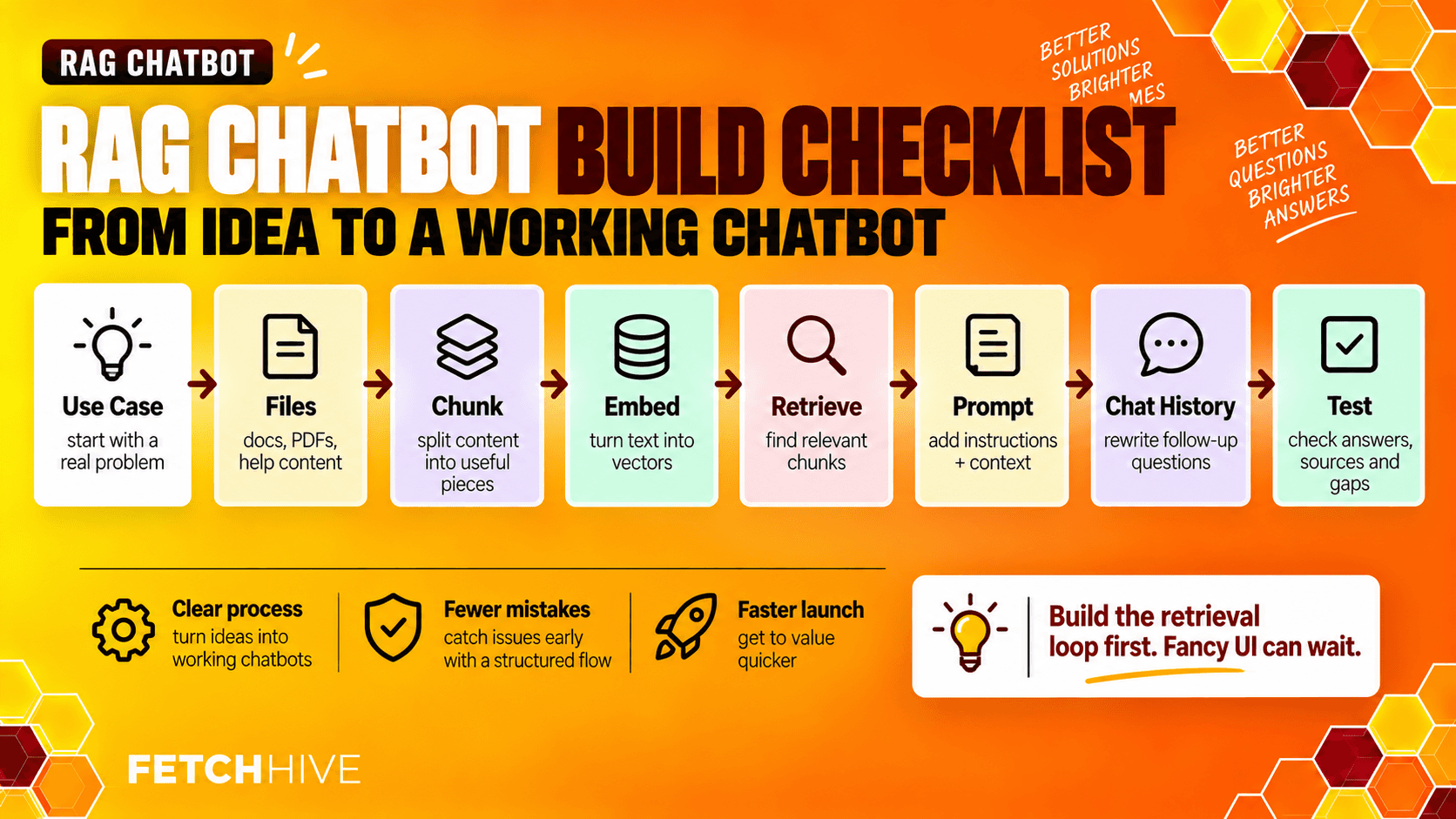
You do not need to build the final architecture on day one. In fact, please don't.
The goal of the first version is to prove that retrieval works on a real problem.
1. Pick one narrow use case. Choose something where the expected answer exists in a known set of documents. Internal policy Q&A, product documentation or a support knowledge base are good starting points.
2. Create the project. Set up Python, install your model client, embedding library and vector database driver, and keep configuration such as the API key in environment variables rather than hard-coding it into the app. If you want a quick UI, import streamlit and build a tiny chat interface. The UI is not the interesting part yet.
3. Load a small set of files. Start with maybe five to twenty representative documents. PDF files are fine, as are Markdown, HTML and database exports. Write a loader that extracts the content into a consistent document structure.
4. Split and embed. Split the documents into useful text chunks. Generate vectors with the embedding model and store the text, vectors and metadata in your vector DB.
5. Build the retriever object. Create a retriever object that accepts a query and returns the best candidate chunks. Start with one search type, then add hybrid or metadata filtering only when your test queries show you need it.
6. Build the prompt. Combine system instructions, user question and retrieved context. Tell the model to answer based on the supplied evidence and to refuse to invent an answer when the evidence is missing. Ask it to return source names or citations if your application needs traceability.
7. Add chat history. Store previous messages and use them to rewrite ambiguous follow-ups into standalone retrieval queries. Do not simply dump every previous message into the search request.
8. Test with questions you did not design the demo around. This is the bit people skip. Create a test set with obvious questions, vague questions, queries using synonyms, questions whose answer appears across several documents and questions that deliberately have no answer. Then inspect what the chatbot retrieved, not just what it said. This is less glamorous than pretending the whole problem is data science magic, but it is considerably more useful. That is the difference between implementing RAG and evaluating whether your RAG chatbot works.
Improving Answer Quality Without Blaming the Model for Everything
When a RAG chatbot gives a bad answer, there is a temptation to immediately swap the model.
Sometimes the model is the problem. Quite often, it never had the right evidence in the first place.
Before touching the model, inspect the retrieved documents and ask:
Did search retrieve the correct source?
Were the relevant chunks ranked near the top?
Was the document current?
Did metadata filters exclude something important?
Did the query rewrite preserve the user's intent?
Did too much irrelevant context bury the useful evidence?
Then improve the retrieval layer systematically.
Tune chunk size and overlap. Test several chunk sizes and overlaps against a repeatable query set. Do not pick a number from a blog post and declare the problem solved.
Compare embedding models. Different domains produce different retrieval behavior. Benchmark more than one embedding model using your actual questions and expected source documents.
Add hybrid search when exact terms matter. Vector retrieval is excellent for semantic meaning. It is less magical for product codes, error IDs, legal clause numbers and exact names. Keyword retrieval or hybrid search often fixes those cases immediately.
Re-rank when top-k retrieval is noisy. A reranker can take a broader candidate set and rescore it for the user's specific question. That can improve precision without changing your initial search layer.
Set relevance thresholds. If nothing is relevant enough, return nothing. Passing five bad chunks to the model because "top five" was configured is how confident nonsense gets manufactured.
Evaluate retrieval and generation separately. You ultimately care about accurate answers, but evaluate retrieval separately from generation. Otherwise you cannot tell which part failed.
Our guide to improving RAG performance goes much deeper into chunking, retrieval, reranking, evaluation and production debugging.

Security, Freshness and Production Operations
Building a RAG chatbot is one thing. Letting employees or customers depend on it is another.
Permissions have to survive retrieval. If a user cannot open a document normally, the chatbot should not be able to retrieve it on their behalf. Carry access-control metadata into the index and apply it before context reaches the model. This is particularly important when one vector store contains content from multiple teams, customers or permission groups.
Freshness needs an actual process. Schedule updates, respond to document changes and remove stale content. A RAG chatbot cannot provide current answers if the underlying index is not current.
Trace what happened. For every run, you should be able to see the query, any rewrite, retrieved chunks, scores, prompt, model call, final answer, latency and cost. This is the part I care about in Fetch Hive as well: when an answer is bad, I want to inspect the exact retrieval and model path rather than stare at the final response and guess.
Measure the things users experience. Track retrieval quality, response latency, no-answer rates, citations, user feedback and cost. If a system is technically impressive but users constantly rephrase questions because it cannot find the right document, the system is not performing well.

A Practical Production Checklist
Before putting the chatbot in front of a large audience, I would want to be able to answer yes to most of these:
Can we explain which data sources the chatbot is allowed to retrieve from?
Are permissions applied before context reaches the model?
Do we know how and when source documents are refreshed?
Can we inspect the chunks returned for any user query?
Do we have a test set with expected relevant documents and answers?
Does the chatbot say it does not know when the evidence is missing?
Can we trace latency and cost across retrieval and generation?
Have we tested questions from real users rather than only our own examples?
Can we change the model without rebuilding the entire application?
Can we change retrieval logic without rewriting the chat interface?
If not, that is fine. It tells you what to build next.

Start Small, Then Make It Boringly Reliable
The first RAG chatbot does not need an agent swarm, five retrieval systems and an architecture diagram that looks like an airport map.
Start with a narrow problem, a trustworthy set of documents and a simple retrieval path. Test real queries. Look at what was retrieved. Fix the obvious failures. Then add complexity when the data gives you a reason.
The useful mental model is simple: the model can only reason over the context you give it. If retrieval finds the right evidence, the job becomes much easier. If retrieval finds the wrong evidence, a larger model mostly gives you a more articulate wrong answer.
Build the retrieval layer you can inspect, measure and improve. The chatbot part is almost the easy bit.
Share this post