
Multimodal RAG: Retrieving from PDFs, Images, Tables and More

By
Tom Dallimore
Published

A lot of enterprise RAG demos quietly assume that all useful knowledge arrives as beautifully formatted text.
Real data is not that polite.
The answer you need might be in paragraph four of a PDF, inside a table on page 38, hidden in a chart legend, visible in a screenshot, or spoken three minutes into a support call. A traditional text-only retrieval system can do a great job on the paragraph and completely miss everything else.
That is the problem multimodal RAG is trying to solve.
Multimodal retrieval augmented generation extends retrieval beyond text so AI systems can search, combine and reason over multimodal data such as PDFs, images, tables, audio, video and structured data. The basic idea is still RAG: retrieve relevant information first, then generate an answer from that evidence. The difference is that the evidence can now live across different modalities instead of one pile of text chunks.
And, like normal RAG, the difficult part is not getting a demo to work. It is making retrieval reliable when the documents are messy, the chart disagrees with the paragraph beside it, a table has merged cells and somebody uploads a screenshot from a five-year-old manual.
What Is Multimodal RAG?
Multimodal RAG is a retrieval augmented generation approach that lets a system retrieve and use more than plain text. Multimodal RAG extends the normal retrieval loop by incorporating multiple modalities rather than forcing every source into one representation.
Traditional RAG systems normally take a text query, run semantic search or vector search over text documents, return the most relevant chunks and give that retrieved context to a language model. That works well until the important evidence is not actually represented in the text index.
A multimodal RAG system keeps the same retrieve-then-generate pattern, but extends it across multiple data sources and data types. Depending on the application, that can include:
Text: manuals, policies, wikis, contracts and support tickets.
Images: screenshots, diagrams, photographs, scans and charts.
Tables: PDF tables, spreadsheets, CSV exports and other tabular data.
Audio: support calls, meetings and recorded notes.
Video: training material, demonstrations and screen recordings.
Structured data: SQL records, metrics, logs and application data.
The useful part is not simply that the model can “see an image.” Multimodal retrieval means the retrieval system can find evidence across those formats. A text query can retrieve images. An image message can retrieve text. A question about a figure can return the figure, its caption and the paragraph explaining it.
That is a much more realistic reflection of how company knowledge actually exists.
If you want the broader mechanics first, our guide to RAG architecture explains the standard ingestion, retrieval and generation layers that multimodal systems build on top of.
Why Text-Only RAG Falls Short
Imagine asking an engineering assistant:
“What changed in the failure rate between 2022 and 2024?”
The PDF contains a short written explanation, a table with the exact values and a chart showing the trend.
A text-only pipeline might extract the prose and completely flatten or ignore the other two. It can then produce a perfectly fluent answer based on incomplete evidence. Lovely.
Multimodal RAG systems try to retrieve the actual evidence instead: the relevant text, the table cells and the chart. That gives the model a better chance of producing accurate answers and gives the user something concrete to verify.
This matters in plenty of less dramatic situations too. A support engineer may have a screenshot of an error but no idea what the error is called. A finance team may need a number buried inside a table. A field engineer may take a photo of a component and want the matching section from a manual. A customer may upload an image rather than type a detailed description.
In all of those cases, forcing everything through text first creates information loss.
Longer context window sizes do not make this problem disappear either. Throwing an entire 180-page PDF into a model is not the same thing as retrieving the right page, figure and table. Bigger context is useful. Precise retrieval is still useful.
From Traditional RAG to Multimodal Retrieval
The jump from traditional RAG to multimodal RAG is easier to understand if you separate storage, retrieval and generation.
A normal text pipeline might look like:
Text -> chunks -> embeddings -> vector database -> similarity search -> relevant chunks -> LLM -> answer
A multimodal RAG pipeline adds modality-aware processing:
PDFs / images / tables / audio / video -> modality-specific processing -> multimodal embeddings -> vector store or indexes -> multimodal retrieval -> fusion -> multimodal model -> response generation
The principle has not changed. You are still trying to place the best evidence in front of the model.
The complexity comes from the fact that different modalities need different treatment. A paragraph can be split by headings. A chart needs its axes and legend. A table needs row and column relationships. An audio clip needs timestamps. A screenshot may need OCR plus visual understanding.
Treating all of that as generic text is where systems start quietly throwing useful information away.
The Core Architecture of a Multimodal RAG System
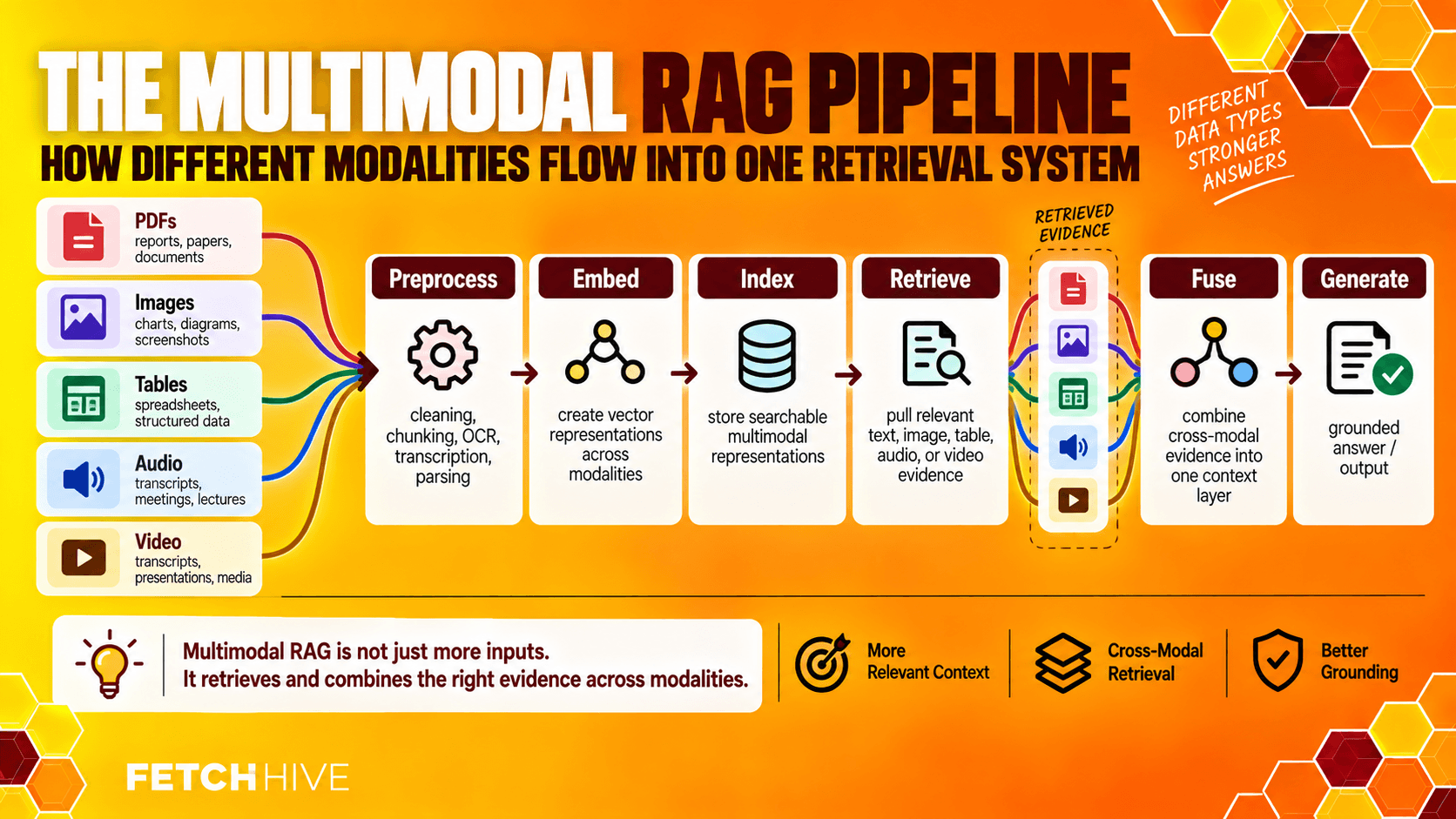
A production multimodal RAG architecture normally has seven moving parts.
Ingestion. Accept PDFs, text documents, images audio and video, spreadsheets, database records and other inputs.
Modality-aware preprocessing. Use layout parsing and OCR for PDFs, image captioning where useful, speech-to-text for audio, key-frame extraction for video and structure-aware parsing for tables.
Embedding. Convert content into vector representations using encoders suited to each modality.
Indexing. Store the multimodal embeddings in a vector database, a group of per-modality indexes, or both.
Retrieval. Convert the user’s query into the appropriate representation and retrieve text, retrieve images, tables or other evidence.
Fusion. Combine retrieved data into a coherent context without destroying the structure that made it useful.
Generation. Send that evidence through a prompt template to a multimodal model or large language models capable of using the supplied modalities, then generate responses grounded in the sources.
That sounds neat on a diagram. Production data will immediately make it less neat.
A single PDF can contain ordinary paragraphs, two-column layouts, embedded screenshots, a table that spans three pages and a chart whose caption appears on the next page. The ingestion layer needs to preserve enough relationships that retrieval later understands those objects belong together.
That is why multimodal capabilities are as much a data-engineering problem as a model problem.
For the standard pipeline underneath this, see how to build a RAG pipeline.
PDFs Are Usually Where the Pain Starts
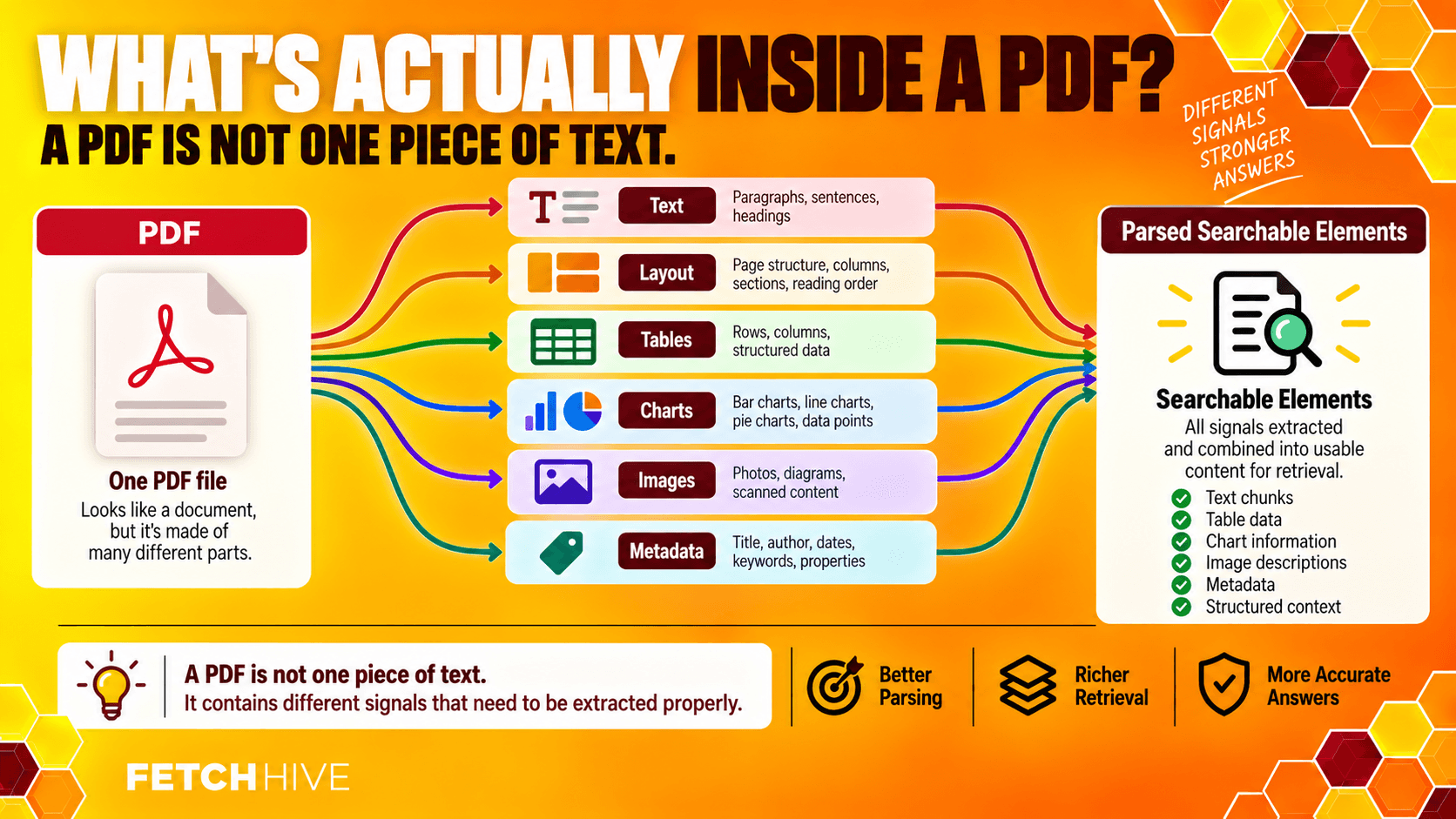
PDFs deserve their own section because they are simultaneously everywhere and vaguely hostile to structured information.
A PDF is designed to preserve how something looks, not necessarily what each element means. Two lines that appear next to each other visually may be stored far apart internally. Tables can be fragmented. Scans may contain no machine-readable text at all.
For multimodal retrieval augmented generation, a decent PDF pipeline usually needs to preserve four things:
Layout: headings, paragraphs, columns, footnotes and sections.
Figures: images, diagrams, charts and nearby captions.
Tables: row headers, column headers, merged cells and numeric values.
Provenance: document, page, section and element IDs so the final answer can point back to the source.
Flattening a financial table into one long string might technically make it searchable. It also makes a question such as “What was Q3 revenue for Enterprise?” much easier to get wrong.

A better pattern is to preserve a structured representation for exact lookups and optionally create a written explanation or textual descriptions for semantic search. You get two retrieval paths instead of forcing one representation to do everything.
The same applies to diagrams. Store the original image, the surrounding caption, extracted labels and useful metadata together. If a user asks for “the wiring diagram for pump controller B,” the system should be able to retrieve images and the surrounding documentation rather than just whichever paragraph happened to contain the word “pump.”
Embedding Multimodal Data Without Creating a Mess
Embeddings are what make semantic similarity search possible. The tricky part is deciding how different modalities should meet inside the embedding space.
There are two broad patterns.
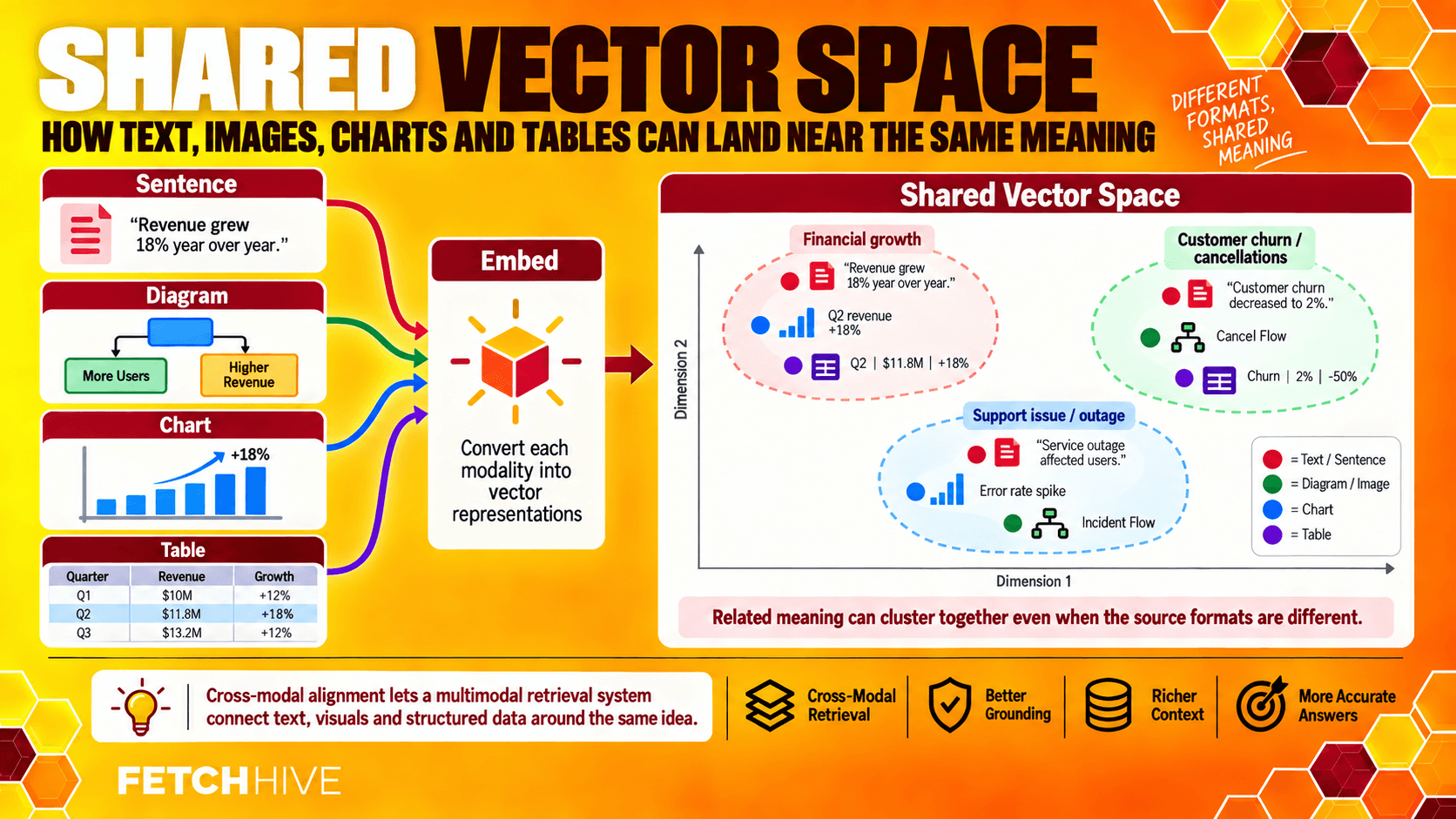
Shared vector space. Text, images and sometimes other modalities are mapped into one shared vector space. Good cross modal alignment means semantically related content should land near each other even when the raw inputs are different.
For example, a chart showing declining failure rates and a sentence saying “failure rate dropped 30%” should end up close enough that a text query can retrieve the chart.
Separate modality spaces. Text uses a text encoder, images use a vision encoder, tables use a structure-aware encoder and so on. The retrieval system searches each index separately, then merges and re-ranks the candidates.
The shared approach is elegant. The separate approach is often easier to tune when one modality behaves badly.
Neither option magically solves retrieval quality. Multimodal models and vision language models can produce strong representations, but you still need to test them against your own queries. A benchmark that looks great on general image-text matching may be useless on tiny labels inside engineering schematics.
The same rule from normal RAG embeddings applies here: evaluate the embedding model using the questions and source material you actually expect in production.
Designing the Retrieval Layer
This is where the article stops being about “supporting multiple modalities” and starts being about whether the system is actually useful.
A user asks a visual question. What should happen?
Maybe the text index contains the answer. Maybe the relevant information is in a table. Maybe the system needs the image plus the paragraph around it. Maybe exact product codes matter more than semantic similarity. Maybe the query needs several sources.
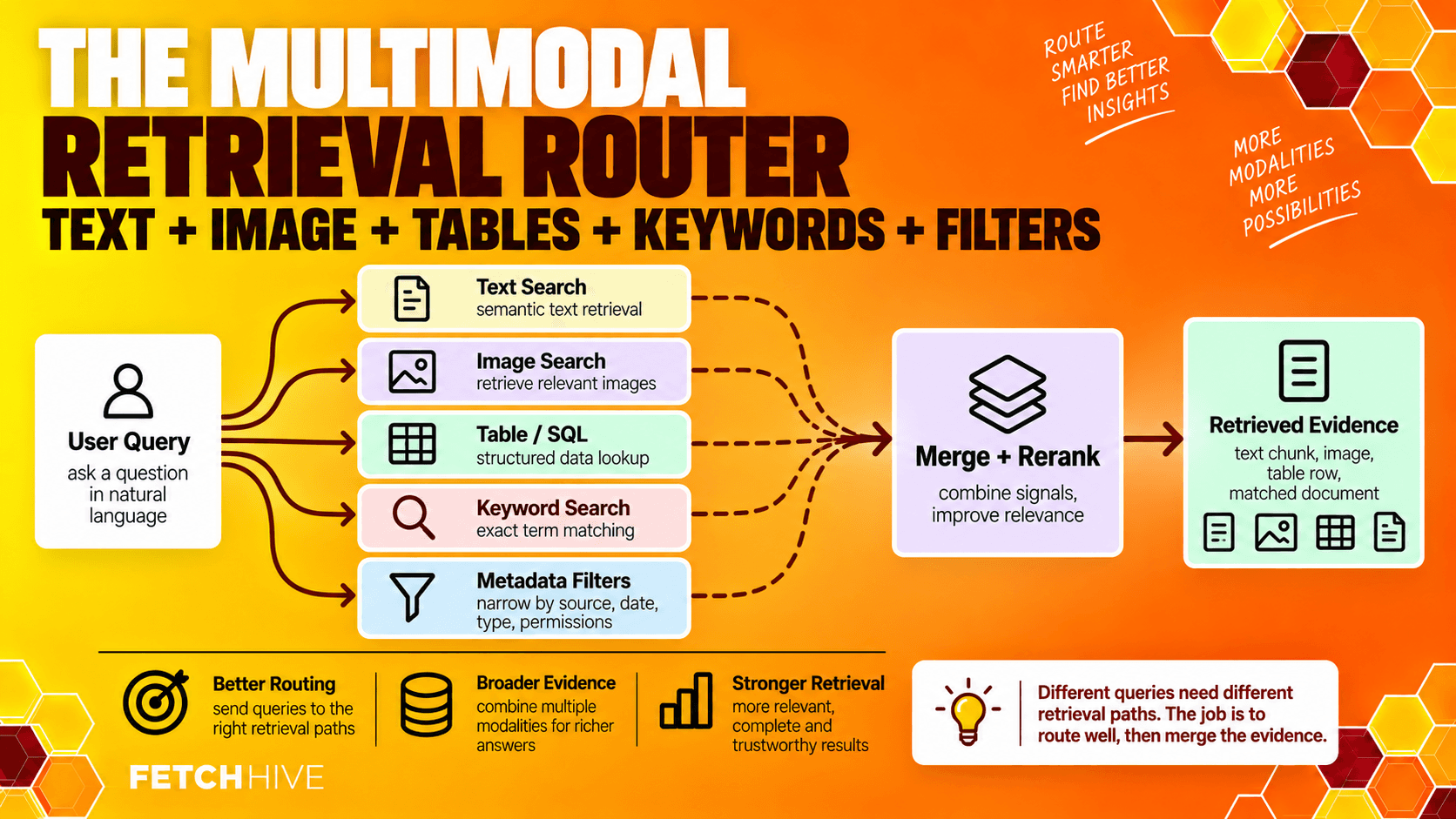
A robust multimodal retrieval strategy usually combines a few techniques rather than betting everything on one vector search.
Semantic search is useful for meaning. Keyword search catches exact names, error IDs and codes. Metadata filters constrain date, product, department or permissions. Re-ranking can combine candidates from different modalities and push the most relevant chunks to the top.
You also need to decide how much evidence enters the context window. More retrieved data is not automatically better. Five excellent pieces of evidence beat thirty loosely related chunks, especially when those chunks include images and table data that consume more processing budget.
The retrieval system should be able to say: “These are the best candidates, this is why they matched, and these are the original sources.”
If you cannot inspect that path, debugging becomes guesswork.
Early Fusion vs Late Fusion
Once retrieval has found useful evidence, you still have to combine it.
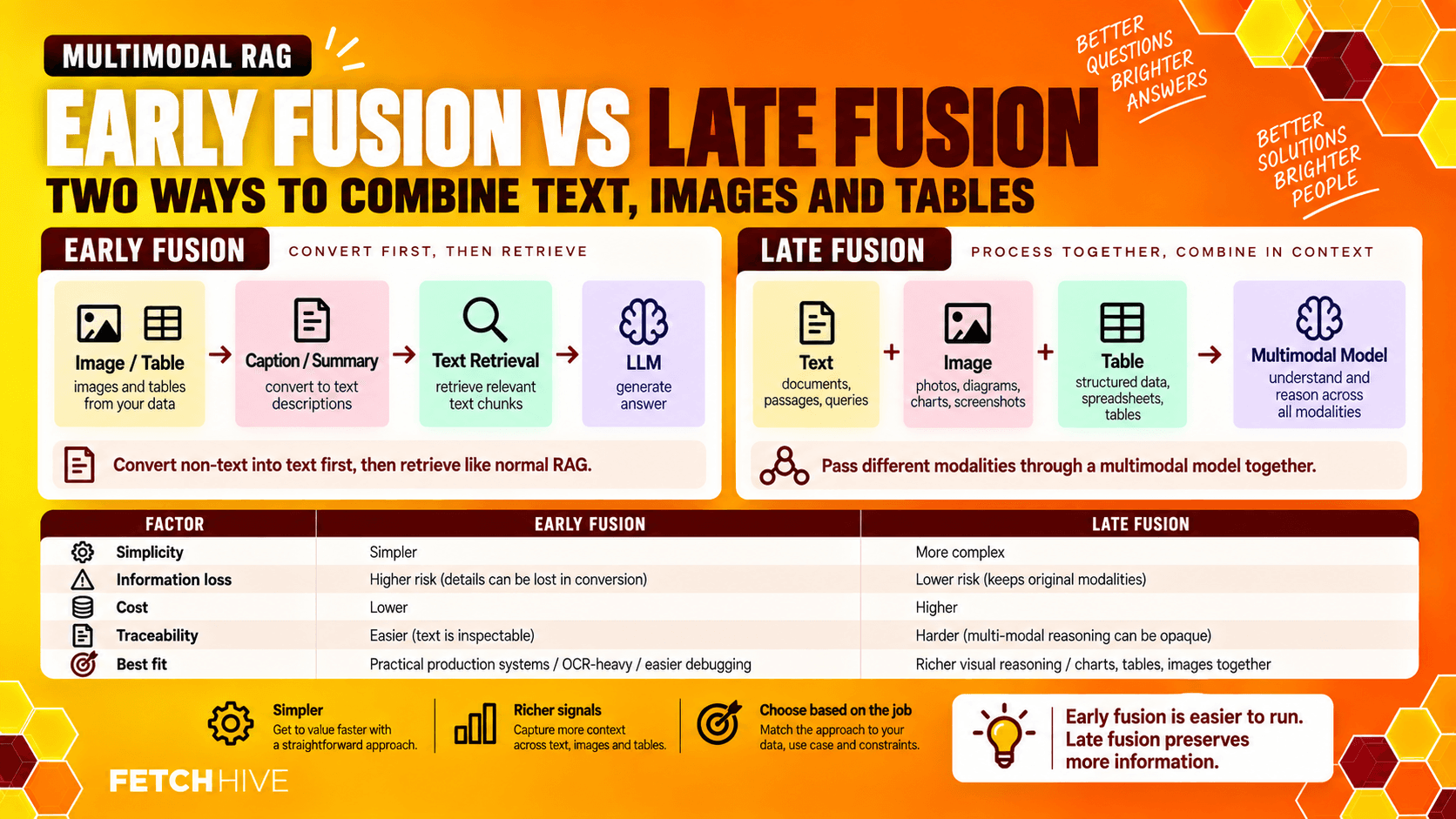
Early fusion converts non-text evidence into text before generation. An image becomes a caption. A chart becomes a written explanation. A table becomes a summary. The rest of the system can then behave much more like traditional RAG.
This is easier to build and usually easier to debug. The downside is obvious: the conversion can throw away detail. “Sales increased” is not equivalent to the chart showing exactly when, by how much and for which segment.
Late fusion preserves different modalities until generation. The model receives text, images, table structures or other modality-specific inputs and reasons over them together.
This is where cross modal attention mechanisms matter. Rather than relying entirely on textual descriptions, the model can attend to evidence from different modalities during response generation.
Late fusion can give you improved factual grounding when the answer depends on exact visual or numerical evidence. It also tends to be more expensive and more difficult to evaluate.
The decision is not philosophical. Use the simplest design that preserves the evidence your questions actually need.
Handling Tables, Images, Audio and Video
The ingestion pattern is basically the same across modalities: parse it, preserve useful structure, embed it, index it and keep a pointer to the original.
But each modality introduces its own failure modes.
Tables need structure. Keep headers, units, merged cells and row relationships intact. When precision matters, store structured values as well as semantic representations.
Images and diagrams need context. They often need OCR plus visual features. Link the image to captions, document sections and surrounding text so retrieval has context.
Audio needs timestamps. Speech-to-text is a useful start, but keep the original clip linked to each transcript segment so an answer can reference the moment it came from.
Video needs alignment. Add key frames, slide OCR and links between transcript segments and timestamps. A useful answer should be able to say something like “the configuration appears at 14:32” rather than “somewhere in this 47-minute recording.”
Structured data needs the right retrieval path. Do not awkwardly serialize it into prose if you can query it directly. A multimodal system may use vector retrieval for narrative content and SQL or another structured path for exact numeric questions.
This is also where “multimodal” becomes broader than “image support.” Real enterprise systems are usually combining diverse data types, unstructured and structured data, static training data and external dynamic information. In practice, the pipeline is integrating external dynamic information rather than dealing with one pristine modality at a time.
Choosing Models and a Vector Database
Do not choose your entire architecture because a model demo looked impressive on X.
Start with the workload.
For generation, ask whether you genuinely need native visual question answering, audio understanding or image inputs. If most queries end up as text after preprocessing, a strong text model may still be the sensible generator. If users regularly attach screenshots or the answer depends on visual evidence, multimodal models become much more important.
For retrieval, test the encoders separately. You may use one model for text, another for images and another for tables. Multimodal learning does not require one giant model to do every job.
For the vector database, the boring requirements still matter:
support for the embedding dimensions you need;
fast similarity search at your expected scale;
metadata filtering;
hybrid or keyword retrieval where required;
operational visibility;
sensible update and delete behavior;
access controls appropriate to the data.
Whether that ends up in one vector DB or several indexes is an implementation choice. The goal is not architectural purity. The goal is reliable retrieval.
Building a Multimodal RAG Pipeline Step by Step
You can make this extremely complicated. I would not start there.
Start with one document type and one question set, then add complexity only when the failures justify it.
Choose the use case. Pick a real workflow where text-only retrieval is obviously missing evidence.
Import document sources. Bring in a small representative set of PDFs, images, tables or recordings with useful metadata.
Parse by modality. Extract text and layout, isolate images and tables, transcribe audio, and keep source relationships intact.
Create multimodal embeddings. Use suitable encoders and store vector representations alongside source pointers.
Build retrieval. Run semantic search, metadata filters and any structured or keyword paths your queries need.
Fuse the evidence. Assemble the relevant chunks, relevant images and structured values without flattening away important detail.
Generate the answer. Send the retrieved context through a clear prompt template and require source references.
Evaluate with real questions. Test figures, table cells, screenshots and mixed-modality questions rather than five easy demos.
A good first test might be deliberately annoying: “According to the chart on page 18 and the table on page 22, which product improved the most, and does the written summary agree?”
If the pipeline cannot answer that reliably, adding another model is probably not the first thing I would do.

Evaluation: Test Retrieval Before You Blame Generation
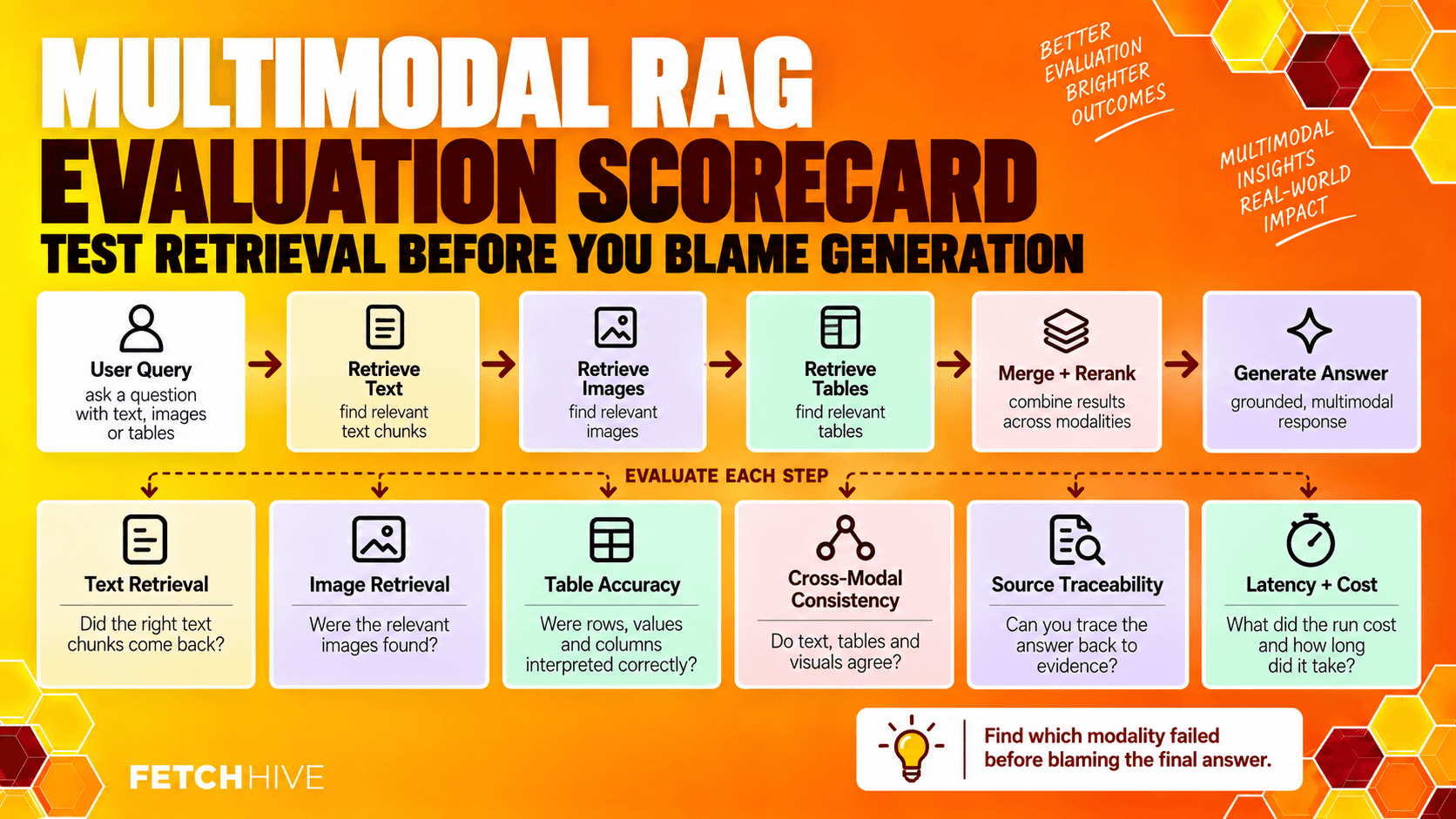
Multimodal RAG introduces more places for evidence to get damaged, so evaluation needs to look at the whole path.
At minimum, track:
Per-modality retrieval quality: did the system retrieve the right text, image or table?
Cross-modal consistency: when the chart and prose refer to the same thing, does the answer reflect both correctly?
Answer accuracy: are the generated outputs supported by the retrieved evidence?
Source traceability: can each claim be traced to the original document, figure, timestamp or table cell?
Conflict handling: what happens when text and image evidence disagree?
Latency and cost: which modality is making the system slow or expensive?
Typical failure modes are less glamorous:
the correct chart was indexed but its caption was attached to the wrong image;
OCR mangled one number in a table;
a text query retrieved the right paragraph but missed the relevant image;
an embedding model ignored a tiny visual label that mattered;
the system stuffed too many candidates into the context window;
the model trusted the prose even though the chart contradicted it.
This is why reliable AI systems need traceability. “The answer was wrong” is not enough. You need to know whether parsing, multimodal embeddings, retrieval, fusion or generation failed.
This is also the point where observability matters. In Fetch Hive, the useful bit for me is being able to inspect the retrieval path, model calls, latency, cost and failures rather than staring at the final answer and guessing what went wrong.
For the deeper retrieval side of this, our guide to improving RAG performance covers chunking, query transformation, reranking and evaluation in more detail.
TEST WITH YOUR OWN DOCUMENTS
Stop guessing why your RAG answer went wrong.
Build a RAG agent with your own documents in Fetch Hive. Test real questions and inspect retrieved context, model calls, latency, cost and failures. Start with one useful retrieval path and improve it with evidence from each run.
Real-World Multimodal RAG Patterns
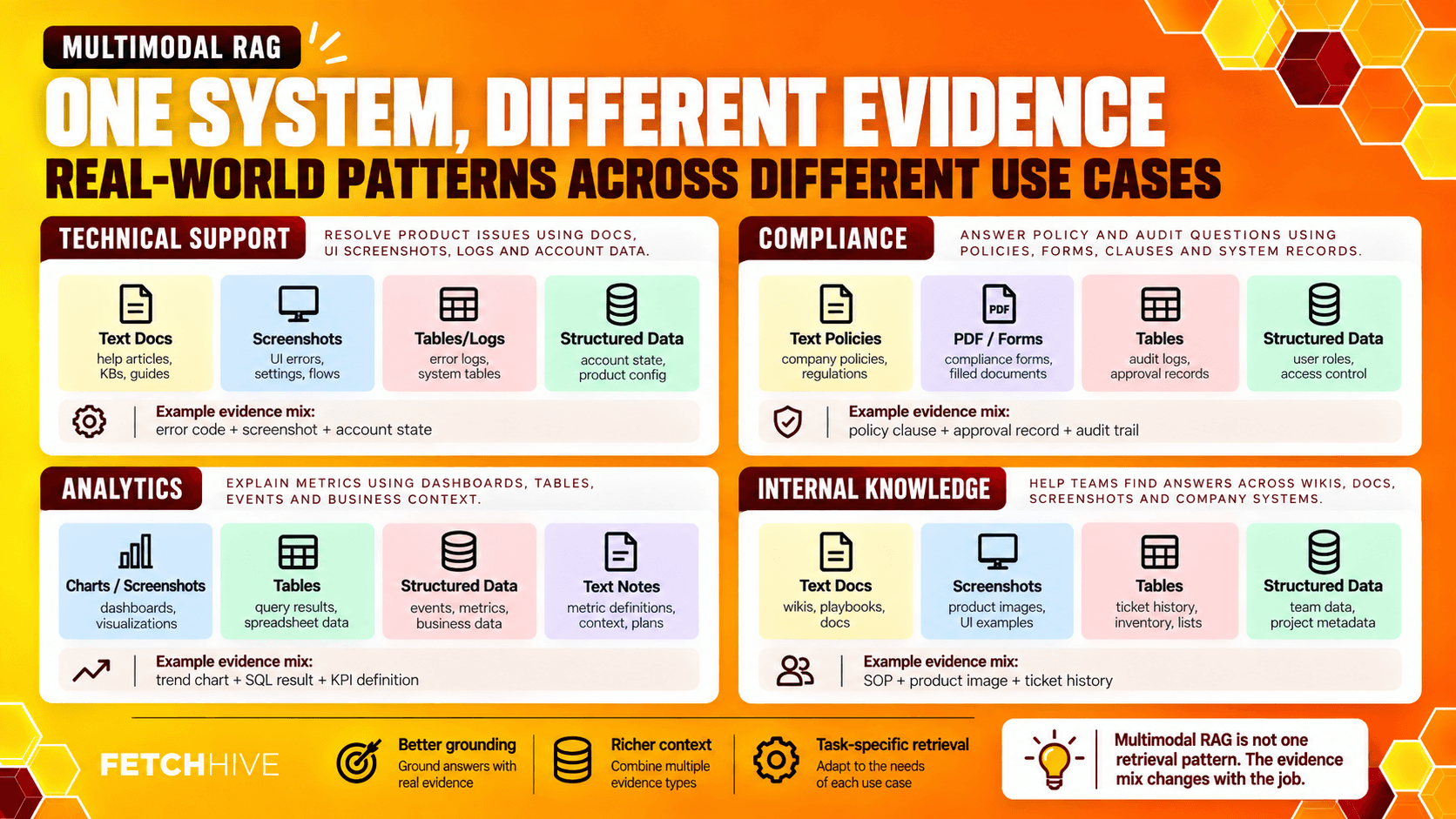
The easiest way to understand multimodal RAG is to look at the evidence each workflow needs.
Technical support. A user uploads a screenshot of an error. The system retrieves matching documentation, similar screenshots, product logs and the relevant configuration section, then produces a grounded troubleshooting response.
Compliance and legal. A query may need a contract clause, a scanned signature page and a structured obligation table. Multimodal retrieval can surface all three rather than pretending the PDF is just a long blob of text.
Analytics and reporting. A user asks which business unit grew fastest. The answer may require a chart, a spreadsheet table and a written explanation from the quarterly report. The system should retrieve the evidence and produce a structured and comprehensive analysis rather than infer the result from whichever paragraph happened to rank highest.
Internal knowledge. Employees can ask questions using text or an image message and retrieve text, diagrams, tables and supporting evidence from multiple data sources. Done well, this can automate repetitive tasks such as finding specifications, policy details and historical metrics.
There are plenty of diverse multimodal RAG scenarios beyond these, but the architecture should follow the problem rather than the buzzword.
Research Is Moving Fast. The Production Problems Are Familiar.
Multimodal capabilities are improving quickly, enabling AI systems to work across more of the messy source material companies already have. Better vision language models, better cross modal alignment, finer-grained element retrieval and stronger multimodal embeddings are making systems easier to build.
There are still some very ordinary problems underneath all of that progress.
Training data for specialized modalities can be limited. Evaluation datasets are still much weaker than text benchmarks in many domains. Data alignment can break. New formats appear. Models can favor one modality over another. External knowledge changes. Outdated knowledge still gets indexed. Bigger models still cost more.
Future work will continue to outline open challenges around covering datasets, multimodal evaluation, continual learning and conflict between different modalities.
But I would not wait for the research to settle before using the idea.
If your users already need answers from documents containing charts, tables, screenshots or recordings, you already have a multimodal retrieval problem. Start with the messiest important source, build a small evaluation set and make that one path reliable.
Then add the next modality.
That is less exciting than “build an advanced AI system that understands everything.”
It is also much more likely to work.
Share this post


