MCP Gateway Architecture: How It Works, Security Controls, and When to Use One

By
Tom Dallimore
Published

One MCP server is easy. Give your client the endpoint, add the credential, test a tool call, and move on with your life.
The fun starts when you have five MCP servers, several AI agents, different teams, different credentials, and somebody needs to answer a fairly reasonable question like, “Which agent called the finance tool at 2am?” Suddenly routing, authentication, access controls and audit logging are not optional plumbing anymore.
That is where MCP gateway architecture starts to make sense. An MCP gateway sits between your AI agents and MCP servers, giving you one place to control tool access, route requests, manage credentials, enforce policy and keep an audit trail of what actually happened.
This guide breaks down how that gateway layer works, how it differs from an MCP server or traditional API gateway, the security controls worth caring about, and when adding one is useful versus when you are just adding infrastructure because the diagram looked lonely.
What is an MCP gateway?
The Model Context Protocol (MCP) defines a standard way for AI systems to discover and invoke external tools. An MCP server exposes capabilities. An MCP client is the thing calling them. A gateway sits in the middle when you want a governed interface across those connections.
The simplest mental model is:
AI clients / agents → MCP Gateway → backend MCP servers → APIs, databases and enterprise systems
The gateway serves as a single endpoint to the client side and a routing, security and observability layer on the backend side. The MCP gateway sits between the agent and the actual tool execution, so the agent does not need to know every backend address, credential or policy detail.
One important update: older MCP articles often say the protocol leaves authentication undefined. That is no longer accurate. The current 2026-07-28 MCP specification includes a much stronger authorization model and modern, stateless HTTP behaviour. The reason to add a gateway is not that MCP has no security. It is that organizations still need unified authentication, enterprise security, tool scoping, routing and comprehensive audit trails across multiple MCP servers.
Why add a gateway at all?
Direct client-to-server connections are perfectly reasonable when you have one developer, one or two tools and a trusted environment. You probably do not need an enterprise MCP gateway for a weekend prototype. You need a README.
The pain starts when the number of agents and MCP servers grows independently. Then the same problems show up again and again:
Credential sprawl. API keys and service account credentials get copied into agent configs, environment variables and deployment secrets.
Fragmented access controls. Different MCP servers enforce different rules, and security teams have no single place to see or change them.
Inconsistent tool access. One AI agent may discover a tool that another should never even know exists.
Scattered gateway logs and server logs. Reconstructing one agent action across four backend services becomes archaeology.
Environment mistakes. A staging agent can accidentally reach production because every connection is configured separately.
Operational overhead. Updating endpoints, rotating credentials or revoking a human user becomes a multi-team exercise.
A gateway does not magically remove those problems. It gives you one place to solve them consistently. That is the useful bit.

Without a gateway | With a gateway |
Each client knows multiple MCP endpoints | Clients connect to a single endpoint |
Credentials live across agents and servers | Credential management is centralized or brokered |
Policy varies by server | Unified policy enforcement can sit in the gateway layer |
Logs are fragmented | Audit trails cover tool traffic in one place |
Backend topology leaks into clients | Routing resolves the appropriate server behind the gateway |
The core MCP gateway architecture
A production design usually has four layers. Keep them conceptually separate even if your first implementation runs them in one process.
1. AI client and agent layer
This is Cursor, Claude, ChatGPT, an internal assistant, a workflow engine, or another AI client. The AI agents decide which capability they need and send the tool invocation. The client should not have to care whether the tool lives on server A, server B, or a service behind an existing API gateway.
2. Gateway layer
The MCP gateway functionality lives here: authenticate the caller, filter visible MCP tools, validate the request, apply access rules, route to the correct MCP server, enforce limits, inject credentials where appropriate, and collect data for observability.
Internally, I think of it as three planes:
Routing and discovery: tool registry, server mapping, versions, health and routing.
Security and policy: agent identity, user identity, authentication, authorization, quotas and policy enforcement.
Observability: gateway logs, latency, errors, tool execution details and audit trails.
3. Backend MCP server layer
Each backend MCP server implements the actual capability. One might wrap your CRM, another might search internal documents, another might call billing systems. A gateway generally should not duplicate that business logic. Its job is to govern and route access to it.
4. Enterprise systems and backend services
The MCP servers may then call REST APIs, databases, queues, SaaS products or other backend services. Existing API gateways can stay exactly where they are. The MCP gateway and API gateways solve related but different problems, and the gateway integrates with the infrastructure you already have rather than replacing it for fun.
How does an MCP gateway work?

A normal tool call looks something like this. The details vary by implementation, but the control points are fairly consistent.
Connect. The MCP client reaches the gateway through its configured endpoint.
Authenticate. The gateway authenticates the client, service account or human user and establishes the caller identity.
Discover. The client asks what capabilities are available. The gateway can filter the visible tool set so each agent sees only governed access it is allowed to use.
Call. The client selects an MCP tool and submits the arguments.
Validate. The gateway validates the input schema, access rules and environment policy before forwarding anything.
Route. The gateway resolves the correct MCP server based on tool, version, tenant, environment or region.
Execute. The backend MCP server performs the tool execution against its API, database or external tools.
Post-process. The gateway may redact sensitive data, normalize errors or apply output policy.
Log. The gateway logs identity, tool name, status, latency and safe request metadata for audit logging.
Return. The result goes back through the gateway to the client.
On current MCP, remote HTTP is designed around a stateless model, which is useful for gateway architecture because requests can be load balanced without forcing every call in a workflow back to the same server instance. A backend service can still require its own state, but that is now an application concern rather than something the modern MCP transport forces on you.
MCP client vs MCP server vs MCP gateway
Component | What it does | Typical failure |
MCP client | Chooses tools, sends requests, handles results and user context | Bad tool selection or reasoning |
MCP server | Implements tools and talks to the actual system | One capability or backend fails |
MCP gateway | Provides routing, governed access, policy and observability across servers | Shared control plane or routing fails |
The gateway therefore plays two roles. To AI clients it looks like the governed MCP surface. Toward backend servers it behaves like an MCP client or routing layer. That dual position is why the gateway can enforce policy without requiring every server to reinvent it.
How does an MCP gateway differ from an API gateway?
There is obvious overlap. Both may terminate TLS, authenticate callers, rate-limit traffic, route requests and produce logs. If you already run Kong, Apigee, Traefik or another API gateway, none of that becomes useless because MCP arrived.
The difference is what the gateway understands.
API gateways primarily understand HTTP routes, services and API policy.
An MCP gateway understands MCP traffic, MCP tools, tool discovery and tool invocation.
Tool visibility can be filtered before an agent sees a capability at all.
Policy can be expressed around tool names, tool risk, agent identity and user identity instead of only URL paths.
The 2026 MCP headers make MCP-aware routing and metering easier without parsing every JSON body.
If your starting point is an existing REST API rather than multiple MCP servers, the architecture can be simpler. I cover that route in How to Turn an OpenAPI Spec into an MCP Server. If you need bespoke behaviour instead of generated tools, see How to Build an MCP Server for an Existing API.
Security controls that actually matter
This is where enterprise MCP stops being a networking diagram and starts becoming useful. A gateway gives security teams a central place to define what an agent can discover, call and return.
Unified authentication and identity
The gateway authenticates the caller and attaches a useful identity to the request. That might be a human user, an agent identity, a workload, or a service account. In enterprise environments, this often integrates with enterprise SSO, OAuth/OIDC and service accounts rather than inventing another password database because apparently we have not suffered enough.
Unified authentication matters because the same identity can then drive authorization, logging and downstream credential decisions across different MCP servers.
Role-based access control and tool scoping
Role based access control is the obvious baseline: support can use support tools, finance can use finance tools, and a read-only assistant should not quietly discover delete_customer because somebody forgot to hide it.
Larger systems may add attribute-based rules around tenant, geography, project or environment. The point is not to create the world's most impressive policy engine. The point is to make tool access explicit and reviewable.
This is also where an enterprise MCP gateway can expose curated tool bundles rather than dumping the full MCP ecosystem into every model context.
Credential management
A gateway should separate client credentials from upstream credentials. The token that lets an MCP client call the gateway is not the same thing as the API key or service account credentials the backend uses.
Keeping those boundaries separate reduces credential sprawl and means agents do not need raw secrets just to invoke external tools. The gateway can broker or inject credentials after policy has already approved the request.
Input and output controls
Schema validation should happen before a tool call reaches the backend. For risky operations, add explicit confirmation or policy checks instead of trusting the model to infer that deleting production data is probably a big deal.
Prompt injection also belongs in the threat model, but be careful with magical thinking. A gateway can inspect requests, restrict tool access, enforce schemas and block obvious policy violations. It cannot guarantee that every malicious instruction hidden in data will be detected. Good security comes from limiting what the agent can do even when the model makes a bad decision.
Audit logging and sensitive data
Good audit logging should answer a boring but important question: who or what called which tool, on whose behalf, when, with what result?
MCP client and agent identity
Human user identity when delegated
Tool name and backend destination
Status, error and latency
Request metadata with secrets and sensitive data redacted
Policy decision and reason where useful
Those records become comprehensive audit trails for incident response, access reviews and compliance. They also become sensitive data themselves, so do not build a beautiful centralized log of every secret you successfully removed from the rest of the architecture.

Routing across multiple MCP servers
Once you have multiple MCP servers, the router needs a registry that answers a simple question: which backend owns this tool right now?
Useful routing dimensions include:
Tool name and namespace
Server version or rollout cohort
Environment such as staging vs production
Tenant, geography or data boundary
Health and available backend servers
The gateway validates that the tool exists, resolves the appropriate server and forwards the call. If server instances scale up or down, the client should not need a configuration update every time.
For legacy or application-specific state, you may still choose to keep related calls on the same server. But the current MCP protocol itself is stateless over modern Streamable HTTP, so session affinity is no longer a universal gateway requirement.
Observability: the part you will care about after launch
Most teams care about tool access while they are building. They care about gateway logs the first time an agent does something unexpected in production.
At minimum, collect data for:
request volume by MCP client, user, tool and backend
success and error rates
tool execution latency
rate-limit and policy rejections
backend health
credential or authentication failures
A useful observability layer lets you follow one tool call through the gateway to the backend MCP server and back again. That turns 'the agent is broken' into something you can actually debug.

Deployment models
There is no single correct deployment topology. The security posture, operational burden and data boundaries matter more than whether somebody drew Kubernetes boxes on the diagram.
Managed: the vendor operates the gateway. Lowest operational burden.
Self-hosted: you run it in your own cloud or network. More control, more responsibility.
Hybrid: a managed control plane with customer-controlled data-plane components. Useful when policy and management can be centralized but tool traffic must stay inside your perimeter.
The right choice depends on who owns the risk. High-sensitivity environments may care more about network placement and log ownership. Smaller teams may care more about not becoming accidental gateway operators.
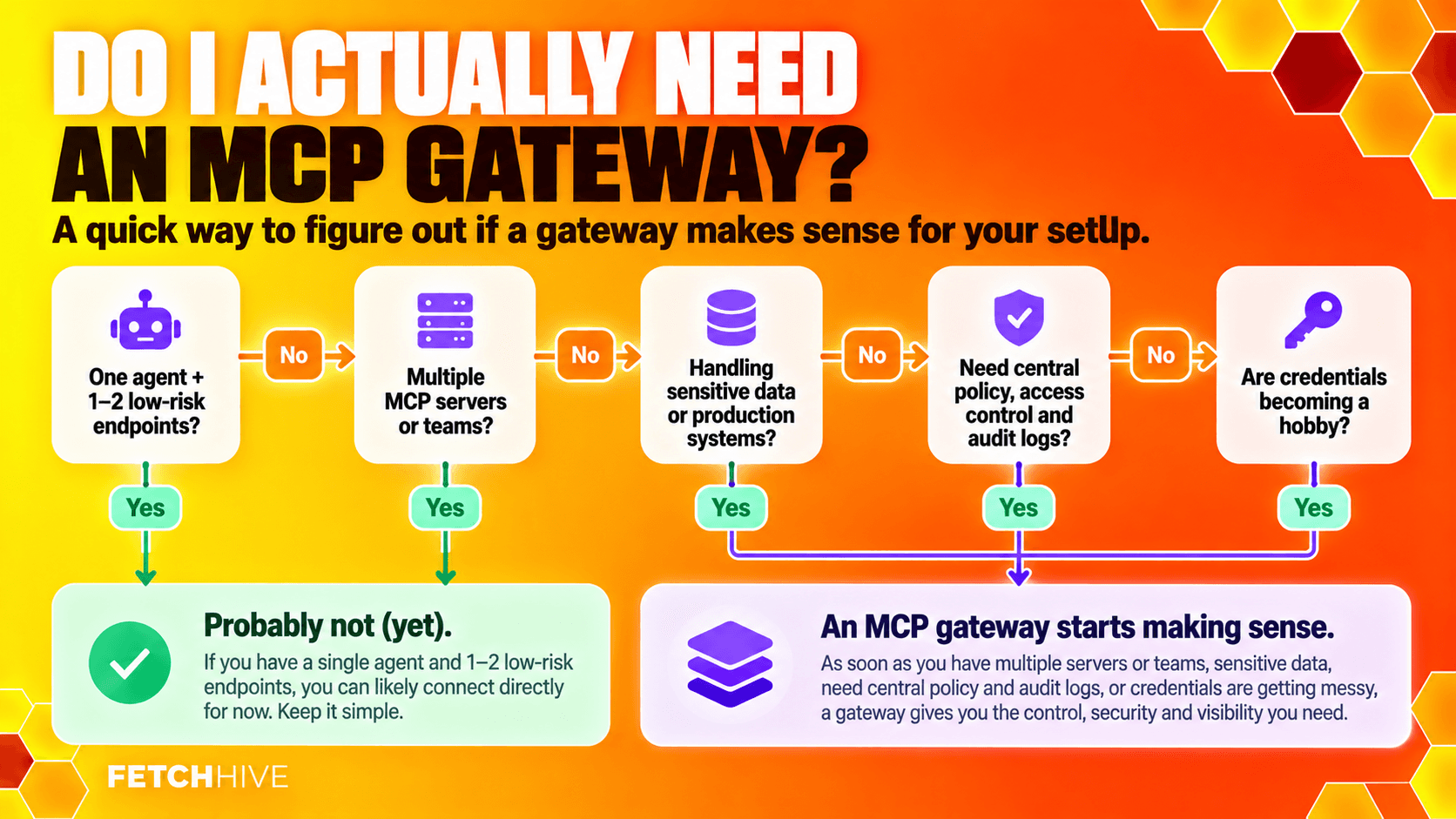
Do you actually need an enterprise MCP gateway?
Not every MCP setup needs one. This is the bit vendors occasionally forget to mention.
I would probably stay direct if you have one agent, one or two MCP endpoints, one team, low-risk tools and credentials that are already manageable.
I would start considering a gateway when several of these become true:
You have multiple MCP servers owned by different teams.
Several AI agents or AI clients need overlapping tool access.
You need central revocation, access controls or role based access control.
You handle regulated or sensitive data.
You need consistent audit trails across tool calls.
You maintain staging, production, regional or tenant-specific backends.
Credential management and service accounts are becoming their own little hobby.
Around three to five independently managed servers, the operational overhead often becomes visible, but the number is not sacred. Two high-risk finance tools may justify governed access earlier than twenty harmless read-only tools.
Build vs buy
Building an MCP proxy is not especially difficult. Building a production gateway that stays boring under load is a different job.
If you build it yourself, the work usually expands into identity, policy, rate limits, audit logging, version support, deployment, failover, admin tooling, incident response and keeping up with the MCP specification. None of those are impossible. They are just infrastructure you now own.
When evaluating a gateway, I would look at:
Current MCP protocol support and upgrade path
Tool discovery and filtering
Unified authentication, enterprise SSO and service-account support where you need it
Policy enforcement and credential management
Audit logging depth and redaction
Deployment flexibility
Latency and throughput
How easily it integrates with your existing API gateways and AI infrastructure
The best gateway is not the one with the longest enterprise checklist. It is the one that removes operational burden without creating a new one.
Where Fetch Hive's MCP Gateway fits
Fetch Hive's current MCP Gateway focuses on a very practical part of this problem: turning an OpenAPI 3.0 or 3.1 specification into an agent-ready MCP endpoint, then giving you the controls around that endpoint.
The same compiler powers two routes:
Open source: the Apache-2.0 mcp-gateway CLI can run locally or self-hosted, including against localhost and private networks with explicit opt-in.
Hosted: publish the compiled tools behind a managed endpoint with scoped access tokens, rate limits and quotas, tool policy, upstream authentication, redacted request logs and a playground.
That is intentionally narrower than pretending every company immediately needs a giant enterprise control plane aggregating fifty unrelated MCP servers. If your problem is 'I have an API and I want agents to use it safely', start there. If your MCP estate grows into multiple teams, servers and identities, the broader gateway architecture in this guide is the next set of problems you will run into.
For the hands-on conversion flow, read OpenAPI to MCP. If you want to hand-build the server layer instead, use the existing API to MCP server guide.

The useful version of MCP gateway architecture
A good MCP gateway is not there to make your diagram look more enterprise. It is there to make the boring control problems boring.
Clients get one governed interface. Servers keep their business logic. Security teams get central access rules and audit trails. Operators get visibility into MCP traffic. Agents get the tools they are actually allowed to use instead of every capability somebody happened to deploy.
If direct connections are still simple, keep them. If every new agent means another round of credentials, custom auth, logging glue and production anxiety, you have probably reached the point where the gateway layer earns its keep.
Share this post