
Vector Databases for RAG: What Matters and How to Choose

By
Tom Dallimore
Published

Choosing a vector database for RAG looks like one of those decisions you can solve by opening a comparison table, sorting by benchmark score, and picking whatever has the nicest landing page.
Unfortunately, production systems have a habit of ruining simple decisions.
Your vector database sits right in the middle of retrieval. If it is slow, badly filtered, awkward to update, or impossible to debug, everything downstream suffers. The large language model can only generate responses from the relevant context it actually receives. Give it the wrong retrieved documents and you get a beautifully written wrong answer.
This guide is about the bits that actually matter: semantic search, vector search, metadata filtering, hybrid search, scaling, security, cost, and when you probably do not need a dedicated RAG vector database at all.
Answer First: Do You Actually Need a RAG Vector Database?
A RAG vector database stores vector embeddings and makes them searchable using similarity search. In a retrieval augmented generation system, that means a user query can be converted into a query vector, compared against stored vector data, and matched to relevant documents before the model generates an answer.
That sounds essential. It is not always essential.
For a small prototype, internal tool, or early RAG application, Postgres with pgvector can be perfectly sensible. If you already have Elasticsearch or another search engine with vector support and hybrid search, you may already have enough infrastructure to prove the idea without adding another service to your life.
A dedicated vector DB starts making more sense when the retrieval workload becomes the product rather than a side feature: a large corpus, lots of live queries, strict latency targets, heavy metadata filtering, tenant isolation, frequent updates, or enterprise environments where availability and security actually matter.
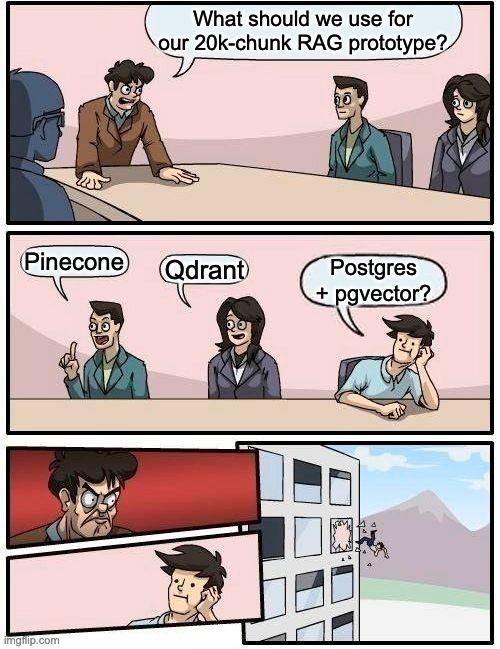
The important question is not “Which vector database is best?” It is “What does my retrieval layer need to do?” Start there and half the vendor comparison nonsense disappears.
RULE OF THUMB Start simple. Move to a specialized vector database when scale, filtering, latency, or operations give you a real reason to. |
Quick Primer: Retrieval Augmented Generation in Practice
Retrieval augmented generation (RAG) gives large language models access to external knowledge at query time instead of forcing them to rely only on static training data. Retrieval augmented generation RAG systems retrieve relevant information first, then use that retrieved data to build an augmented prompt for the LLM.
The basic flow is simple: the user submits a question, the system retrieves relevant data from external data sources or your own data, and the model generates a response using that context provided.
That helps with three very practical problems: keeping answers connected to up to date information, grounding responses in authoritative sources, and letting an AI application work with domain specific knowledge that was never part of the underlying model’s training data.
If you are completely new to this, read my RAG explained guide first. If you already know the basics, carry on.
Where the Vector Database Sits in a RAG Pipeline
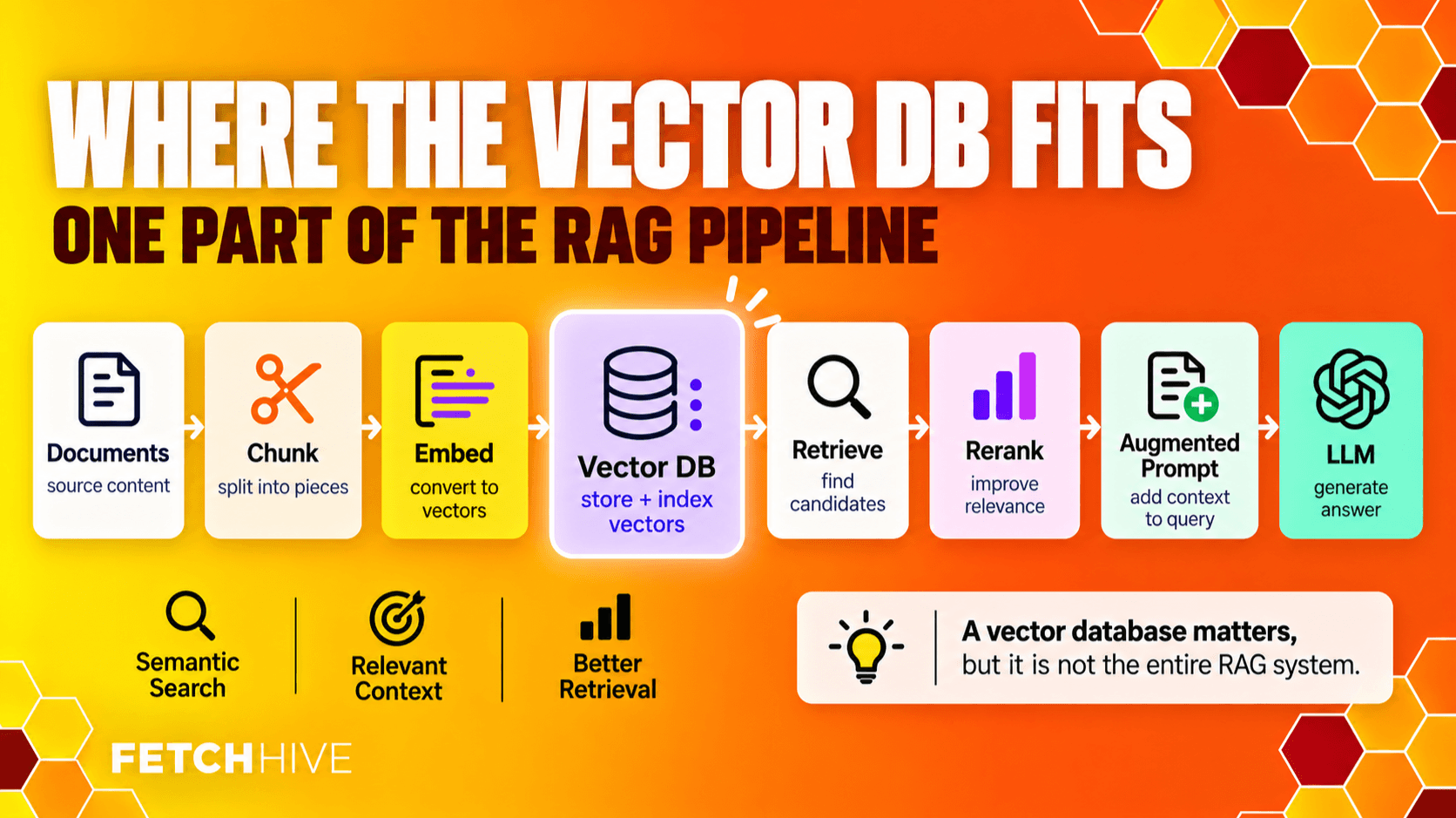
A RAG pipeline is easier to understand if you split it into two halves: preparing knowledge and answering questions.
• Ingest documents and other external data from files, APIs, databases, websites, support systems, or internal documents.
• Clean and chunk the data into useful sections instead of feeding an entire dataset into every request.
• Use an embedding model to convert those chunks into numerical representations called vector embeddings.
• Store the embeddings, metadata, and references to the original content in a vector database.
• When a user query arrives, generate a query vector using the same embedding space.
• Run vector similarity search, semantic search, keyword search, or hybrid search to find relevant data points.
• Retrieve the strongest chunks, build the augmented prompt, and send the relevant context to the large language model.
• The model generates the final answer from the retrieved documents, ideally with source attribution.
The RAG vector database lives between embedding and retrieval. It is not the whole RAG architecture; it is the part responsible for storing data in vector form and getting the right evidence back quickly.
For the full end-to-end flow, see my RAG Pipeline guide. That article covers ingestion through generation; this one zooms in on the retrieval and storage layer.
What Is a RAG Vector Database, Really?
At the risk of upsetting an entire category of SaaS landing pages, a RAG vector database is just a database designed to store and search high dimensional vector representations efficiently.
Instead of asking for an exact row by ID or matching exact keywords, you can ask: “Which stored vectors are most similar to this input query?” The database returns relevant vectors and the associated text, metadata, or document references.
That is what makes semantic search useful. The system can find similar documents based on semantic meaning rather than only literal wording. “How do I cancel?” can match a document headed “Closing your account” even though the exact words are different.
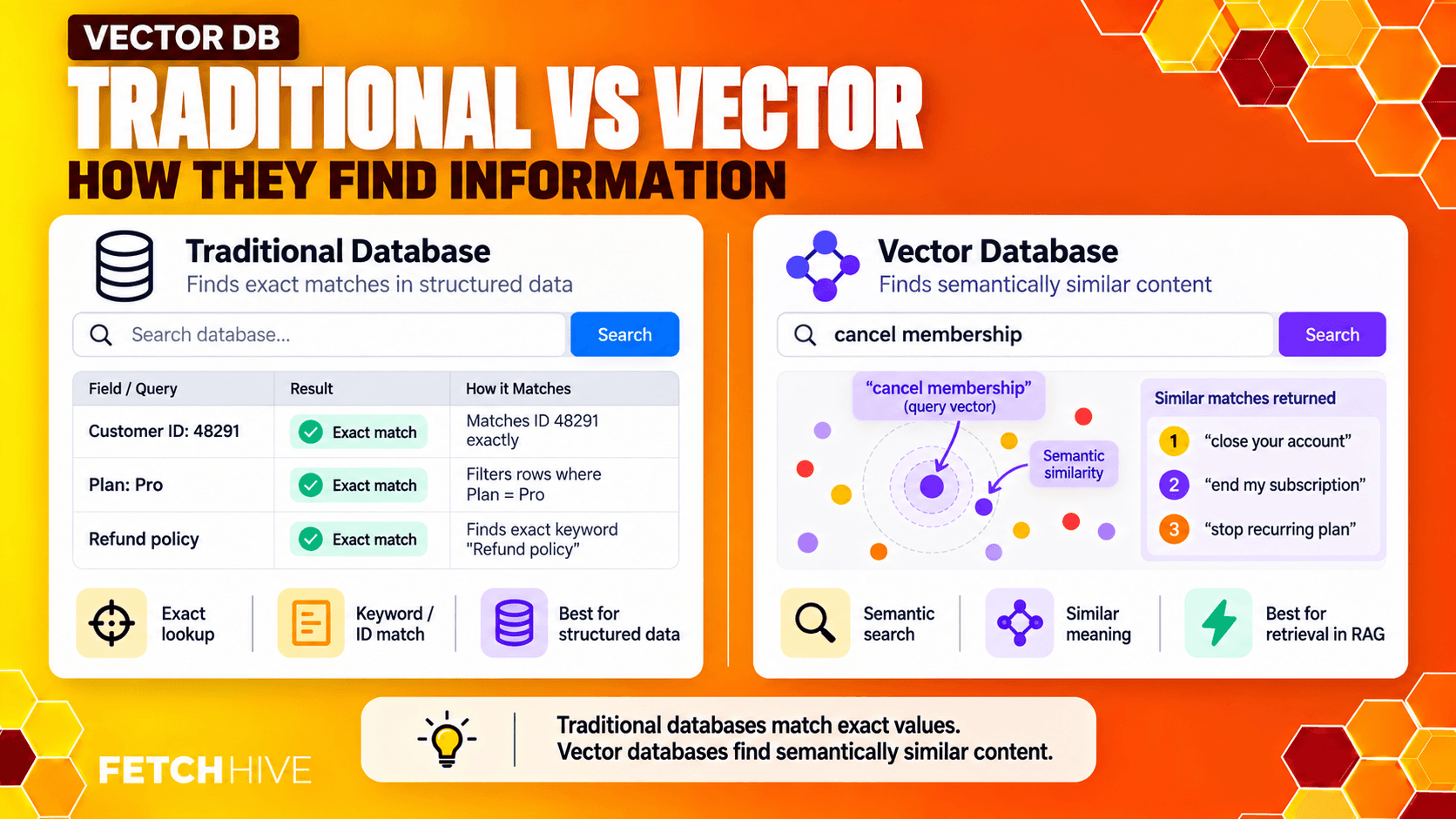
Vector databases offer a few things traditional relational stores were not originally built around: fast similarity search, approximate nearest neighbor indexes, similarity metrics such as cosine similarity, and metadata filtering combined with vector retrieval.
Modern databases are blurring the lines, though. PostgreSQL has pgvector. Elasticsearch and OpenSearch support vector search. MongoDB has vector search. Redis can store and search vectors. So do not get religious about categories. Pick the thing that solves your actual retrieval problem.
Embeddings: The Bit That Makes Semantic Search Possible
Before the vector database can search anything, your content needs to become vectors.
An embedding model converts text, images, or other data into numerical form. These numerical representations place similar meanings near each other in a high dimensional space. The vector database then searches that space for the nearest or most relevant vectors.
For example, a support document about “resetting a password” may sit close to a user query asking “I forgot my login credentials” even if the wording barely overlaps. That is semantic similarity doing the useful work.
This is also why changing the vector DB rarely fixes a bad embedding model. If your embeddings fail to capture semantic meaning, product jargon, version differences, or domain specific language, the database will perform fast similarity search over a bad map.
If you want the deeper version of model choice, dimensions, dense vectors, sparse retrieval, and evaluation, I cover that separately in my RAG embeddings guide.
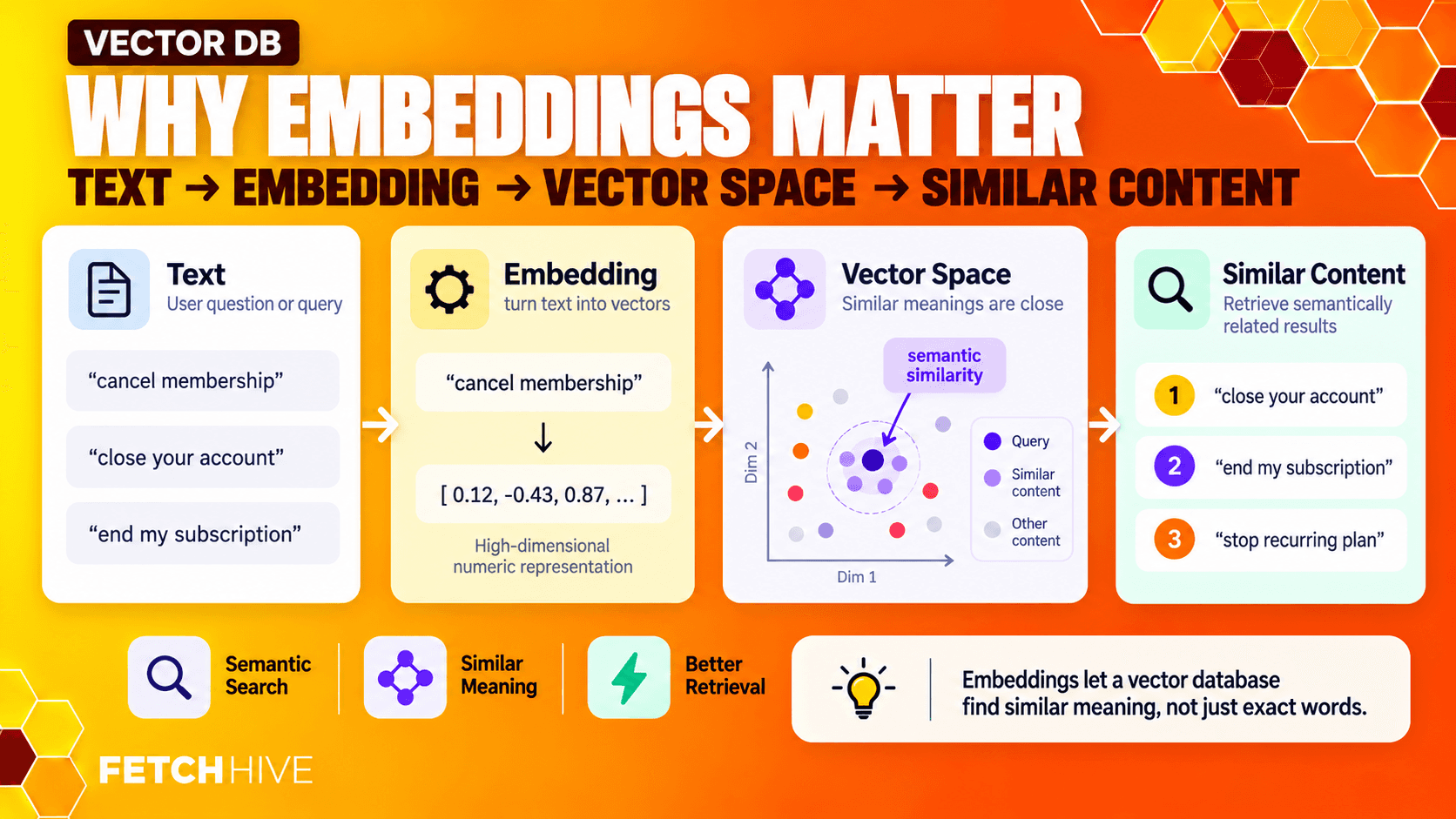
IMPORTANT Use the same compatible embedding space for documents and queries. Mixing unrelated embedding models makes vector similarity scores meaningless. |
How Vector Retrieval Works Inside RAG Systems
At query time, the mechanics are not particularly glamorous.
1. Take the user query or input query.
2. Run it through the embedding model to create a query vector.
3. Compare that query vector against stored vector embeddings.
4. Use a similarity metric to rank relevant data points.
5. Return the top candidates as retrieved data.
6. Optionally rerank, filter, or combine those search results with keyword matching before generation.
The common similarity metrics are cosine similarity, dot product, and Euclidean distance. For text retrieval, cosine similarity is probably the one you will see most often. If vectors are normalized, dot product can produce the same ranking.
Exact nearest-neighbor search gives you the mathematically closest vectors, but comparing against an entire dataset becomes expensive as the corpus grows. Approximate nearest neighbor (ANN) indexes trade a tiny amount of recall for dramatically faster retrieval. HNSW and IVF are common examples.
That trade-off is usually worth it in production. Nobody cares that your search is mathematically perfect if the customer support chatbot takes fourteen seconds to answer “How do I reset my password?”
Pure Vector Search Has Inherent Limitations
Vector search is very good at finding similar meanings. It is not psychic.
A common mistake is to treat semantic search as the replacement for every other kind of search. Then production arrives and you discover that users ask for error codes, dates, exact product names, invoice numbers, version strings, and other things where exact keyword matches matter a lot.
• A semantic match can confuse two documents that discuss almost the same topic but refer to different product versions.
• Old and new policies can be extremely close in vector space even though only one should be returned.
• Similar documents can answer completely different questions despite sharing the same vocabulary.
• Chunk size can destroy context. Too small and the useful explanation gets split apart; too large and the embedding averages several ideas into one noisy representation.
• Updating millions of embeddings or rebuilding an index can become expensive when new data arrives or the embedding model changes.
These are not reasons to avoid vector databases. They are reasons to stop pretending a vector database is the entire retrieval system.
If retrieval quality is poor, changing the generation model is often the least interesting thing you can do. I go much deeper on diagnosing this in my RAG performance guide.
Hybrid Search: Meaning + Exact Words
For a lot of production RAG systems, hybrid search is the sensible default.
Hybrid search combines vector similarity with keyword search or full text search. Dense vector retrieval handles intent, paraphrases, and semantic meaning. Lexical retrieval handles exact keywords, product codes, names, IDs, and phrases. The two sets of relevant results are then merged or reranked.
Practical example: imagine the query is “FH-2047 timeout error after SSO”. Vector search may find documents about authentication timeouts. Keyword matching makes sure the exact error code FH-2047 is not treated as decorative punctuation. Together, you get more accurate retrieval.
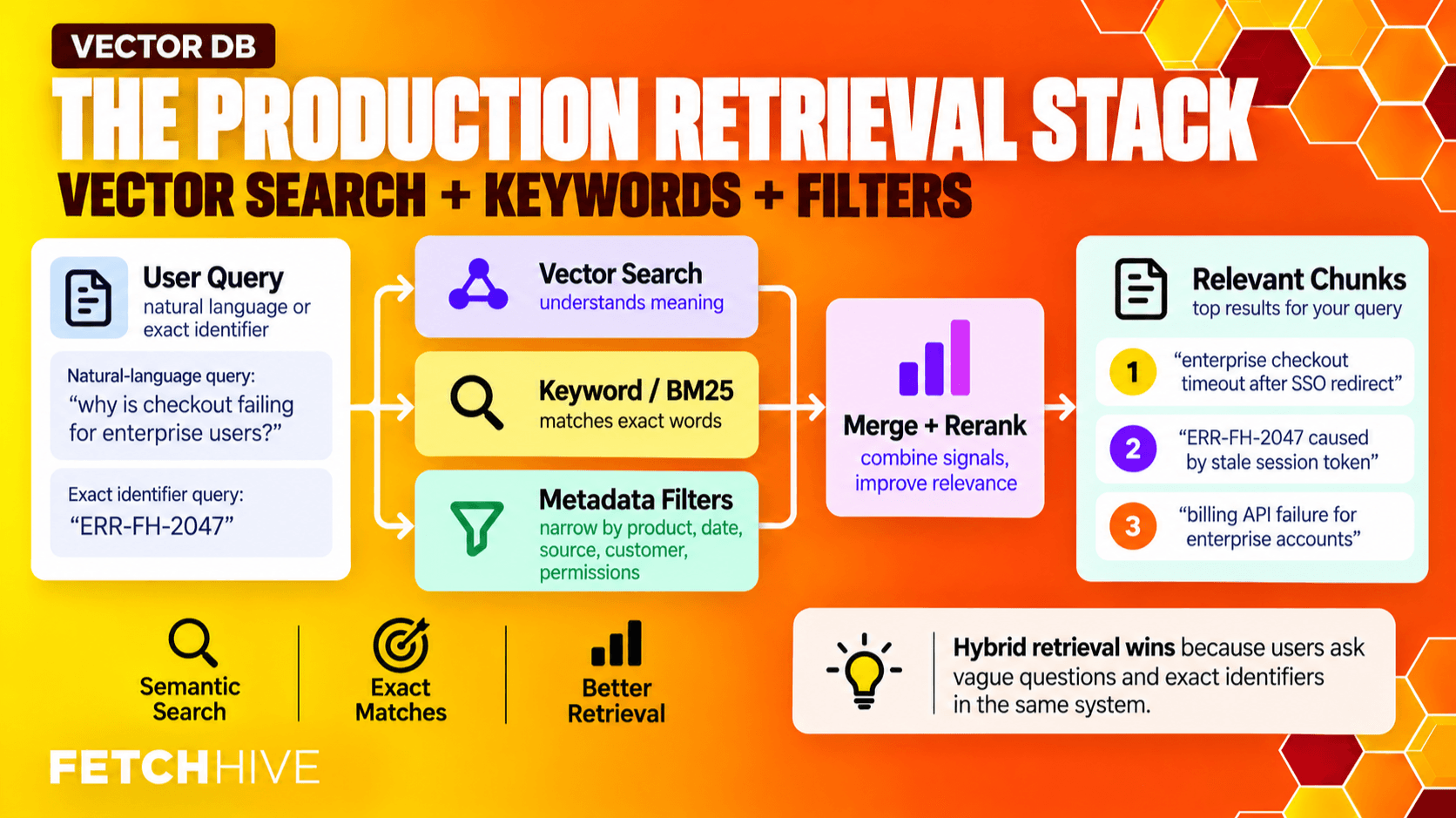
Metadata filtering adds another signal. If your application already knows the customer, product version, language, date range, or permissions, use that information before or during retrieval. Do not make semantic search rediscover facts your application already has.
This is how you move from “find similar documents” to “find the right documents for this exact user, right now.”
Where Graph-Based Retrieval Fits
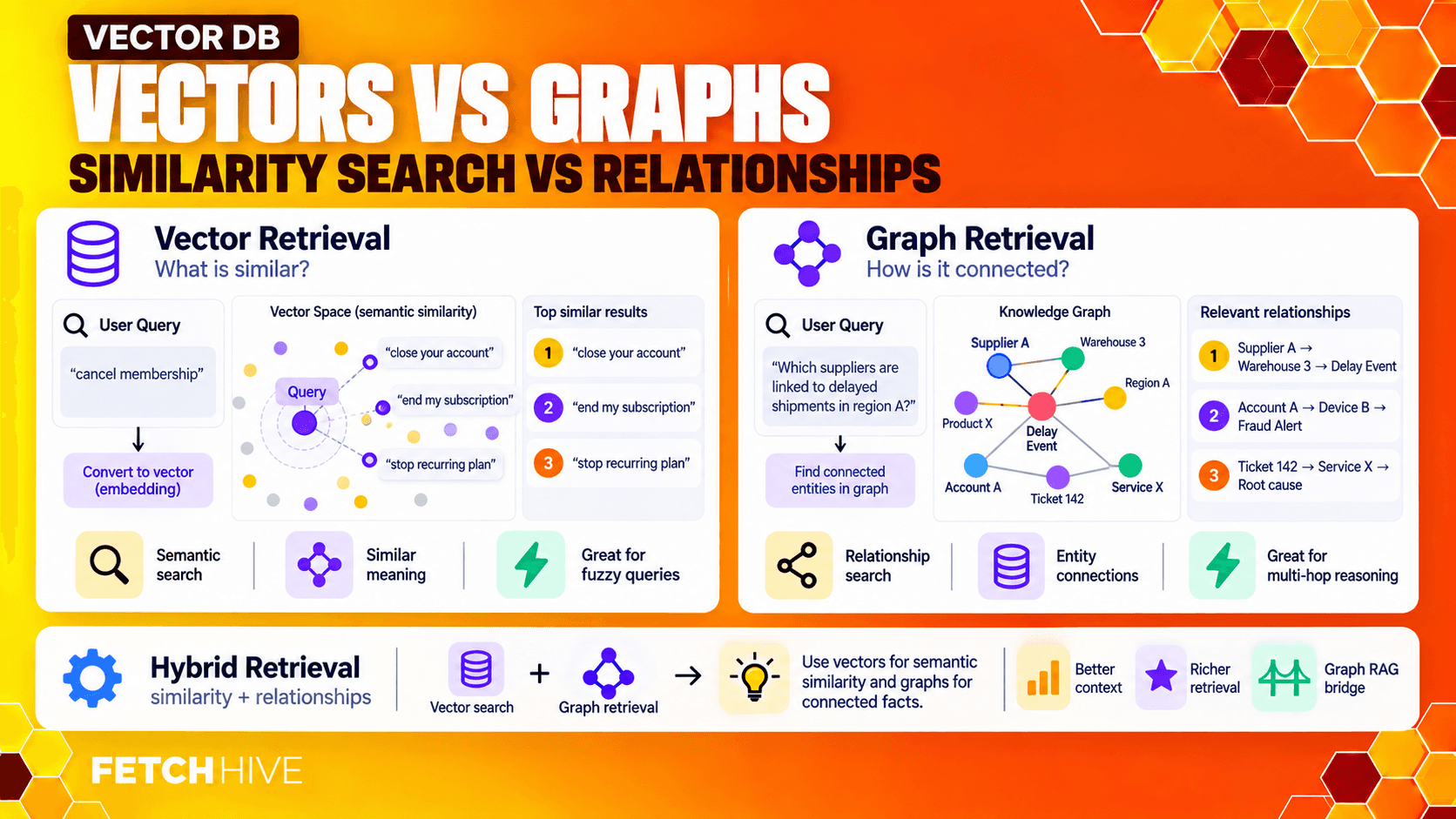
Vectors capture similarity. Knowledge graphs capture relationships. Those are different jobs.
Graph based retrieval becomes useful when the answer depends on how entities connect rather than which chunk looks semantically similar. Think company structures, dependencies between services, regulatory cross-references, or complex queries that require several hops through related information.
A graph database might know that Policy A belongs to Department B, applies to Product C, and supersedes Policy D. A vector database can tell you which documents are semantically similar to the query. Used together, they can provide additional context that neither retrieval method gets perfectly on its own.
You do not need graph databases for every RAG system. Please do not add Neo4j to your grocery list because somebody said “GraphRAG” on LinkedIn. But for relationship-heavy data, graph based retrieval can be a very useful complement to vector search.
What Actually Matters When Choosing a Vector Database
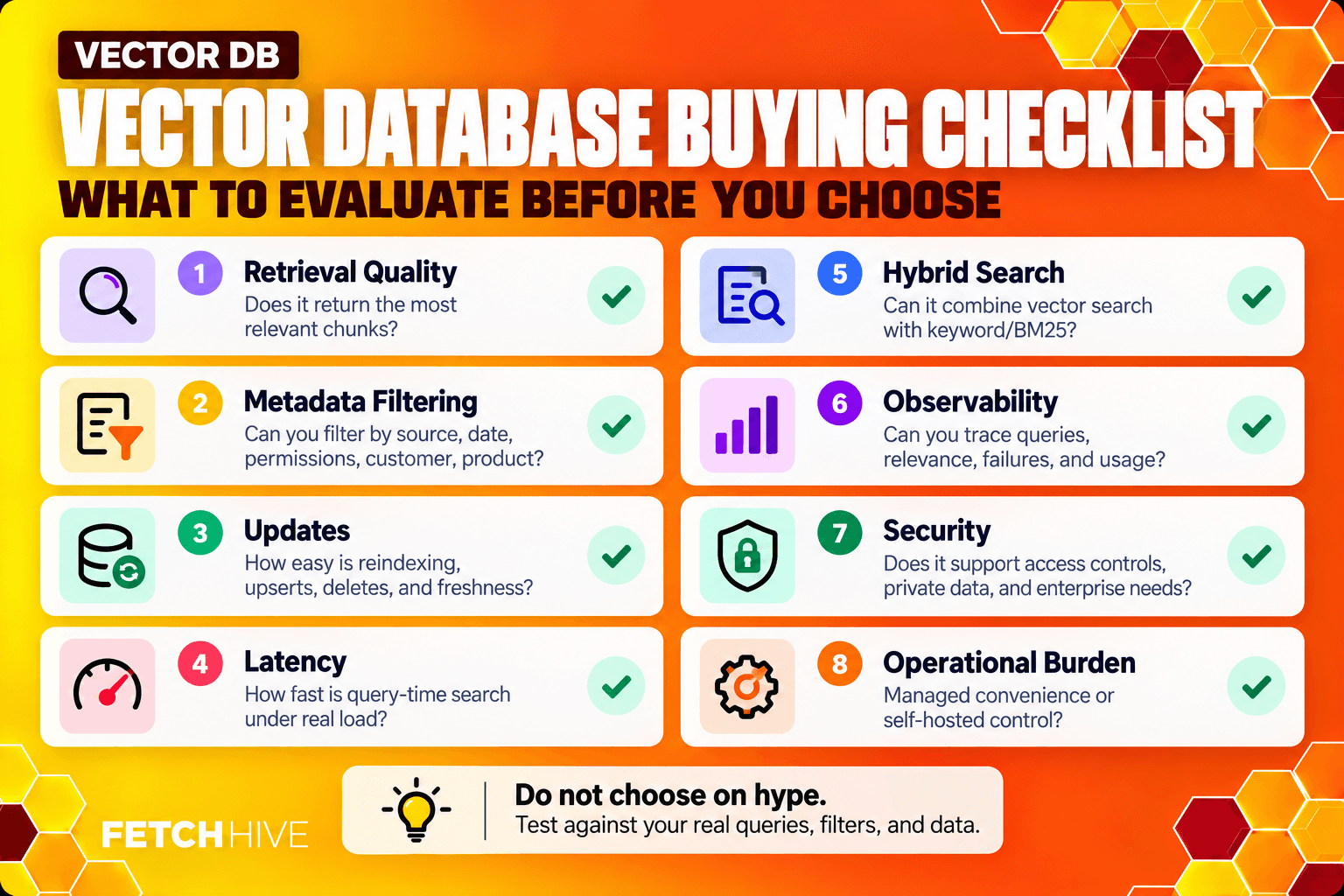
This is the section I would care about if I were choosing today. Not who has the coolest benchmark chart. Not who raised the most money. What matters for your workload.
1. Retrieval Quality
Can the system consistently return relevant documents and useful chunks for real user queries? Test vector similarity search, filtering, hybrid retrieval, and reranking together. Accurate retrieval is the goal; raw QPS is not.
2. Metadata Filtering
For enterprise RAG systems, metadata filtering is not a nice little extra. It is how you enforce tenant boundaries, permissions, product versions, languages, regions, source types, and freshness. Deep filtering should happen as part of search, not as an awkward cleanup step after the database has already returned the wrong candidates.
3. Indexing and Update Behaviour
How quickly can you ingest new data, update vectors, delete stale documents, and rebuild indexes? A database that is incredible at reads but miserable at updates can become painful when your knowledge base changes all day.
4. Latency and Scale
Measure p50 and p95 or p99 search latency on the amount of vector data you actually expect to store. High-scale ANN performance matters if you have millions of vectors. It barely matters if your entire knowledge base contains 30,000 chunks.
5. Hybrid and Keyword Search
If exact terms matter in your domain, native hybrid search can simplify the architecture. Otherwise you may end up running a search engine beside the vector DB and fusing the results yourself.
6. Observability
Can you inspect what was retrieved, the similarity scores, filters, latency, and why a particular result ranked? This is also why I care so much about tracing in Fetch Hive: when a RAG answer goes sideways, I want to see the retrieved context, tool calls, model calls, cost, and failures instead of staring at the final response and guessing.
7. Security and Governance
For sensitive data, look at encryption, access controls, audit logs, tenant separation, backups, and data residency. A fast vector search that leaks another customer’s internal documents is not a successful optimization.
8. Operational Burden
Managed services are easier to operate. Self-hosted systems give you more control. Hybrid cloud deployments can split the difference. There is no free lunch: you either pay the vendor, pay the infrastructure bill, or pay engineering time.
Vector Database Options: Pick by Shape, Not Hype
There are roughly three buckets worth thinking about.
Dedicated / Managed Vector Databases
Tools such as Pinecone, Qdrant, Weaviate, Milvus/Zilliz and similar products are built around vector retrieval. They tend to offer strong ANN indexing, metadata filtering, scaling controls, and APIs designed around semantic search workloads.
They are attractive when vector search is central to the product and you do not want to build the operational layer yourself.
Search Engines With Vector Support
Elasticsearch, OpenSearch, Azure AI Search and similar search-first systems can combine full text search, exact keyword matching, filters, and vectors in one place. That can be extremely useful when hybrid search matters more than winning a synthetic pure-vector benchmark.
General Databases With Vector Extensions
PostgreSQL with pgvector, MongoDB Atlas Vector Search, Redis and other general-purpose databases let you keep vector data close to application data. For smaller or medium workloads, that simplicity can be worth far more than having another specialized service.
My preference for a new system is boring: if the database you already run can meet the retrieval requirements, start there. Add a dedicated service when the pain is measurable.
Vector Databases Are Useful Beyond RAG Chatbots
The same vector representations that power RAG applications also work for AI search, recommendation systems, clustering, duplicate detection, and anomaly detection.
This kind of generative AI knowledge infrastructure can support more than one artificial intelligence feature. Once the index is useful, the same retrieval layer can often power search, recommendations, copilots, and discovery without rebuilding everything from scratch.
• Recommend similar documents, articles, products, API endpoints, or learning content.
• Surface relevant support material after a customer question.
• Find related incidents, tickets, or code changes from a natural-language description.
• Power discovery features where similar vectors reveal content a user may care about.
• Combine semantic similarity with user or account metadata to create more contextual recommendations.
So a good vector database decision can create business value outside the original RAG workflow. Just design the metadata and indexing model with those future search applications in mind rather than hard-coding everything around one chatbot.
If you want examples of where this becomes useful beyond search infrastructure, I have a separate guide covering 7 real-world RAG use cases.
A Simple Decision Process
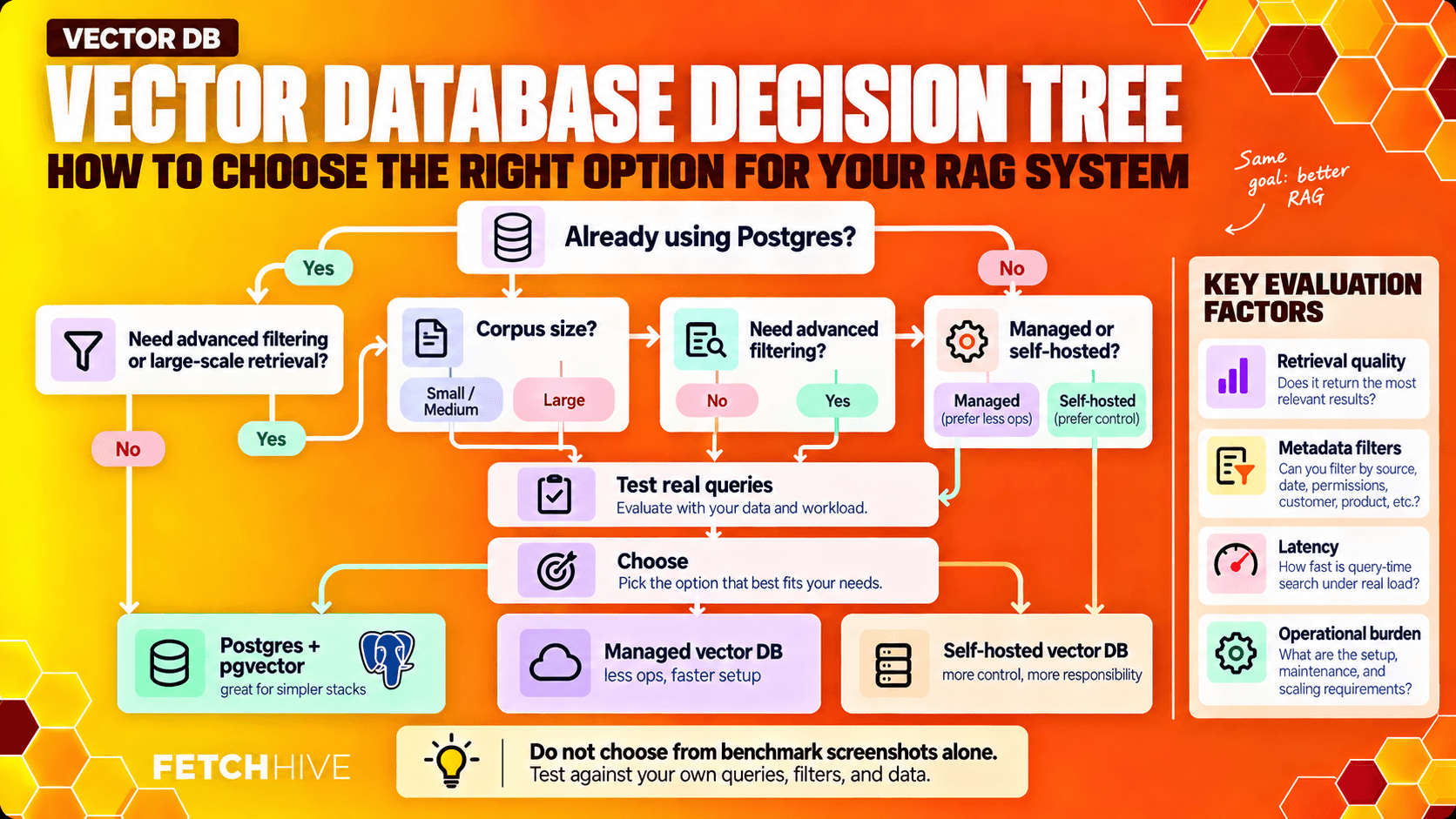
If I were choosing a vector database for a new RAG system, I would do it in this order:
1. Define the user experience first. What questions are people asking and how fast do answers need to feel?
2. Audit your own data. How large is the corpus, how often does it change, and what permissions or domain specific data must be enforced?
3. Choose and evaluate the embedding model before blaming the database for bad semantic similarity.
4. Prototype retrieval with the simplest vector store that can realistically work.
5. Test semantic search and exact keywords. Add hybrid search if your real queries need both.
6. Measure relevant results, latency, update behaviour, and filtering using production-shaped data.
7. Only commit to a more complex vector database when the workload proves you need it.
And test the retrieval separately from the generated response. If the correct evidence never appears in the search results, prompt engineering will not save you. The generation layer cannot invent factual accuracy from context it never received.
TEST RETRIEVAL ON REAL DATA
Check the evidence behind your RAG answers.
Add your documents to Fetch Hive, build a RAG agent and inspect the context behind its answers. Start with real questions so you can spot retrieval gaps before reaching for a bigger model.
Common Mistakes I Would Avoid
• Indexing the entire dataset because storage is cheap. Garbage in, garbage retrieved.
• Using vector search alone even when exact keyword matches obviously matter.
• Ignoring metadata until you need permissions, freshness, or tenant filtering in production.
• Choosing a huge embedding model because more dimensions sound impressive, then wondering why storage and latency exploded.
• Switching embedding models without planning to re-embed the corpus.
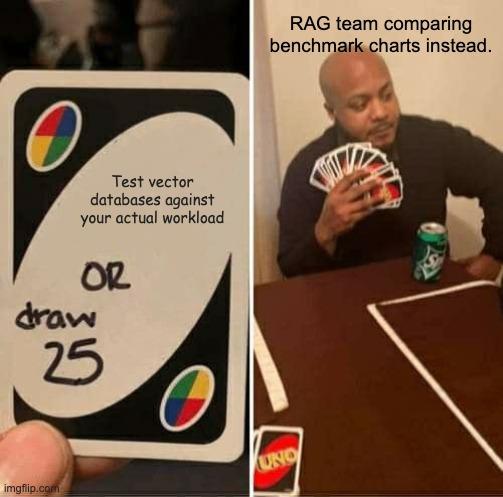
• Comparing vendor benchmarks instead of testing real user queries and relevant documents.
• Treating the vector database as the source of truth when it should usually be an index over authoritative sources.
Most of those mistakes come from optimizing a component in isolation. The thing users experience is the full retrieval augmented generation system, not your HNSW settings.
The Bottom Line
A vector database matters because it controls what evidence reaches the LLM. But the database itself is not magic.
Good RAG systems combine a sensible embedding model, useful chunking, semantic search, exact keyword search where needed, metadata filtering, reranking, and proper evaluation. Vector databases offer the infrastructure for fast similarity search, but retrieval quality still depends on the data and the decisions around it.
Start with the simplest architecture that handles your workload. Measure actual retrieval. Watch what happens when new data arrives. Keep the authoritative source outside the index. Add complexity only when you have a real problem to solve.
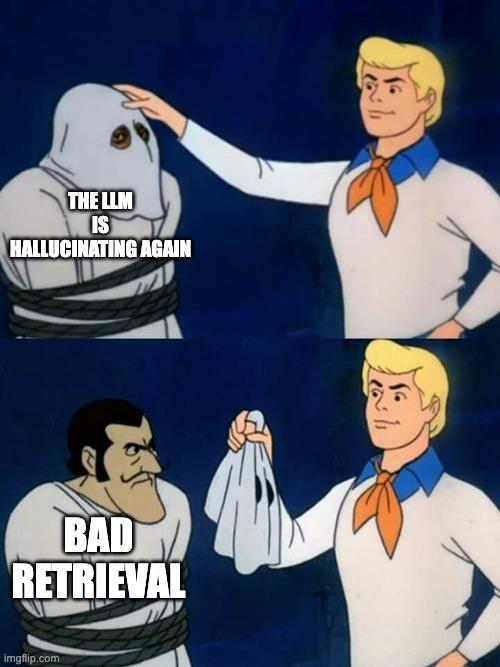
If the model is hallucinating because you retrieved the wrong document, do not buy a bigger model. Fix retrieval first. The model already has enough problems.
Share this post


